
How to Submit to SubmitMySaas, Where the Badge Earns the Dofollow
Submitator files customers to SubmitMySaas on its free route, with the badge it asks for placed on their homepage and kept live. Every listing count below was taken from submitmysaas.com on 23 October 2026.
SubmitMySaas is a weekly launch board for SaaS and software. Each launch goes live with its cohort on a Monday at 8:00 AM UTC; the free route has ten spots a week and Premium has no weekly cap. Ahrefs rates the domain 59, read with our checker on 23 October 2026, and the sitemap lists 671 launch pages since September 2025.
The free route asks for one thing, and the free card in their form says it plainly: "SubmitMySaas homepage badge required". Their badge goes on your homepage, you press Verify Badge and only then is a Monday yours.
That badge is also what the followed link tracks. The same card offers a "Dofollow backlink for the weekly top 3", yet every badge-verified free launch on the site links out followed: 266 of 266, the 103 that finished fourth or lower included. Free launches without a verified badge link out nofollow, all 252 of them, and 251 of those launched in 2025, when most free launches went out without it.
So the badge is the part to get right, and it is the part we take off your hands: our badge component carries SubmitMySaas's badge on your homepage, and we keep it live.
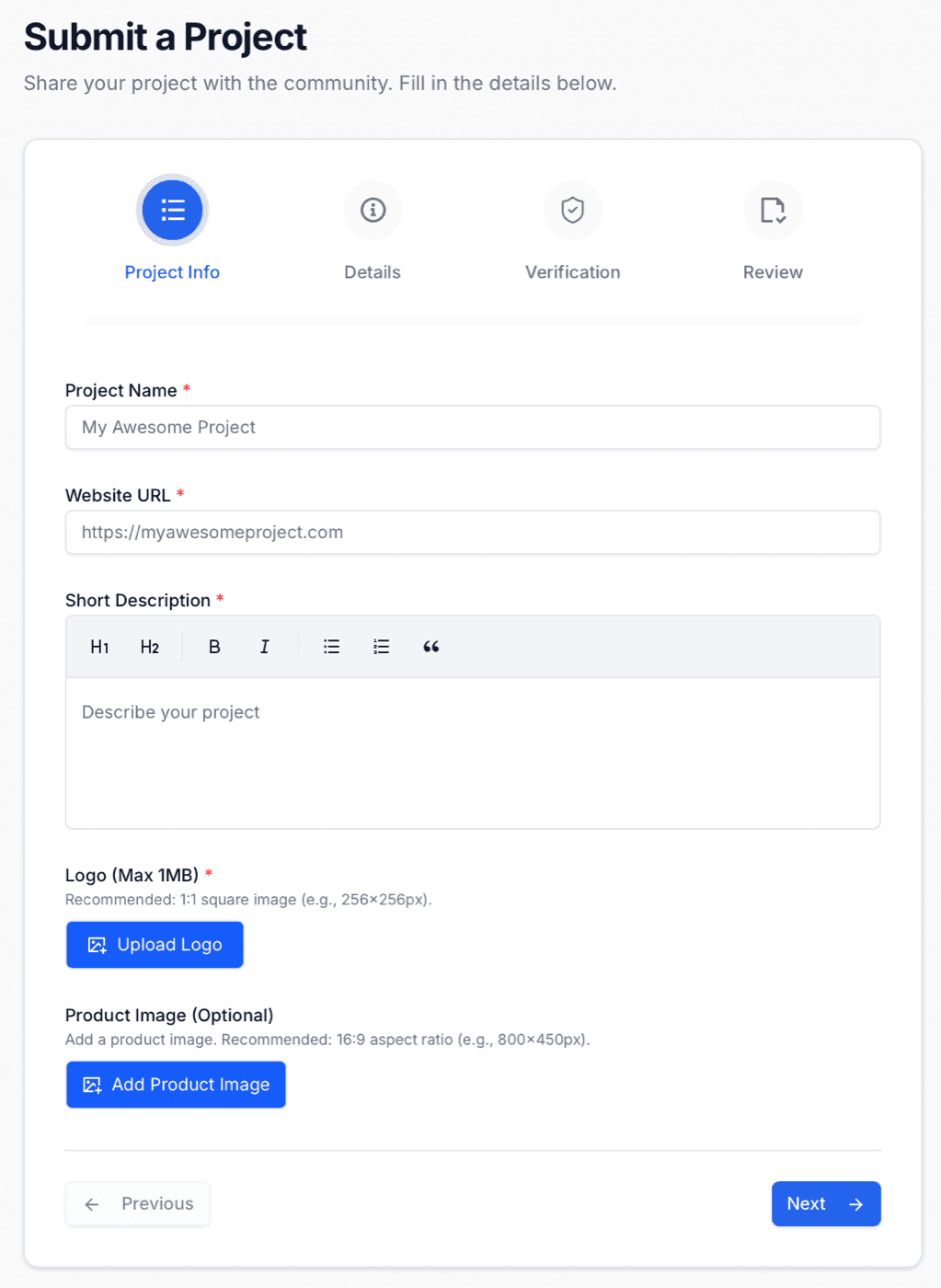
| Field | What it asks for |
|---|---|
| Project Name | Required; your heading and the start of your page title |
| Website URL | Required; both Visit buttons link it, with utm tags added |
| Short Description | Required; rich text with headings, bold, italics, two kinds of list and quotes; its first 160 or so characters become your meta description |
| Logo | Required, 1 MB at most, square (they suggest 256 × 256) |
| Product Image | Optional, 16:9 (they suggest 800 × 450) |
| Categories | Required, up to three of 37 |
| Tech Stack | Required, up to five tags, each added with Enter or a comma |
| Platforms, Pricing Model | Required: Web, Mobile, Desktop, Api or Other; Free, Freemium or Paid |
| GitHub URL, Twitter URL | Optional |
| Launch Type | Free Launch at $0, selected by default, or Premium Launch at $19 |
| Verification | Their badge on your homepage, then Verify Badge |
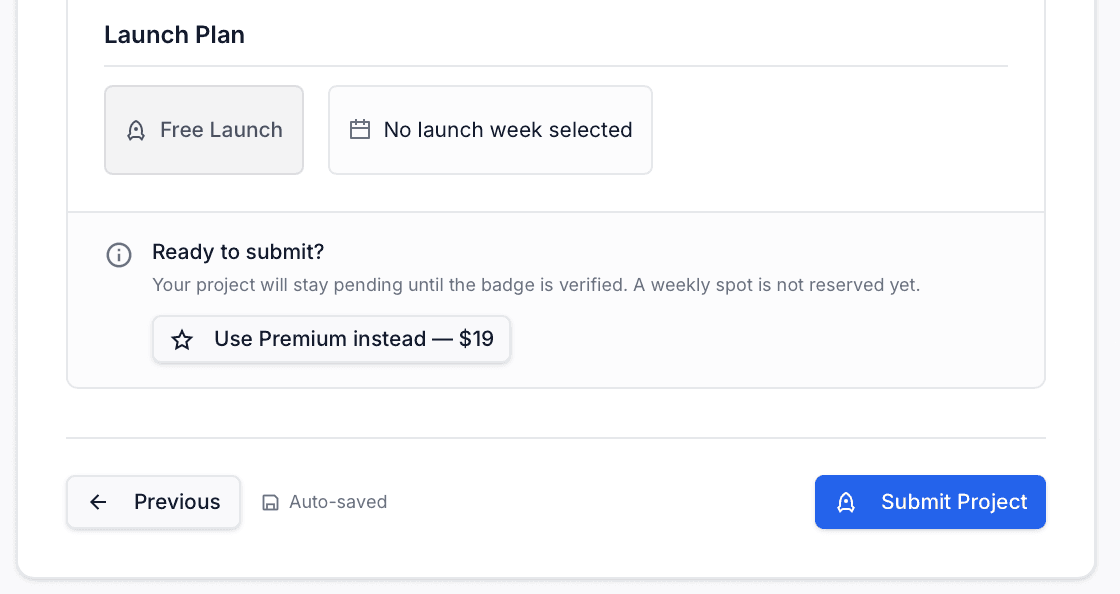
| Review | Launch plan and week, then Submit Project |
"SubmitMySaas homepage badge required" and "Dofollow backlink for the weekly top 3". On the live listings the followed link goes with the first line, not the second: every launch with a verified badge links out followed, wherever it finished. Our component keeps the first line true on your homepage, with no commit from you.
SubmitMySaas at a glance
| What you get | SubmitMySaas |
|---|---|
| Price to launch | $0 with their badge verified; Premium $19 per launch, no badge |
| Free spots | 10 a week, all going live on Monday at 8:00 AM UTC |
| Their badge | On your homepage, verified before your week is reserved |
| The link | Two Visit buttons to your address; followed on all 277 badge-verified and Premium launches |
| Listing page | Open to indexing, its own canonical, in the sitemap |
| Domain Rating | 59 (Ahrefs); their Premium card prints DR 37 |
| Launch pages | 671 since September 2025, 64 of them booked ahead; 37 categories |
| Filed for you by Submitator | Free launch, badge placed and kept live, from $29 |
Read from submitmysaas.com with GET requests alone on 23 October 2026, 12:28 to 12:50 UTC: the home page, /pricing (its two plan cards and, in its structured data, the answers to its three FAQ questions), /legal/terms, /legal/badges, /categories, /sponsors, /partners, /winners, robots.txt, three blog posts, the sitemap with all 671 launch pages it lists and the weekly trending page for every week from 2025-W30 to 2026-W43. Those weekly pages embed each launch's record (launch type, badge flag, creation date, scheduled date and weekly rank) for 529 of the 671 launches; the 2025 weeks show their top 20 only. Every launch page answered 200 and holds two Visit anchors, both to the address its maker entered with utm_source=submitmysaas.com, utm_medium=project_page and utm_campaign=product_launch appended (after an ampersand when the address already held a query string). The rel is "noopener noreferrer" on 347 pages and "noopener noreferrer nofollow" on 324; sponsored and ugc appear on none, and the two anchors on a page never differ. Joined to the records, the link is followed on all 11 Premium launches and on all 266 free launches whose badge flag is set (153 that finished their week in the top three, 103 that finished fourth to ninth and the 10 of the week that began on 19 October), and nofollow on all 252 free launches whose flag is not set, 251 of them launched in 2025 and 229 carrying a Daily Winner achievement. Of the 142 launches the trending pages do not cover, 64 are booked for Mondays from 26 October to 14 December 2026, all marked Scheduled and all followed; 72 from 2025 or with no launch week shown carry nofollow (43 of them with a Daily Winner achievement); and 6 from 2025, each with a Daily Winner achievement, are followed. Their badge flag is not published. One launch entered its address as uhttps://, and its Visit anchors point at that string. No launch page carries a robots meta tag, every one names itself as canonical and six pages fetched again as Googlebot returned the rel they had returned before. Maker GitHub and Twitter links, where given, carry rel="noopener noreferrer". Footer links to other directories, the operator's social profiles and the sponsor card repeat on every page and were left out. Where a product image was uploaded (569 pages) it shows on the page and is the og:image; on the other 102 the og:image is the logo. Weekly Winner images (Top 1, Top 2 and Top 3) sit on the weekly top three of every week since August 2026 and on no launch ranked lower. Days from creation to launch come from the creation and scheduled dates in the same records; category counts are from /categories. Form labels, both launch cards, the badge step and the review step are transcribed from screenshots of the signed-in form supplied by Submitator's founder on 23 October 2026; the submit page sends a signed-out visitor to sign-in. /legal/badges is a separate licence attribution notice built around a Powered by SubmitMySaas image, not the launch badge. Ahrefs puts submitmysaas.com at Domain Rating 59, the figure submitator.com/domain-rating-checker returned on 23 October 2026, with 1,478 live referring domains on 22 October; the Premium card in the form prints DR 37. Nothing was filed, upvoted or bought on the site while researching this guide. Submitator's part is as our founder stated on 23 October 2026: we submit customers through SubmitMySaas's free route with their badge on the customer's homepage, placed with our badge component and kept live. That component is a single install on the customer's site carrying every badge or link the plan's directories require, so a new directory costs the customer no commit. He stated on 25 September 2026 that we write each directory's description to its own rules and cut cover images to each site's format. Our plans are one-off: $29 buys 30 directories, $49 buys 60 directories and $79 buys 100 directories. Customers pick their directories from a dashboard that shows the Domain Rating of each, and each rejection earns one extra directory to pick, as our terms set out.
Your homepage carries the badge, then the Monday is yours
Step 3 is Verification, and its first line sets out the choice: "Add our badge for a free launch, or choose Premium if you prefer not to add anything to your homepage." The embed code is a linked Featured on SubmitMySaas image pointing at submitmysaas.com, with a plain instruction under it: "Paste this code into your website's <body> tag." Put it on the homepage, as the free card asks, and leave the snippet as given.
Then press Verify Badge. A button lower down, Continue without verifying, lets you finish the form first, but the review step spells out the cost: "Your project will stay pending until the badge is verified. A weekly spot is not reserved yet." The order is fixed, in their words: "Your free weekly spot is reserved only after badge verification and launch-week confirmation."
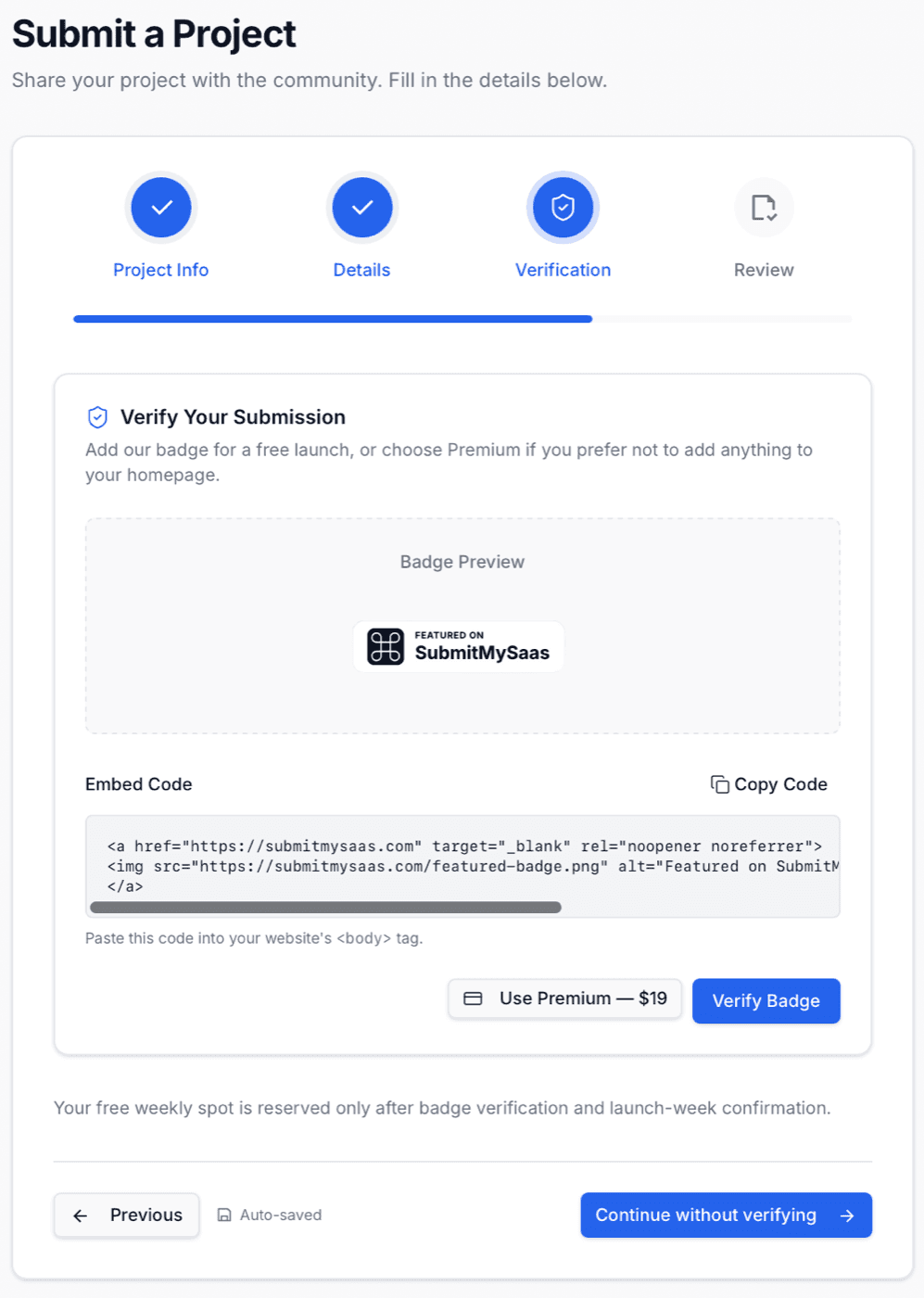
Placing that badge is our job. One Submitator component sits on your site and carries every badge or link the directories in your plan ask for. For SubmitMySaas it shows their badge on your homepage, we pass Verify Badge and the badge stays up after your Monday has come and gone. No directory in your plan needs a commit of its own.
Other badge directories on the same install
What the listings say about the link
Each listing page links your product with a Visit button, present twice in the markup (one for wide screens, one for phones), and both go straight to the Website URL you entered with utm_source=submitmysaas.com and two more utm tags on the end, so your analytics can name the source. On 23 October 2026 the rel on that button divided the site cleanly:
The Visit link by launch type
| Launches | Listings | Visit link |
|---|---|---|
| Premium launches | 11 | Followed |
| Free, badge verified, weekly top three | 153 | Followed |
| Free, badge verified, fourth or lower | 103 | Followed |
| Free, badge verified, week still running | 10 | Followed |
| Free, no badge (251 of them from 2025) | 252 | nofollow |
| Booked for 26 October to 14 December | 64 | Followed |
Their two price cards word the rule differently. The free card in the form gives the followed link to "the weekly top 3"; the free plan on their pricing page lists, under "Dofollow Backlink only if:", both "1. Top 3 weekly ranking" and "2. Display our badge on your site". The listings follow the badge. Plan on it: both cards name it, and every launch that has it links out followed. A top-three finish adds a Weekly Winner badge to your page on top.
The page around the link is built to be found. All 671 listing pages name themselves as canonical, appear in the sitemap and carry no robots tag asking search engines to stay away. The opening of your short description becomes the meta description, and your product image, or your logo when there is none, is the picture a shared link carries.
Their card says DR 37. Ahrefs says 59.
The Premium card in the form promises a "Guaranteed Dofollow Backlink (DR 37)". The domain rates higher than that: Ahrefs rated submitmysaas.com 59 on 23 October 2026, and counted 1,478 live referring domains the day before. A price card keeps whatever was true when it was written, so read the current figure in our Domain Rating checker before you weigh any launch board by it, this one included.
Step 1: what your listing is built from
Website URL becomes both Visit buttons, so paste the exact page you want visitors to land on, starting with https://. The utm tags are added after whatever you type. One listing on the site entered its address as uhttps://, and its Visit buttons lead nowhere.
Short Description is a rich-text box with headings, bold, italics, both kinds of list and quotes. Its first 160 characters or so become the page's meta description, which is what search results and shared links show, so make the first sentence say what the product does and for whom, then use the rest for features, the audience and the price.
Logo is required, 1 MB at most and square, at the 256 × 256 they suggest, and it fronts your card in every list. Product Image is marked optional, but fill it: in 16:9 at 800 × 450 it shows on your page and becomes the picture a shared link carries. Leave it out and the logo stands in, as it does on 102 of the 671 pages.
Step 2: classification and the launch type
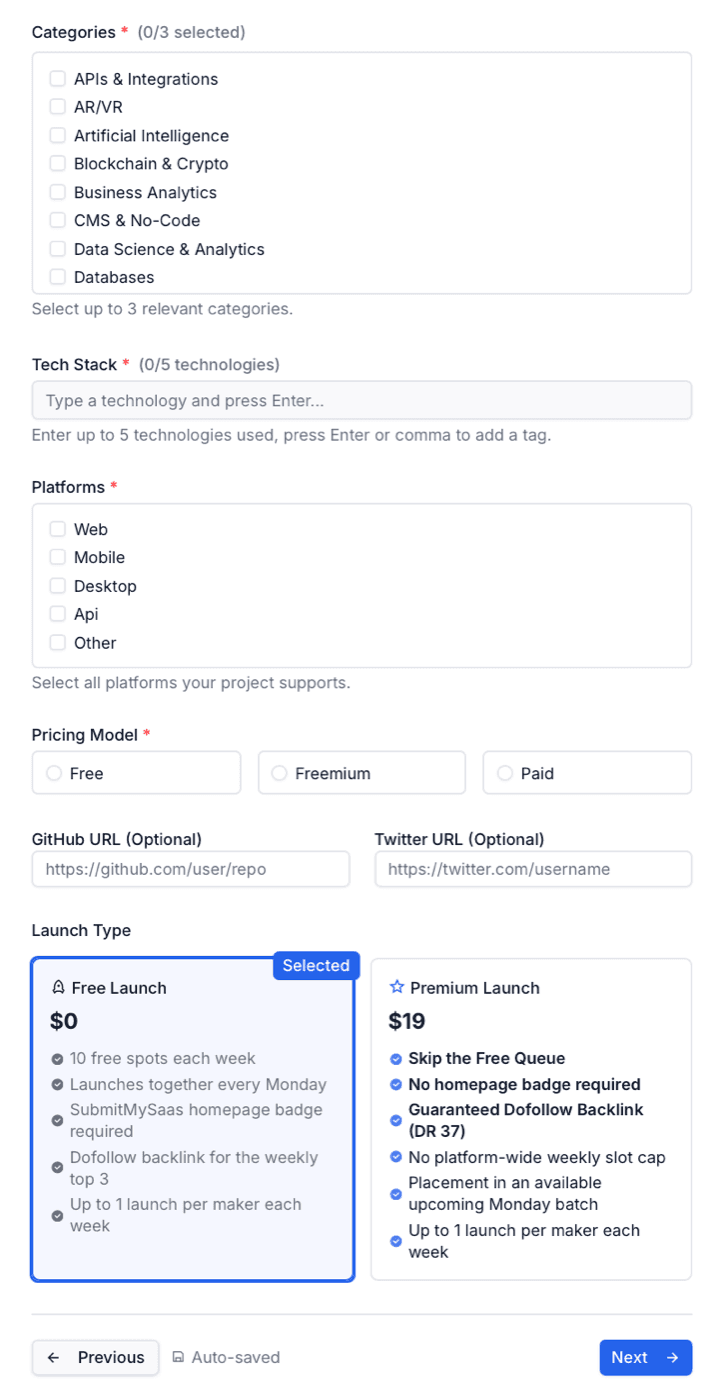
Categories take up to three of 37. The big ones are busy: on 23 October, Artificial Intelligence and SaaS held 268 projects each, Productivity 191 and Marketing Tools 112. Put one broad category beside two that describe exactly what you sell, where far fewer projects compete for a reader.
Tech Stack is required and takes five tags, each closed with Enter or a comma; they print on your page as hashtags. Platforms and Pricing Model appear in the facts beside your description. The optional GitHub URL and Twitter URL become links on your page as well, with no nofollow on them, so give the real repository and profile.
Launch Type opens on Free Launch, already selected. Leave it there if the badge is going on your homepage.
After you press Submit Project
Their FAQ describes launch day in two sentences: "Weekly launches start every Monday at 8:00 AM UTC. All products scheduled for that week go live together." During that week your launch sits in Top Projects This Week on the home page, ranked by votes. When the week closes, its rank is frozen on your page under Ranking milestones, and the top three carry a Weekly Winner badge from then on.
Book well ahead. The ten free launches that opened on 19 October 2026 had been created 20 to 30 days earlier, and the ten of 12 October 17 to 23 days earlier. A free spot is held only from the moment the badge passes, so the badge step decides how soon you get a Monday.
The queue runs further out than that suggests. On 23 October every Monday from 26 October to 30 November already had ten or eleven launches booked, against ten free spots a week, and 7 and 14 December had one each. Those 64 booked launches already have their pages up, marked Scheduled, with the Visit button in place and followed: a booked launch has its page and its link before its Monday comes round.
What Premium's $19 buys
Premium costs $19 per launch. Its card lists "Skip the Free Queue", "No homepage badge required", "No platform-wide weekly slot cap" and "Placement in an available upcoming Monday batch", plus the followed link the card guarantees. All 11 Premium launches on the site link out followed.
So the $19 buys a homepage without their badge and a Monday without the free queue. That link is the same followed Visit button a badge-verified free launch carries. Our route is the free one, with the badge placed through our component and kept live.
SubmitMySaas review: the short answer
Take the free launch and keep the badge up. It buys one of ten free spots on a Monday, a listing page on a DR 59 domain that is open to indexing and, on every badge-verified launch measured, a followed link to your site. Book early: on 23 October 2026 every Monday through 30 November already had ten or eleven launches booked. Then fill all four steps with care and ask your users for votes during launch week. More SaaS directories we file to are on our SaaS directories page.
How to launch on SubmitMySaas, step by step
- 1
Create an account
Sign up, then open Submit Product. The form opens only for a signed-in account.
- 2
Fill in Project Info
Your name, the exact Website URL starting with https://, a description whose first sentence works as a search snippet and a square logo under 1 MB. A 16:9 product image is optional.
- 3
Classify it
One broad and two precise categories, up to five tech stack tags, your platforms and pricing model, then your GitHub and Twitter addresses if you have them.
- 4
Keep Free Launch selected
It is the default on the Launch Type cards. Premium is the alternative if nothing can go on your homepage.
- 5
Put the badge on your homepage and press Verify Badge
Paste their embed code into the homepage as given. Until it passes, your project stays pending and no Monday is held for you.
- 6
Confirm your week and press Submit Project
Choose an available upcoming week. Every launch in it goes live together on the Monday at 8:00 AM UTC.
- 7
Rally votes in launch week, and keep the badge
The top three of each week earn a Weekly Winner badge. The badge on your homepage is what both of their cards ask you to keep.
- 8
Or let Submitator file it
We write the description for SubmitMySaas, cut your product image to their 16:9 format, place their badge through our component, pass Verify Badge and keep the badge live beside your other directories' badges.
Their $19 skips the badge. Our $29 places it, on 30 directories.
One payment, every directory named in your dashboard with its Domain Rating on the card, a rejection replaced by another directory you pick and one component that places every badge a directory asks for and keeps it live.
$19 skips their badge. $29 places it for you, on 30 directories.
SubmitMySaas launches SaaS products every Monday at 8:00 AM UTC, ten free spots a week, on a DR 59 domain. A free launch needs their badge verified on your homepage, and every badge-verified launch on the site links out followed, top three or not; Premium, at $19, skips the badge and the queue. Book weeks ahead, start your description with what the product does and keep the badge up. All SaaS directories.
FAQ
How do I submit to SubmitMySaas?
Sign up, open Submit Product and work through four steps. Project Info takes your project name, website URL, a short description and a square logo, plus an optional 16:9 product image. Details takes up to three categories, up to five tech stack tags, your platforms, a pricing model, optional GitHub and Twitter addresses and the launch type. Verification puts their badge on your homepage, and Review is where you press Submit Project. A free weekly spot is reserved once the badge is verified and you confirm a launch week.
Is SubmitMySaas free?
Yes. The Free Launch costs $0, with “10 free spots each week” and “SubmitMySaas homepage badge required” on its card. The Premium Launch costs $19 per launch, skips the free queue and needs no badge. Both allow “Up to 1 launch per maker each week”.
Is the SubmitMySaas link dofollow?
On every badge-verified and Premium launch, yes. Each listing page links your product with a Visit button that goes straight to the address you submitted, and on 23 October 2026 it was followed on all 266 free launches with a verified badge, whatever their weekly rank, and on all 11 Premium launches. It carried nofollow on all 252 free launches without one, 251 of them from 2025, when most free launches went out without the badge. The free card itself words the rule more narrowly: “Dofollow backlink for the weekly top 3”.
Does SubmitMySaas require a badge?
For a free launch, yes: “SubmitMySaas homepage badge required”. Their embed code is a linked Featured on SubmitMySaas image pointing at https://submitmysaas.com, and the form reserves no weekly spot until Verify Badge passes. Premium, at $19, lists “No homepage badge required”.
What is SubmitMySaas's Domain Rating?
59 on Ahrefs when our Domain Rating checker read submitmysaas.com on 23 October 2026. The Premium card in their form still prints DR 37, in the line “Guaranteed Dofollow Backlink (DR 37)”.
When do SubmitMySaas launches go live?
On Mondays. Their FAQ: “Weekly launches start every Monday at 8:00 AM UTC. All products scheduled for that week go live together.” Free spots fill well ahead: on 23 October 2026 every Monday through 30 November already had ten or eleven launches booked, against ten free spots a week.
What does SubmitMySaas Premium include?
$19 per launch for six lines on its card: “Skip the Free Queue”, “No homepage badge required”, “Guaranteed Dofollow Backlink (DR 37)”, “No platform-wide weekly slot cap”, “Placement in an available upcoming Monday batch” and “Up to 1 launch per maker each week”. All 11 Premium launches on the site linked out followed on 23 October 2026.
What happens if I continue without verifying the SubmitMySaas badge?
The form lets you, and the review step then says “Your project will stay pending until the badge is verified. A weekly spot is not reserved yet.” Verify later, or switch to Premium from the same screen.
What categories does SubmitMySaas have?
37, from APIs & Integrations to Web Development, and a launch may take up to three. On 23 October 2026 the largest were Artificial Intelligence and SaaS with 268 projects each, Productivity with 191 and Marketing Tools with 112.
Does Submitator submit to SubmitMySaas?
Yes, on the free route with the badge. Our component puts SubmitMySaas's badge on your homepage, we pass their Verify Badge check and we keep the badge live afterwards, with no commit from you. We write the description for this directory and cut your product image to their 16:9 format. 30 directories cost $29.
Similar directories we submit to.
SubmitMySaas is one launch board among many. See where else to submit your startup.
Where to submit →Their $19 skips the badge. Our $29 installs it, on 30 directories.
One payment, each directory named with its Domain Rating on the card before you choose it, a rejection swapped for another directory and one component that installs every badge and keeps it live.