
A Full Listing for $0 and a Badge That Stays Up.
Submitator files customers to SaaS.fyi on its Free tier and places the badge that tier asks for, so this guide is written from the submitting side of the form. The words in quotation marks are SaaS.fyi's own, copied from its pages on 11 October 2026.
SaaS.fyi is a hand-picked directory of SaaS tools, 115 of them on 11 October 2026, and our checker reads its Ahrefs Domain Rating as 28. The home page puts the idea in four words, "Hand-picked software. Zero algorithms." The submit page makes the matching promise: "A person reads every submission."
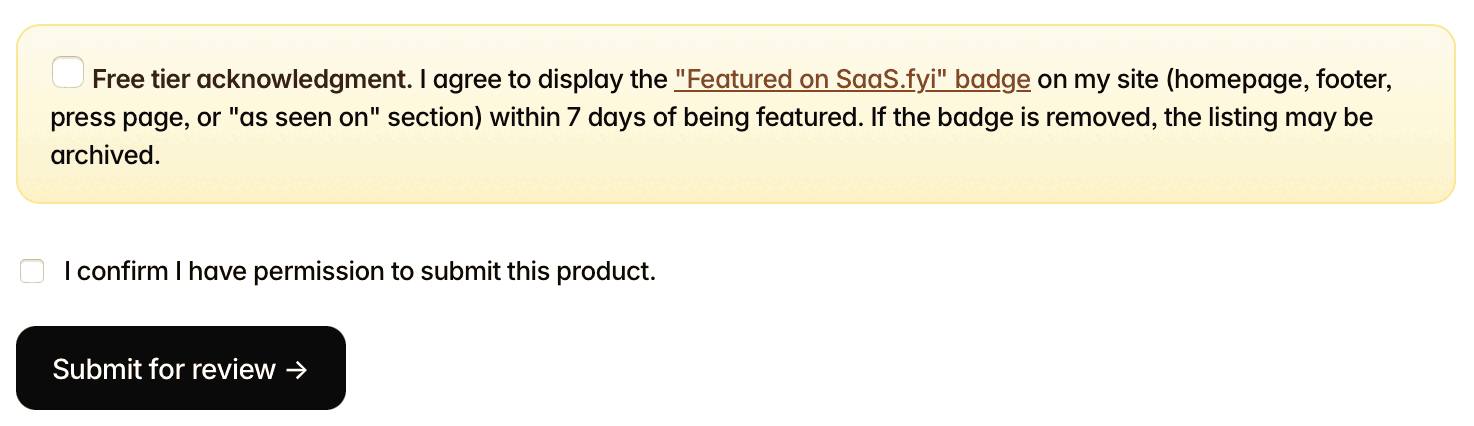
Both tiers get a full listing, as the form itself puts it, and the badge is what covers the Free one. The pledge asks for their Featured on SaaS.fyi badge on your site "within 7 days of being featured", and its last line explains why it should stay there: "If the badge is removed, the listing may be archived." Premium costs $99 once and needs no badge.
We submit our customers to SaaS.fyi on the Free tier. Their badge goes up through our badge component, a one-time install on your site. From then on we keep the badge live.
| Field | What it takes |
|---|---|
| Listing tier | Free ($0, badge required) is preselected; Premium is $99 once |
| Product name | Required; heads your listing and starts its page title |
| Website URL | Required; both links on your listing point here |
| Category | Required; one of 15 |
| Pricing model | Required; Free, Freemium, Paid or Enterprise |
| One-line tagline | Required; the field stops at 120 characters, the help text says about 100 |
| Description | Required; at least 60 characters, two or three sentences |
| Tags | Optional; comma-separated |
| Your name and email | Required; their reply comes by email |
| Anything else? | Optional; a recent launch or other notes |
| Badge pledge | Required on Free: their badge within 7 days of being featured |
| Permission box | Required: you confirm you may submit the product |
"If the badge is removed, the listing may be archived." That one sentence makes the badge a standing job rather than a one-off: it has to outlast every redesign, template change and footer edit to come. Our component carries it in your footer, one of the four places the pledge names, and we keep it live there.
SaaS.fyi at a glance
| What you get | SaaS.fyi |
|---|---|
| Price to list | $0 on Free; the badge is the cost |
| Asked of your site | Their badge, within 7 days of being featured, kept up |
| Review | By a person, every submission |
| Account | None |
| Your listing | Its own page, in their sitemap, linked from the home page |
| Links to your site | Two per listing page, tagged utm_source=saas.fyi |
| Premium, $99 once | Dofollow backlink, no badge, review within 48h, 30-day pin |
| Domain Rating | 28 (Ahrefs) |
| Listings | 115, each picked by a person |
| Filed for you by Submitator | Free tier, badge placed and kept live, from $29 |
The pages behind this guide were read from saas.fyi on 11 October 2026 between 13:26 and 13:48 UTC, with nothing but GET requests: the home page, /submit, /thanks, /brand, the collection pages, /compare, robots.txt, sitemap.xml, llms.txt, llms-full.txt and every listing page under /tools/. The sitemap, the home page, llms.txt, llms-full.txt and the data behind /compare all count 115 tools. Labels, help texts, limits (maxlength 120 on the tagline, minlength 60 on the description), the 15 categories and both tier cards are quoted from the form's served HTML, which agrees word for word with the blank form in two screenshots from Submitator's founder, also dated 11 October; the listing page, the badge card and the thanks page were captured with a headless browser on the same date, and the thanks page is quoted as the site's own account of what follows a submission. On every listing page the product is linked twice, through the domain under the name and the Visit site button, pointing directly at the address in their data with utm_source=saas.fyi and utm_medium=listing appended; the rel on all 230 of those anchors is "noopener noreferrer" alone, without nofollow, sponsored or ugc, and no anchor goes through a redirect. Every listing page sets meta robots to "index, follow" and gives its own address as the canonical; the site's robots.txt blocks no crawler. Finding the anchors by their visible text and by the product's domain gave the same result, and a render of 12 pages plus a Googlebot fetch of 5 matched it. No page or data on the site records which tier a listing came through, and the site sells its dofollow backlink with Premium, so these counts describe the catalogue as it stands, not a promise for the Free tier. What may follow a removed badge is quoted from the pledge; the site publishes nothing more on it. The preview image comparison covers one listing, Granola. The 28 is Ahrefs' Domain Rating for saas.fyi by way of our checker, submitator.com/domain-rating-checker; the domain-rating.com badge in their footer, fetched later the same day, displayed the same 28. The form was read, not sent. Per Submitator's founder on 11 October 2026, we file customers to SaaS.fyi on its Free tier, which requires their "Featured on SaaS.fyi" badge on the customer's site, and that badge is placed through our badge component and kept live. The component goes onto the customer's site in one install and holds whatever badge or link each directory asks for, with no commit per directory. The customer's own email goes into the email field, also per the founder. Plans are one payment each: $29 buys 30 directories (Starter), $49 buys 60 (Growth) and $79 buys 100 (Scale); you choose the directories in your dashboard, where each shows its Domain Rating, and our terms replace a rejected submission with an extra directory of your choice.
The badge comes after the listing, and stays
The pledge is the box the Free tier adds near the end of the form, and its clock is generous: the badge is due "within 7 days of being featured", so it follows your listing rather than standing in front of it. Four places count: your homepage, your footer, a press page or an as seen on section.
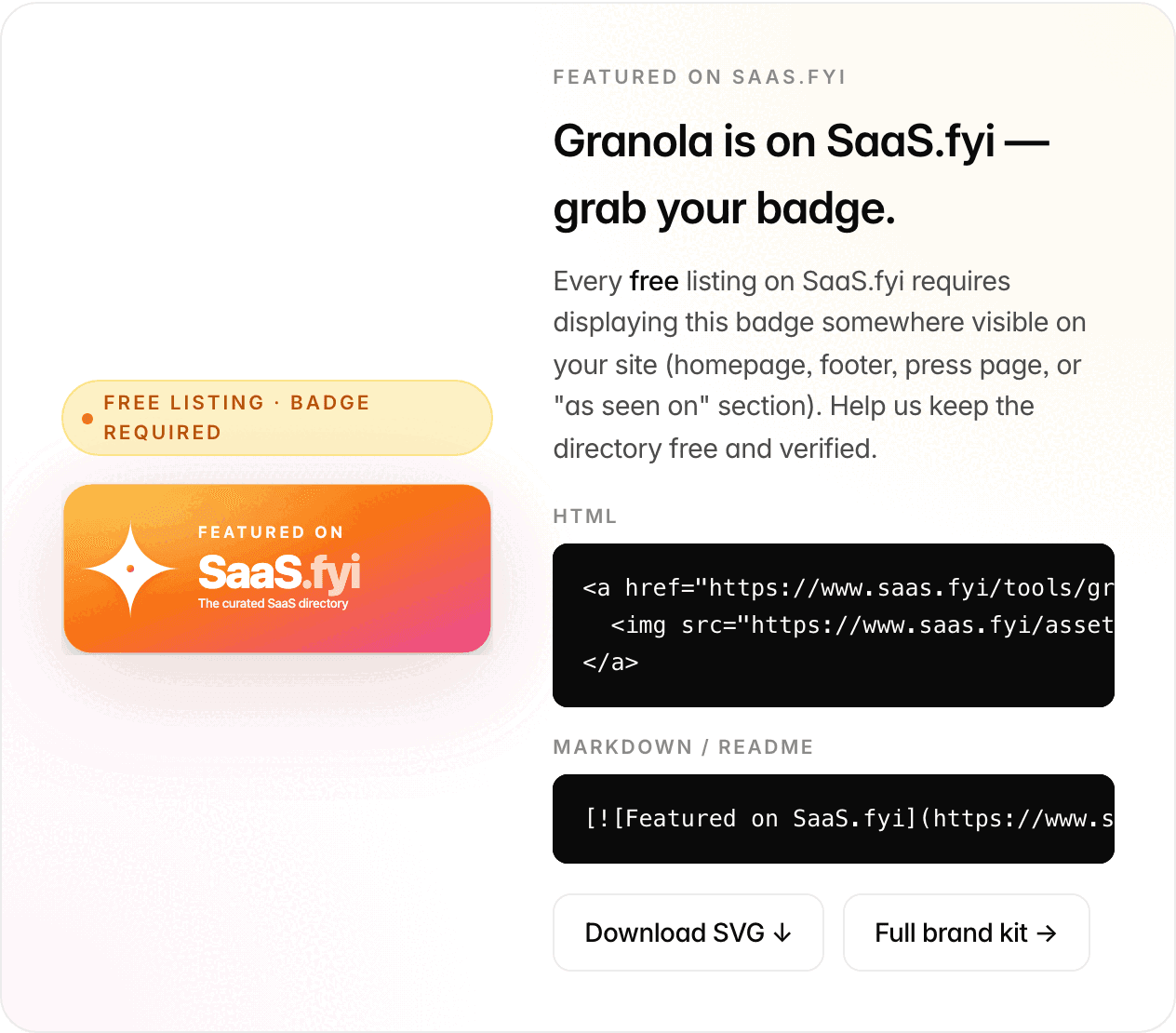
Once you are live, the snippet is waiting on your listing. Each listing page carries a card marked Free listing · badge required, with HTML and Markdown versions of the badge that already point at that listing and a button to download the SVG. The badge shows at 294 by 117 pixels and opens your listing in a new tab.
That snippet is where we take over. You put our badge component in your footer once, and from then on it holds whatever badge or link the directories in your plan want, SaaS.fyi's among them. Each one is kept live from our side, and none of them costs you a commit.
A badge pasted into a template is one redesign away from disappearing, and the pledge is clear about what may follow. Held in a component we maintain, it stays where the pledge asks for it.
More badges that ride in the same component
What your SaaS.fyi page carries
Your listing lives at saas.fyi/tools/ followed by your product's slug. Every listing page is in the sitemap, linked from the home page's list of all tools, set to index, follow with a canonical naming itself and marked up with structured data. Related listings also point to each other through an Alternatives on the list rail.
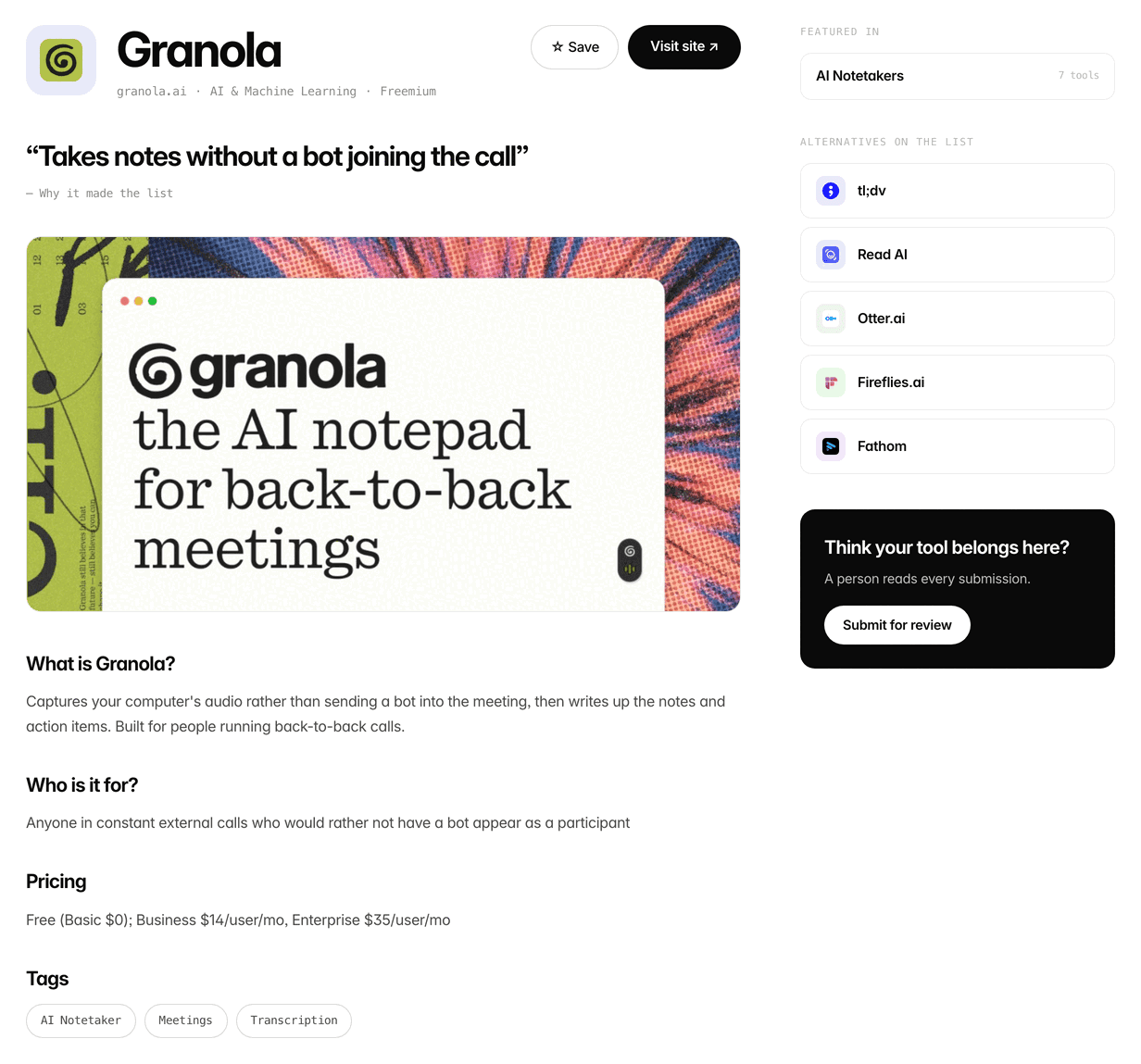
Both links to your site, the domain under your name and the Visit site button, go straight there with utm_source=saas.fyi added, so SaaS.fyi shows up as a named source in your analytics. Your tagline is set as the quote under Why it made the list and comes after your name in the page title, while the opening of the What is section doubles as the meta description.
There is no image field on the form, yet most listings show a large preview image. Granola's is the same picture granola.ai serves as its social preview, so check the one your own site serves before you submit.
Outside the page itself, the site's llms.txt lists every tool with its tagline. A comment in its robots.txt reads "We want both traditional search and AI search engines to index us." and the file then welcomes AI crawlers by name.
What each field turns into
Website URL is where both listing links lead, so paste the page that introduces the product best, often simply the home page.
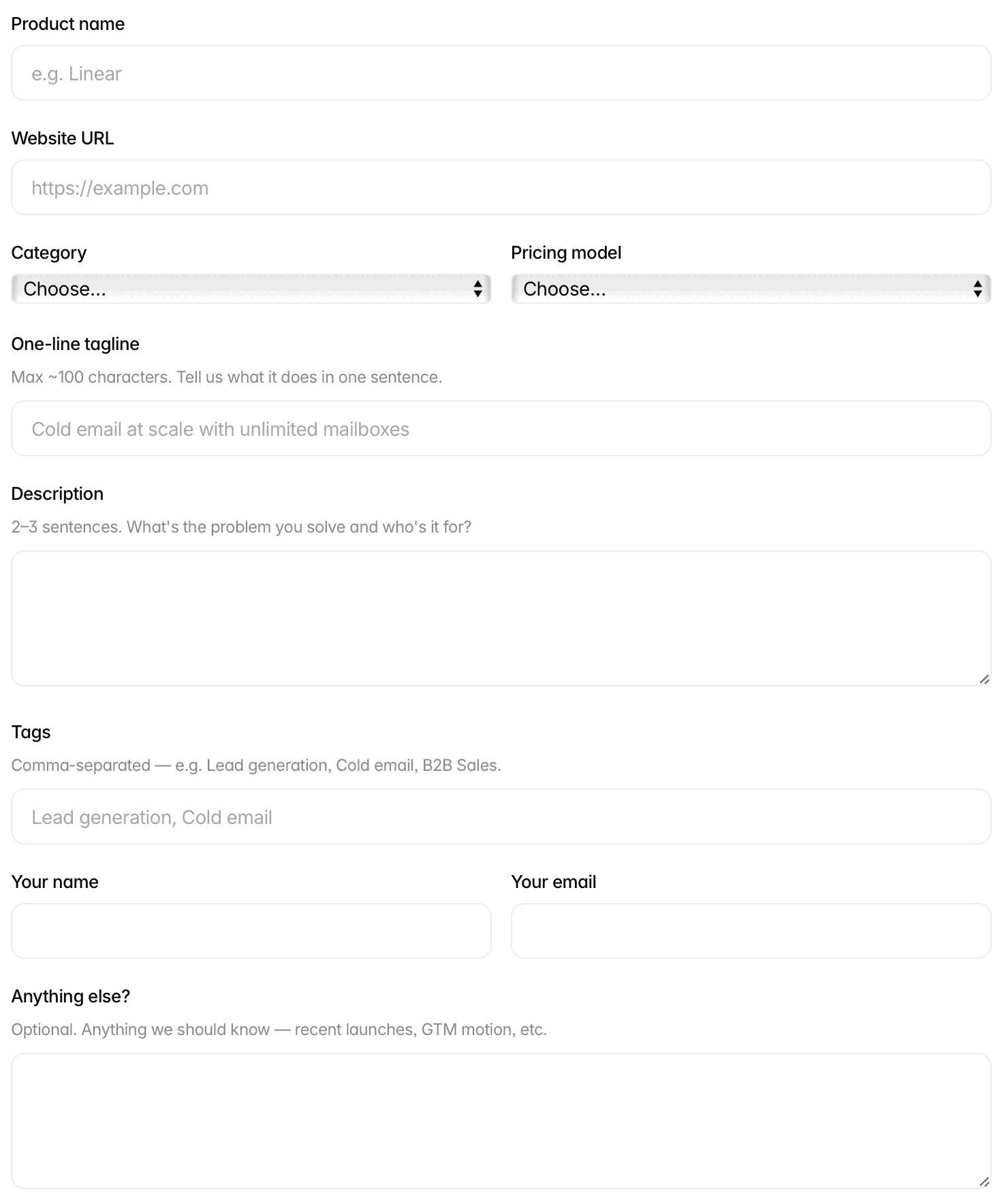
Category is one of 15 and is printed on your listing beside the pricing model. Pricing model also counts in search: on the home page, a search containing free or freemium shows only Free and Freemium listings. Choose the model that is true for your product.
One-line tagline: the field stops at 120 characters, while the help text says "Max ~100 characters." The tagline follows your name in the page title, which is cut at around 60 characters, so start with what the product does.
Description needs at least 60 characters, and its help text asks "What's the problem you solve and who's it for?" Your page answers the same two questions under What is and Who is it for?, so give the editor plain material for both.
Tags are optional and comma-separated, and each one shows on your page as a link. Anything else? is the place for a recent launch or anything the editor should know. Your email is where their reply arrives, and later the address of your listing.
Before you press the button, check that your pricing page is public. One of the four things they look for is "pricing that's transparent", and their editorial principles add "Prices come from the vendor's own pricing page."
After you press Submit for review
Their thanks page sets out the next steps in its own words: "A human reviews it." Then "We may email you. If we need a screenshot, clarification, or pricing detail." And last, "You'll get a link. Once it's live, we'll send the URL of your listing page."
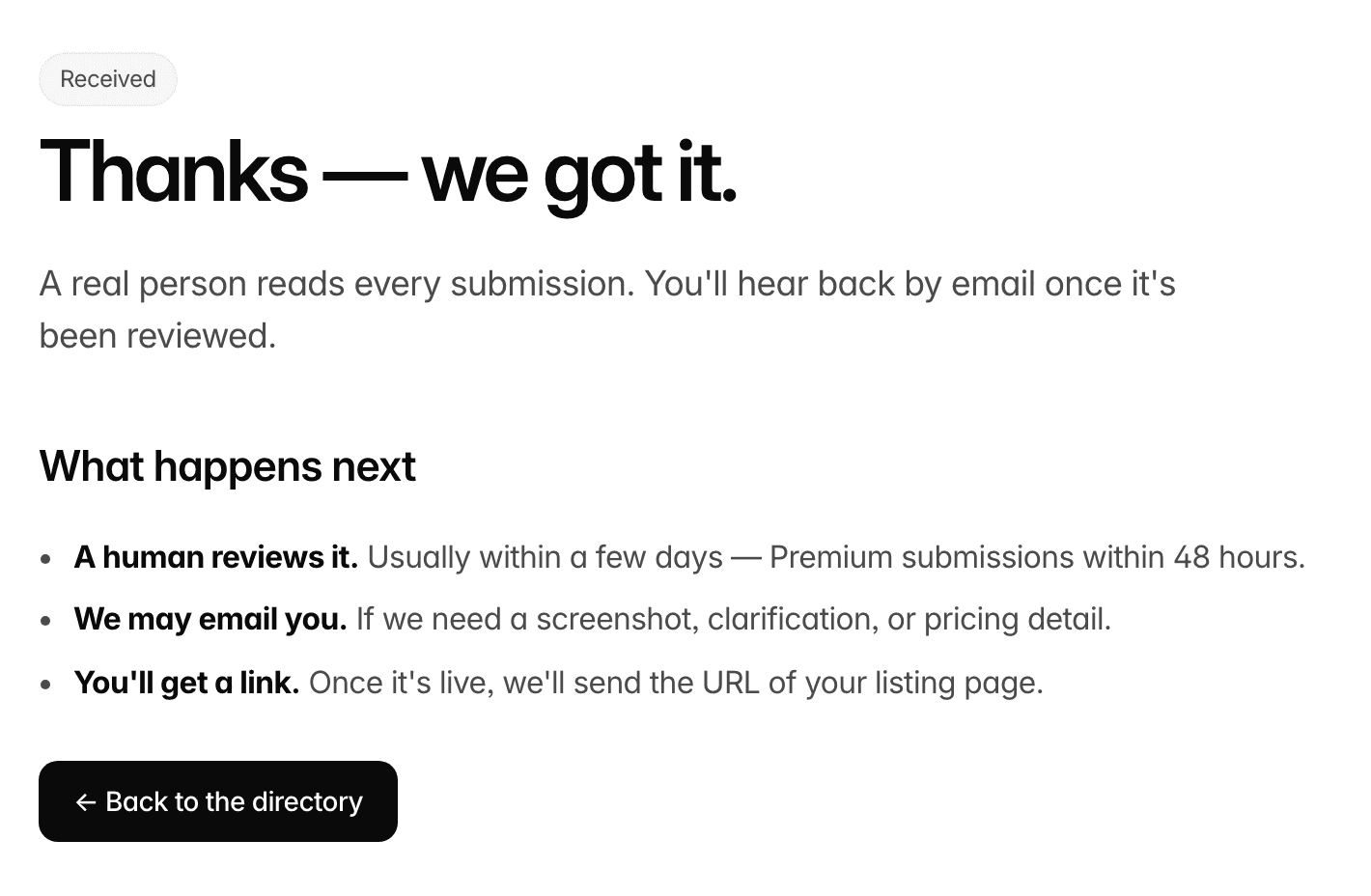
That link is also your cue for the badge, since the pledge counts its seven days from the day you are featured.
Where the $99 Premium tier differs
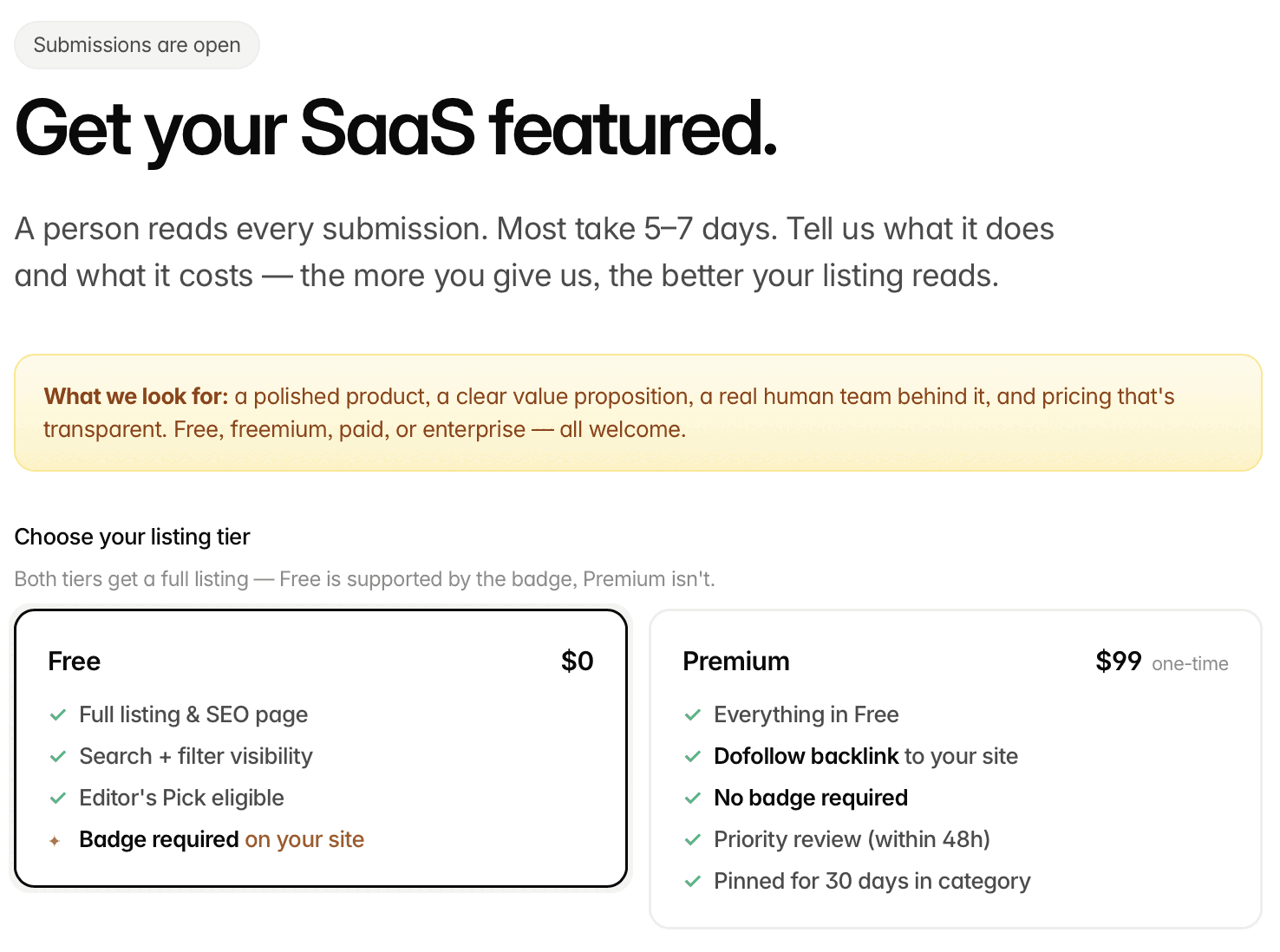
Premium is $99, one-time, and its card promises "Everything in Free", "Dofollow backlink to your site", "No badge required", "Priority review (within 48h)" and "Pinned for 30 days in category". The site's llms.txt draws the same line: "Paid placement is limited to the $99 Premium tier: a pinned slot for 30 days and a followed link. Nothing else is for sale."
So the dofollow backlink, the priority review and the pin are Premium's, and the Free card promises none of them. What Free gives is the listing itself, its full page and its place in search and filters. Customers we file go on Free; our component carries their badge and we keep it live.
SaaS.fyi review: the short answer
Submit. SaaS.fyi is a curated SaaS directory where a person reads every submission, and a listing there is a full, indexable page with two links to your site. On the Free tier the only price is their badge, due within seven days of being featured. Put it up, then keep it up: the pledge ties the listing to it.
How to submit to SaaS.fyi, step by step
- 1
Get your pricing page and social image ready
Their criteria include “pricing that's transparent”, and listing prices are taken from your own pricing page. There is no image upload, so check the preview image your home page serves to social networks.
- 2
Open the submit page and keep Free selected
saas.fyi/submit needs no account. The Free tier is chosen when the page loads, and the pledge box near the end belongs to it.
- 3
Enter the name, address, category and pricing model
Use the URL you want both listing links to carry, choose the category the product plainly belongs in and pick the pricing model that is true for you. Free and Freemium are the two that match a search for free.
- 4
Write a tagline and a two-question description
Open the tagline with what the product does, since the page title, your name plus the tagline, is cut at around 60 characters. In the description, say what problem you solve and who it is for, in at least 60 characters.
- 5
Add tags, your name and your email
Tags are optional and become links on your page. The email is where their reply comes, and later the address of your live listing.
- 6
Tick both boxes and press Submit for review
The badge pledge and the permission box are both required on Free. Their thanks page then confirms that a person reads every submission and that you will hear back by email.
- 7
Put the badge up once you are featured, then leave it
Copy the snippet from the card on your own listing page and place it on your homepage, footer, press page or an “as seen on” section within their seven days. Or hand it to Submitator: our component holds it beside your other directories' badges and we keep it live.
Their $99 skips the badge. Our $29 places it, on thirty directories.
One payment, every directory named in your dashboard with its Domain Rating on the card, a rejection replaced by another directory you pick and one component that places every badge a directory asks for and keeps it live.
$99 skips their badge. $29 places it for you, on thirty directories.
SaaS.fyi is a hand-picked SaaS directory, DR 28 on Ahrefs, where a person reads every submission and each listing gets a full page with two links to your site. The Free tier costs their badge, due within seven days of being featured and kept up after; $99 once skips it. Open your tagline with what you do, answer both questions in the description and keep the badge where the pledge puts it. The whole catalog.
FAQ
How do I submit to SaaS.fyi?
Go to saas.fyi/submit; there is no account to open, and the Free tier is selected when the page loads. Fill in the product name, website URL, category, pricing model, a one-line tagline, a description of at least 60 characters, your name and your email. Tags and “Anything else?” are optional. Tick the badge pledge and the permission box, then press Submit for review.
Is SaaS.fyi free?
Yes. The Free tier costs $0 and comes with “Full listing & SEO page”, “Search + filter visibility”, “Editor's Pick eligible” and “Badge required on your site”. Premium costs $99 one-time and lists “Everything in Free” plus “Dofollow backlink to your site”, “No badge required”, “Priority review (within 48h)” and “Pinned for 30 days in category”.
Is the SaaS.fyi link dofollow?
SaaS.fyi sells its dofollow backlink with Premium. The $99 card lists “Dofollow backlink to your site”, and the site's llms.txt says “Paid placement is limited to the $99 Premium tier: a pinned slot for 30 days and a followed link.” The Free card lists no backlink. On every listing page the product gets two links, the domain under its name and a Visit site button, both going straight to its site with utm_source=saas.fyi added.
Does SaaS.fyi require a badge?
For a Free listing, yes. The pledge reads “I agree to display the "Featured on SaaS.fyi" badge on my site (homepage, footer, press page, or "as seen on" section) within 7 days of being featured. If the badge is removed, the listing may be archived.” The seven days run from the day you are featured, and your listing page carries the snippet, already pointing at it. Premium reads “No badge required”.
What does the SaaS.fyi form ask for?
Eleven required items: the listing tier, product name, website URL, a category from 15, a pricing model (Free, Freemium, Paid or Enterprise), a one-line tagline (the field stops at 120 characters), a description of at least 60 characters, your name, your email, the badge pledge on Free and a box confirming you have permission to submit the product. Tags and “Anything else?” are optional. There is no logo or image upload.
How long does SaaS.fyi take to review a submission?
The submit page states “Most take 5–7 days.” Premium's card offers “Priority review (within 48h)”. On either tier a person reads each submission, and the thanks page says “You'll hear back by email once it's been reviewed.” Once the listing is live, they send you its address.
What is SaaS.fyi's Domain Rating?
Ahrefs puts saas.fyi at 28, according to our checker on 11 October 2026.
Where do I get the SaaS.fyi badge?
From your own listing page, once it is live. Each listing carries a card marked “Free listing · badge required” with HTML and Markdown snippets that already link to that listing, plus a Download SVG button. The brand kit at saas.fyi/brand has a generic version with a slug to fill in. The badge shows at 294 by 117 pixels and can go on your homepage, footer, press page or an “as seen on” section.
What categories does SaaS.fyi have?
Fifteen on the form: AI & Machine Learning, Sales & Outreach, CRM, Email & Newsletter, Forms & Scheduling, Design & Creative, Developer Tools, Backend & Infrastructure, Analytics & Monitoring, Project Management, Productivity & Notes, Communication & Video, Customer Support & Feedback, E-commerce & Payments and SEO & Content. The one you pick is printed on your listing next to the pricing model.
Does Submitator submit to SaaS.fyi?
Yes. We file you on its Free tier, which requires their “Featured on SaaS.fyi” badge on your site. Our badge component places it there, and we keep it live. That component goes onto your site one time only. Every badge or link your chosen directories ask for then runs through it, so adding a directory never means adding a commit. Their reply and your listing's address arrive by email, so we enter the address you give us.
More submit-to guides.
Their $99 skips the badge. Our $29 installs it, on thirty directories.
One payment, each directory named with its Domain Rating on the card before you choose it, a rejection swapped for another directory and one component that installs every badge and keeps it live.