
A Square Logo, Sixty-Four Characters and You Are Live on Owwly.
We list customers on Owwly through its free form. Counts, prices and quotes below are from 10 October 2026.
Owwly is a free list of products and AI tools that bills itself as the "Ultimate AI tools list" and greets visitors with "Discover startups and find your next favourite product!" Its Others tab, where free listings go, held 7,600 products on 10 October 2026. The 30 days before brought 265 new ones, the latest on the day itself. Entries from February 2020 are still on it.
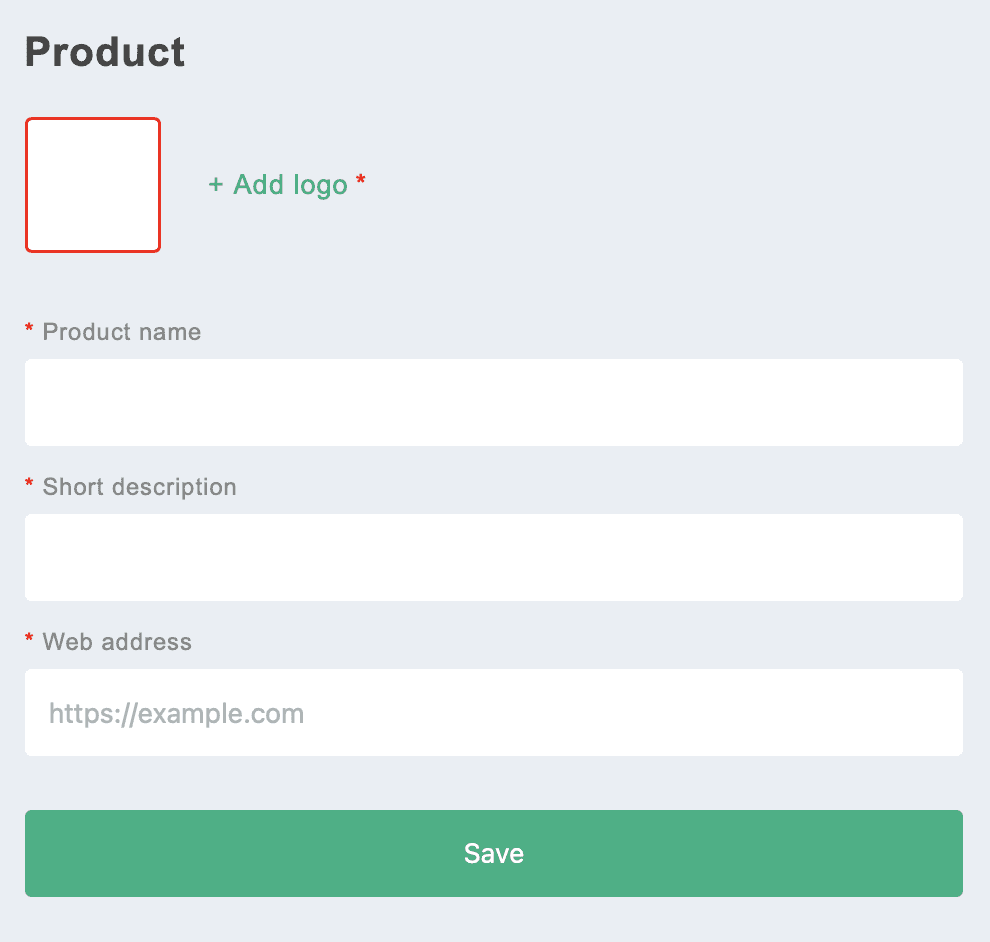
Listing costs nothing and takes four things after a Twitter or Google sign-in: a logo, a product name, a short description and the web address. No category is asked for, and Owwly wants neither a badge nor a link back. Press Save and the product is published at once, at the top of the Others list, which runs newest first.
What visitors see is what you typed: the logo, the name and one line, with a click on the name opening your site. With Owwly in your Submitator plan, we fill all four fields for you.
| On the form | What it takes |
|---|---|
| + Add logo | Required; JPG or PNG, cropped square and saved as a 200 px PNG |
| Product name | Required, 30 characters at most |
| Short description | Required, 64 characters at most |
| Web address | Required; https:// optional, paths and query strings accepted, no ports |
| Category or tags | Not asked; free listings carry none |
A row on Owwly is the logo, the name in bold and the short description. That description is the one line that tells a visitor what the product is, and the field holds 64 characters, so make it one complete sentence: the job your product does and the people it serves. Of the 1,611 products added so far in 2026, 585 sit at exactly 64 characters, where the field cuts a longer line off.
Owwly at a glance
| What you get | Owwly |
|---|---|
| Price to list | Free; paid extras from $7 |
| Sign-in | Twitter or Google |
| The form | Logo, name (30), description (64), web address |
| Badge or link back | Not asked |
| Publishing | At once, at the top of Others |
| Listings in Others | 7,600; 265 added in 30 days |
| A click on your name | Opens your site in a new tab, no redirect |
| Crawlable link | None; the row is not an HTML link |
| Domain Rating | 23 (Ahrefs, our checker) |
| Filed for you by Submitator | Four fields filled, logo cut square, from $29 |
What was read, every item on 10 October 2026 and taken from snapshots of the live site saved that day: owwly.com's home page, its Others list, the terms, the sign-in page and robots.txt, plus the JSON the site itself loads for the Others list (all 7,600 entries; the page after the last one came back empty), for Featured and for the category menu. The form's labels, red required marks and https://example.com placeholder are those in our founder's screenshot; the 30- and 64-character caps, the square crop to 200 pixels, the address check and its message, the "Product added" notice, the profile setup for new accounts and the prices on the "Feature your product" page come straight from the site's own code. Owwly prints no dates, so dates here are the created timestamps in that JSON, which can also shift when an entry is saved again. For the link, 80 entries picked at even intervals across all 7,600 were drawn by Owwly's own code in a browser: none contains a link element, and the words nofollow, sponsored and ugc never occur on the page; clicking a name opens the product's address in a new tab through a script, straight to the address with nothing in between. The 45 newest entries behave identically. No page carries a noindex instruction, and each page's canonical points at itself. Owwly's robots.txt keeps crawlers out of /feed, /account, /questions, /api, /assets and /ux-case-studies and lists no sitemap, and a request for /sitemap.xml returns the app instead of a sitemap. Google's guidance on links, from its "Link best practices for Google" page: "Generally, Google can only crawl your link if it's an <a> HTML element (also known as anchor element) with an href attribute." The sign-in image is that page as it rendered on 10 October 2026. The DR of 23 is the Ahrefs figure that the Domain Rating checker on our own site returned for owwly.com on the evening of 10 October 2026. Filing customers to Owwly on its free route, and seeing each listing appear at once, is our founder's report from our own filings; that we write a separate description for every directory and crop images to its format is his statement too. Our own side, from our pricing table and terms: $29 covers 30 directories, $49 covers 60 and $79 covers 100, paid once; each rejection by a directory returns one directory to your selection; refunds come under the conditional 30-day policy in the terms.
Sign in first, with Twitter or Google
Two buttons lead to the form. Submit product sits in the menu behind the user icon at the top right, and a green Add your product button sits in the side panel. Both lead to Log in to Owwly, which offers Continue with Twitter and Continue with Google and no email and password route.
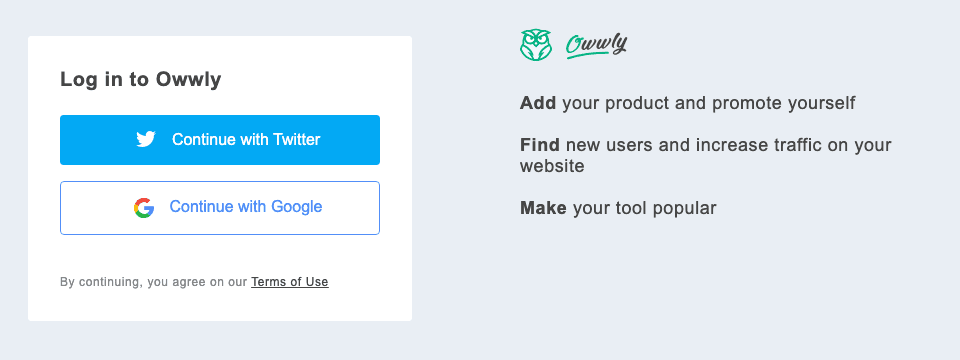
A new account goes through a setup first. Confirm profile asks for a user name, full name and email, with city and country optional; then comes the product form itself, under Add your product. After that, returning visits reach the form as a page headed Product, from the side-panel button or from Add product on the profile.
Four fields and how to fill each one
Start with the logo: it is required, and its empty box keeps a red border until one is added. The picker takes JPG or PNG, then a crop step holds the image to a square and saves it as a PNG 200 pixels wide, which the list shows at 40 by 40. A bold, simple mark with no small lettering holds up at that size.
The name field takes 30 characters. Use the name your product already goes by, the one people would search for, rather than a name with a slogan attached; the slogan belongs in the 64 characters below it.
The web address takes a full URL, with or without https://. A path and a query string are both accepted, so you can send visitors to a particular landing page or add UTM tags, as 71 listings already do. An address with a port number is refused with "Please enter a valid URL (e.g., https://example.com)".
Your row in the Others list
Owwly's product list has two tabs under the heading Products: Featured (the default) and Others, where free listings go. A row in Others shows the logo, the name in bold and the short description. The newest product comes first and rows load 15 at a time, with more as a visitor scrolls. The tab also has its own search box, "Search products, keywords or tags…".
The row is the whole free listing. Everything beyond it, from a place in Featured to a product page "with description and tags", is on Owwly's paid page, covered below.
Where a click on your name goes
A click on a name in Others opens that product's address in a new tab, exactly as it was entered, with https:// added only when the scheme is missing. Nothing sits in between, no redirect and no tracking added to the address, so with UTM tags on the address you submit, your analytics will show which visits came from Owwly.
That click runs on a script rather than a link. The row is not an HTML link element, and Google's link guidance spells out what that means for crawlers: "Generally, Google can only crawl your link if it's an <a> HTML element (also known as anchor element) with an href attribute." Featured cards and the paid product page also open sites by script rather than by link, so neither paid placement changes this.
So plan on Owwly for visibility and visits, and on directories with followed links for link equity. Our catalog says the same of Owwly: its card reads no equity, beside the Domain Rating of 23 that Ahrefs gives owwly.com.
The paid page and its Skip button
Right after a new account's first product, Owwly shows a page headed "Feature your product". Its day-rate options, set on a slider of up to 30 days, are a place in Featured at $7 a day and a branded card pinned to the top of Featured. The pin adds $10 a day and ticks Featured with it, so a pinned card comes to $17 a day. Below the day rates sit three one-off extras at $35 each: a newsletter slot, a spot on Owwly's social channels and a product page with description and tags. Payment runs through Stripe.
None of it is needed for the free listing. Both day options start ticked, so choose Skip rather than Go to payment when the free row is what you came for.
Four fields, filled by us
With Owwly in your plan, the form is ours. Your logo is cropped to a square that still reads at 40 pixels and the name goes in as your product is known. The short description is written for Owwly alone: a complete sentence inside 64 characters, not a longer pitch cut short.
Your web address comes from the startup details you keep in your dashboard. Then the listing goes out on Owwly's free route, where it is published the moment it is saved.
Is Owwly worth the four fields?
Yes. Listing is free, your site stays untouched and the product is published at once, at the top of a list that took in 265 products over the 30 days before 10 October. Every click on your name lands straight on your site. Put real care into the logo, the name and the 64 characters, because together they are the whole listing.
How to submit to Owwly, step by step
- 1
Get a square logo and a 64-character line ready
The logo is cropped square and shown at 40 by 40 pixels, so pick a mark that reads at that size. Make the short description one complete sentence inside 64 characters: it is all the text your row carries.
- 2
Press Submit product or Add your product
Submit product is in the menu under the user icon at the top right, and the green Add your product button is in the side panel. Either one leads to the sign-in page.
- 3
Continue with Twitter or Google
There is no third way in. A new account confirms its profile next: it needs a user name, a full name and an email, while city and country can stay blank.
- 4
Fill the four fields
Add the logo, then the name, up to 30 characters, followed by the description and the web address. A path or UTM tags in the address are fine; a port number is not.
- 5
Press Save, then Skip on the paid page
Owwly confirms with “Product added”. A new account is shown “Feature your product” next, and Skip keeps the listing free.
- 6
Open Others and click your name
Your product sits at the top of the list, which runs newest first. Click the name to check that it opens the address you meant; Edit on your profile fixes anything that is off.
- 7
Or put Owwly in your Submitator plan
We square the logo, write the line for Owwly's 64 characters, enter your name and address and file the listing on Owwly's free route.
$0 here. $29 for the thirty you have not filled in yet.
One payment, every directory named in your dashboard with its Domain Rating on the card, text written for each one and the ones you tick filed for you.
Four fields, live at once. $0 here, $29 for thirty.
Owwly lists products free after a Twitter or Google sign-in: a square logo, a 30-character name, a 64-character line and your address, with no badge, no category and no review step. The product lands at the top of the Others list the moment it is saved, and a click on its name goes straight to your site. We fill all four for you, alongside every other directory you pick. The whole catalog.
FAQ
How do I submit to Owwly?
Use Submit product in the user menu or the green Add your product button, then sign in with Twitter or Google. Fill in the four fields (logo, product name, short description and web address) and press Save; a new account confirms its profile first. On a returning account Owwly answers “Product added” and opens your profile.
Is Owwly free?
Yes. The form carries no fee, and the paid page new accounts see afterwards, “Feature your product”, has a Skip button that keeps the listing free. Its prices: Featured at $7 a day, a pinned branded card for $10 a day on top of Featured and $35 once each for the newsletter, Owwly's social channels or a product page.
What does the Owwly form ask for?
It asks for a logo (cropped square and saved as a 200-pixel PNG), a product name of up to 30 characters, a short description of up to 64 and a web address shaped like https://example.com, and all four are required. Category, tags, screenshots and pricing get no field at all.
Does Owwly review products before they appear?
Nothing in Owwly's submit flow speaks of moderation: no review, no approval step, no queue. Save confirms with “Product added”, and the product then sits on your profile with Edit and Archive beside it. Listings we file there are published at once, at the top of the Others list.
Where does my product show up on Owwly?
In the Others tab, beside the default Featured tab, as a single row: your logo, the name in bold and the short description. Others puts the newest product first and loads 15 rows at a time. Featured, the newsletter and Owwly's social channels are paid placements.
Is the Owwly link dofollow?
There is no link to be dofollow or nofollow: the listing has no link element. Clicking the name opens your site in a new tab through a script, directly and with no redirect in between, so a visitor lands on your site in one click while search engines find no link to follow. Count Owwly for visibility and visits rather than link equity.
What is Owwly's Domain Rating?
Ahrefs rates owwly.com 23; that is the figure our Domain Rating checker showed on 10 October 2026.
Can I change my Owwly listing later?
Yes. Your profile lists each product with Edit and Archive. Edit lets you change it and confirms with “Product updated!”, while Archive takes the product down.
Does Submitator submit to Owwly?
Yes. We file customers there on the free route, for anyone who picks Owwly in the dashboard. We crop your logo square, enter the name and address and write a line for Owwly that lands inside 64 characters. The listing is published at once. Owwly can be one of thirty directories on the $29 Starter plan.
More submit-to guides.
Owwly is free. Thirty directories are $29, each one measured.
One payment. Each directory is named with its Domain Rating on the card before you choose it, badges are installed and kept live where one is wanted and a rejection is swapped for another directory.