
Press Publish, and Your Project Has a Make.rs Page of Its Own.
We post customers' projects to Make.rs on its free route. What follows, from sign-up to project page, describes make.rs on Saturday 10 October 2026.
Make.rs sums itself up in ten words: "The place where makers show the world what they've made". It is a free community where you claim a maker page at make.rs/@yourname and post your projects to a public feed. A project goes live when you press Publish, on a page of its own whose Visit site button opens your site.
The feed moves. Make.rs holds 9,952 project pages and 6,433 maker profiles; 788 new projects arrived in the 30 days to 10 October 2026.
Posting costs nothing. All it takes is an account: an email, a username and no password, since Make.rs signs you in by magic link. The form then requires two things: the project's name and its description. That description is the part we take on for customers who pick Make.rs.
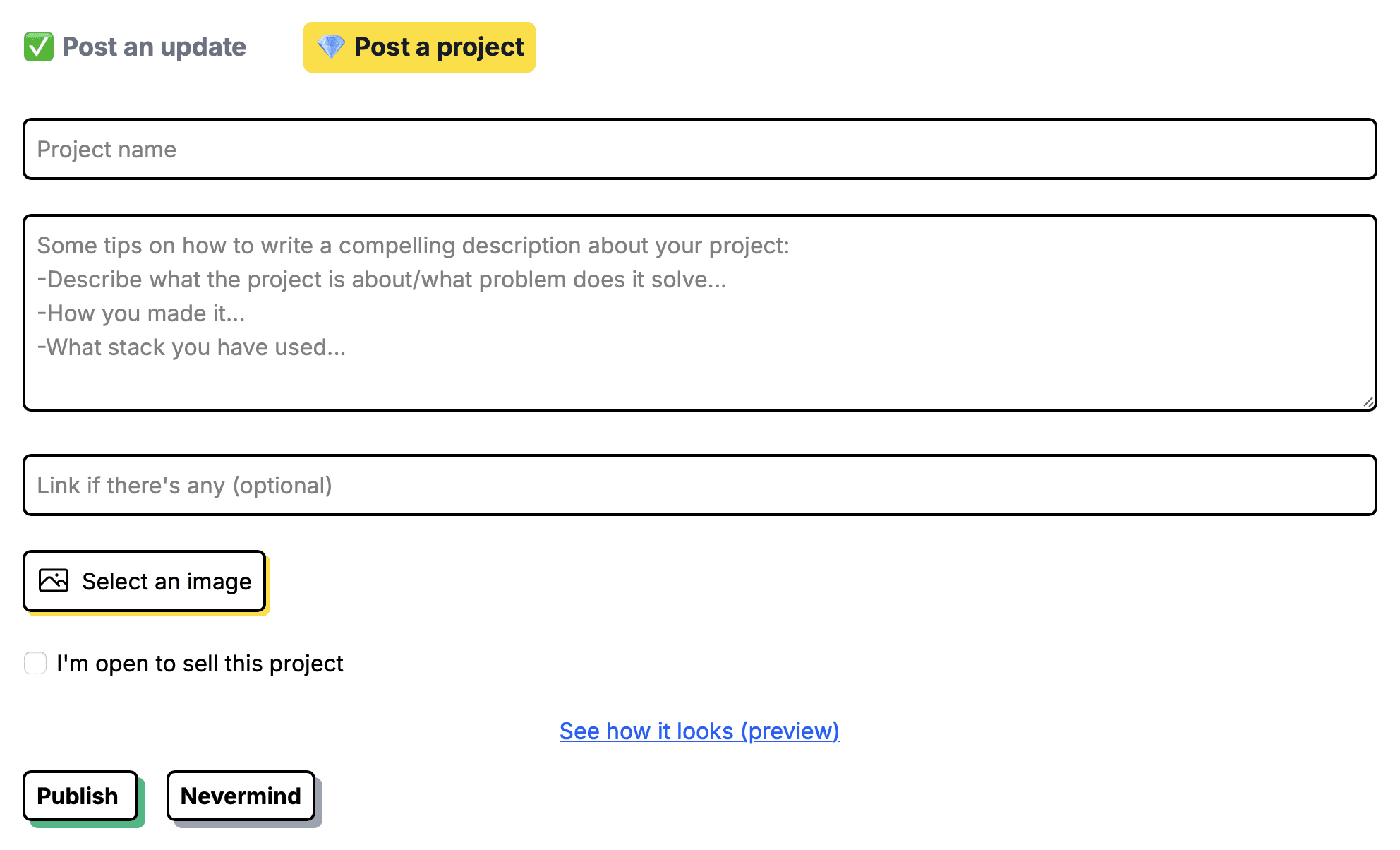
| Field | What to know |
|---|---|
| Project name | Required |
| Description | Required; three writing tips as the placeholder, line breaks kept |
| Link | Optional; must start with http:// or https:// |
| Image | Optional; one file, through Select an image |
| For sale box | Optional; “I'm open to sell this project” adds a For sale badge |
| Preview | “See how it looks (preview)” shows your feed card first |
| Publish | The project goes live at once |
Make.rs runs no approval queue. Press Publish and the project is live on its own page and in the Everyone feed on the home page: a project created at 20:17:51 UTC on 10 October 2026 was in that feed and in the site's sitemap less than three minutes later.
Make.rs at a glance
| What you get | Make.rs |
|---|---|
| Price to post | Free |
| Account | Free: email, username, magic-link sign-in |
| Review | None; live on Publish |
| Required fields | Project name and description |
| Categories | None |
| Your project page | Indexable, self-canonical, titled with the project name |
| Link to your site | Visit site, direct, ugc and nofollow, tagged ref=make.rs |
| New projects | 788 in the 30 days to 10 Oct 2026 |
| Paid option | One pinned Sponsored slot, $100 a month |
| Domain Rating | 39 on Ahrefs, 10 Oct 2026 |
| Filed for you by Submitator | Free route, description written for it, from $29 |
Per make.rs, read on 10 October 2026 from 20:20 UTC: the home page and its first six feed pages, /about, /terms, /storyteller, /stacks, /leaderboard, /forsale, /sponsor, the sign-up and sign-in pages, two maker profiles, robots.txt and the sitemap index with its three sitemaps. The form is quoted from the code behind it and from our founder's capture of the empty form that day; the sign-up and project page images are from the same day. For this write-up no listing was filed, nothing was paid for and no vote was cast. The projects sitemap held 9,952 project pages and the users sitemap 6,433 maker profiles. Dates are sitemap lastmod: newest 10 October 2026, oldest 5 April 2021, 788 created between 10 September and 10 October; on all 100 pages in the census below, lastmod matched the page's own creation date. The newest project at the time, created at 20:17:51 UTC, was on the home page feed and in the sitemap at 20:20:24. Link census: 100 project pages, the 20 newest plus 80 taken at even intervals across the sitemap, each answering 200. On 99 of them a single Visit site link goes directly to the product's own domain, ref=make.rs appended, with rel="ugc nofollow noopener" on all 99 and sponsored on none; the hundredth has no link because none was entered. Across the 100 pages, 103 links point at members' sites and none is followed. No page sends an X-Robots-Tag header or a robots meta tag; each names itself as canonical. Five pages fetched as Googlebot came back byte-identical to the ordinary copies; twelve rendered in Chromium showed the same rel. One link component in the site's code gives posts, comments, descriptions and bios that same rel. In the same code, a pinned Sponsored project links out with rel="sponsored noopener". The words backlink, dofollow and SEO appear on none of the pages read. The 280-character feed card, the 160-character page description and the generated share card are read from live pages and the site's code. Cezar is named on the @cezar profile, which reads "Maker of Make.rs" and "Paris, France"; the About page lists cezar@make.rs. Ahrefs supplied the Domain Rating of 39, through submitator.com/domain-rating-checker; robots.txt names no crawler to block. Submitator's founder is the source for these points: customers are submitted to Make.rs on the free route, projects publish there instantly, descriptions are written per directory, images are cut to each site's format and, as confirmed on 11 October 2026, each account is opened with the customer's own email. Plans: thirty directories at $29, sixty at $49, a hundred at $79, each a one-off payment, with every directory picked by the customer in the dashboard. Each rejection is replaced by one more directory of the customer's choosing; refunds come under the 30-day policy in our terms, with its conditions.
Start with make.rs/@yourname
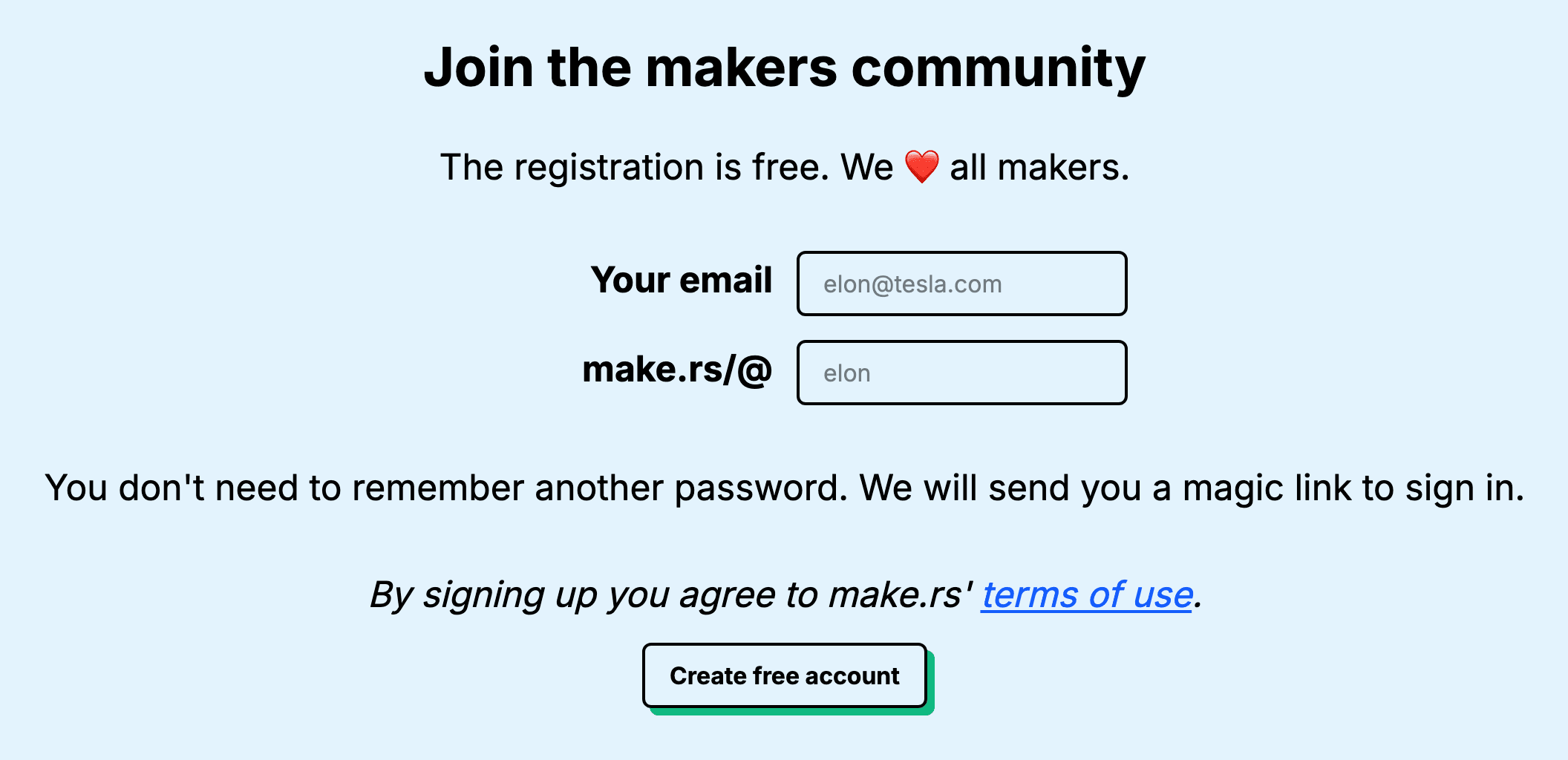
Posting needs a free account. The first thing Make.rs asks for is a username: type it into the make.rs/@ box on the home page, press CLAIM and add your email. The Sign up page, headed "Join the makers community", takes both at once.
No password is involved: "You don't need to remember another password. We will send you a magic link to sign in." Every sign-in comes through your inbox, so register with one you will still be reading next year: it is the only way back in.
Pick the name with the same care as the project's. It becomes your maker page at make.rs/@yourname and the "Made by" line on every project you post. It also appears on the share card Make.rs draws for a project without an image.
Write the first 280 characters for the feed
A new project appears in the Everyone feed as a card headed with your name and the project's, then your bio line, the first 280 characters of the description and a "... more" link to the project page, with your image beneath. The project page then cuts the same text to 160 characters, ellipsis included, for its meta description, which is what search results and link previews are handed.
So the first sentence does the selling: what the product is, who it serves and the problem it solves, ahead of the story of how it started. If the opening 160 characters make sense on their own, both cuts read well.
Below that, follow the three tips Make.rs leaves in the box as its placeholder: describe the project and the problem it solves, say how you made it and name the stack. Line breaks carry through to the page, so a few short paragraphs read better than one block.
Inside a Make.rs project page
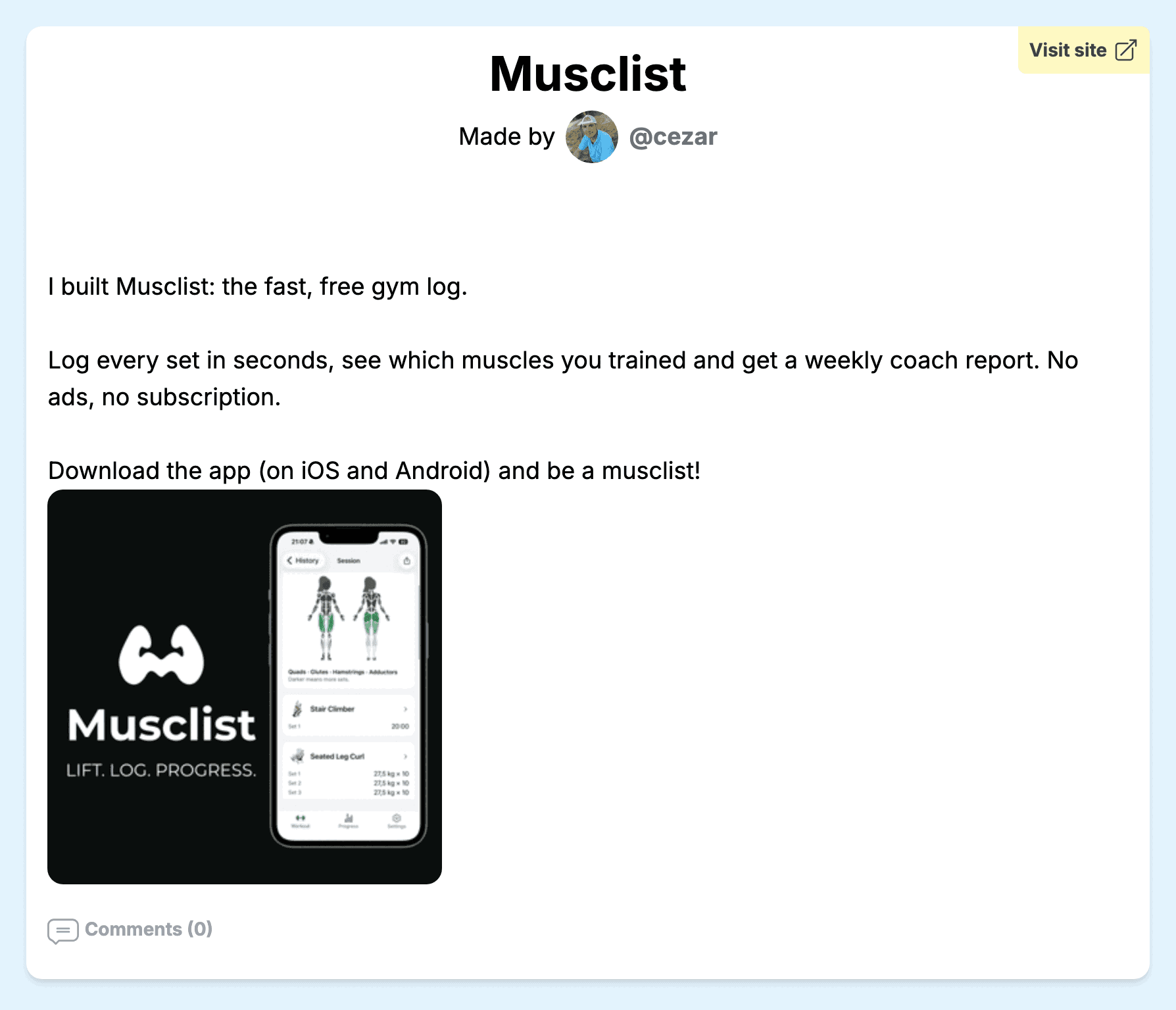
Each project gets its own address, made of make.rs/project/, a number and the project's name. Its page title is the name followed by "| Make.rs". The page opens with the name, a yellow Visit site button in the corner and "Made by" with your avatar and username, then the description with its line breaks, your image and the comments.
It is open to search engines and names itself as its canonical address. Your image is also the picture a shared link shows; post without one and Make.rs draws a card with the project name, your username and the words "on Make.rs".
Your maker page gathers every project under its Projects tab, beside your posts, your followers and a Stack tab for the tools you build with. The About page says what sets it apart: "It's a different kind of profile page where it's not about the companies you worked for but what you've done."
Give the link its https://
The link field is optional, but it is what gives your page its Visit site button: of 100 project pages measured on 10 October 2026, the only one without a button belonged to a maker who left the field empty. Type the full address, starting with http:// or https://; a bare domain turns the field red.
Make.rs adds ref=make.rs to the address, fitted around any query string already there, so the visits your page sends arrive tagged with the Make.rs name; UTM tags you add yourself are kept. The button opens your site directly, with no Make.rs redirect on the way.
Make.rs marks the links its members post rel="ugc nofollow noopener", the Visit site button included; all 99 buttons on those 100 pages carry it. A project here brings readers and a mention rather than link equity. In our catalog, the card for Make.rs says so: no equity, next to an Ahrefs DR of 39.
Post as the maker, then keep posting updates
Make.rs is run by Cezar, a maker based in Paris. In its About page's words, "MAKE.RS is a project fueled by passion." Its terms draw one line on promotion: "If you excessively promote your website/app/business/yourself or spam any of our users, we have the right to ban you for life."
So write the project the way you would tell another maker about it: what you built, why and how. Post each product once and keep the news for updates.
Updates sit in the other tab of the same window: up to 280 characters with a counter, optional images and a menu, "Tag one of your projects (optional)". A tagged update links back to the project and is listed on its page under Latest updates. Make.rs's Storyteller page pitches that timeline in one line: "Use it to communicate new releases to your users, or to showcase your work."
Where people find a new project
There are no categories, tags or search on Make.rs. A project is found through your maker page, the Everyone feed on the home page (ten entries to a page) and the New projects list beside it, which holds the 20 newest. Tick the for-sale box and it joins the For sale feed as well, badge and all.
With nothing to file under, the name and the opening line do the signposting. Use the name people would type into Google and make the first sentence about the product.
The one paid option sits above the feed: a single Sponsored slot, $100 for a month pinned at the top, booked by email.
Make.rs in your Submitator plan
Pick Make.rs in your dashboard and we post the project on its free route. The description is written for Make.rs and no other site. The image is cut to suit it. The account is opened with your own email, so Make.rs sends its sign-in links to you and the maker page stays yours.
In a launch, Make.rs is the community stop: your project on a page of its own, in a feed of people who build things. It sits in the same plan as every other directory you choose, on a single payment.
Should you post on Make.rs?
Yes. It costs nothing, puts a project live on Publish and gives it a page of its own that search engines can index, next to a maker page that keeps everything you make in one place. Put the product in the first 280 characters, give the link its https:// and post updates as you ship.
How to submit a project to Make.rs, step by step
- 1
Claim your username
Type it into the make.rs/@ box on the home page and press CLAIM, or use Sign up. It becomes your maker page and the byline on every project.
- 2
Add an email you will keep
Make.rs has no passwords: whenever you sign in, it sends a magic link to that inbox.
- 3
Open Post a project
Press POST in the menu. The window opens on Post an update; the project form is the tab beside it.
- 4
Name it and write the description
Put what it does and who it is for in the first sentence, then how you made it and the stack. The first 280 characters become the feed card.
- 5
Add the link and an image
Paste the full address with https:// so the field accepts it, then choose one image with Select an image. It is the picture a shared link to your page shows.
- 6
Preview, then press Publish
“See how it looks (preview)” shows the card as the feed will show it. Leave “I'm open to sell this project” unticked unless you would sell, then press Publish and the project is live.
- 7
Or let Submitator post it
Tick Make.rs in your dashboard. We write the description for it, cut the image and post the project on the free route with the rest of your plan.
$0 here. $29 for the thirty you have not filled in yet.
One payment, every directory named in your dashboard with its Domain Rating on the card, text written for each one and the ones you tick filed for you.
Free here, live on Publish. $29 for thirty directories.
Make.rs is a free maker community. Claim make.rs/@yourname and post a project with a name, a description and your link: it is live when you press Publish, on its own page with a Visit site button. In the 30 days to 10 October 2026, 788 projects joined. Lead the description with the product and give the link its https://, or leave the writing to us as one of thirty directories for $29. The whole catalog.
FAQ
How do I submit to Make.rs?
Make a free account first: claim a username in the make.rs/@ box on the home page or on the Sign up page and add your email. There is no password: Make.rs signs you in with a magic link sent to that inbox. Press POST in the menu, switch to the Post a project tab, enter the project's name and a description, add your link with https:// and an image if you have one, preview the card and press Publish. The project is live at once.
Is Make.rs free?
Yes. Registration is free, as its sign-up page says. Posting a project or an update costs nothing either. The one paid option is a Sponsored slot that pins a post or project at the top of the feed for a month, at $100, booked by email.
Is the Make.rs link dofollow?
No. Make.rs marks the links its members post rel="ugc nofollow noopener", the Visit site button on a project page included. Across 100 project pages measured on 10 October 2026, 99 had that button and all 99 were marked that way; the hundredth had no link entered. The button goes straight to your site with ref=make.rs added, so a project here brings visitors and a mention rather than link equity.
What Domain Rating does Make.rs have?
39, the figure Ahrefs gave our checker for make.rs on 10 October 2026. Its robots.txt blocks neither AhrefsBot nor any other crawler by name.
What does the Make.rs form ask for?
Two required fields, a project name and a description; the description box suggests covering what the project does, how you made it and the stack you used. Then an optional link, which must start with http:// or https://, one optional image and a box marked “I'm open to sell this project”, which adds a For sale badge. A preview shows your feed card before you press Publish.
How long does Make.rs take to approve a project?
It does not hold projects for approval: a project goes live when you press Publish. Its terms set the rule on promotion: “If you excessively promote your website/app/business/yourself or spam any of our users, we have the right to ban you for life.” In practice that means one post per product, in a maker's own words, with later news going into updates.
Does Make.rs have categories?
No, and no tags or search either. A project is found through the Everyone feed, the New projects list of the 20 newest beside it and its maker's page, plus the For sale feed when the for-sale box is ticked. That puts the weight on the project name and the first lines of the description.
What does ref=make.rs on my link do?
It tags the visit. Make.rs adds ref=make.rs to the address you enter, fitted around any query string already on it, so visits from your project page arrive carrying the Make.rs name. UTM tags you put on the link yourself stay where they are.
Can I post updates about my project on Make.rs?
Yes, from the Post an update tab of the same window: up to 280 characters with a counter, optional images and a menu reading “Tag one of your projects (optional)”. A tagged update links back to your project and is listed on its page under Latest updates.
Does Submitator submit to Make.rs?
Yes, on the free route. Choose Make.rs in your dashboard; we then write your project's description for this site alone, cut your image for it and post the project as part of your plan, on an account opened with your own email. Plans start at $29, which covers thirty directories.
More submit-to guides.
Make.rs is free. Thirty directories are $29, each one measured.
One payment. Each directory is named with its Domain Rating on the card before you choose it, badges are installed and kept live where one is wanted and a rejection is swapped for another directory.