
A Free Launch, a Page That Stays. PitchWall's AI Writes the First Draft.
Submitator files customers on PitchWall's Free Launch plan, so the route below is the one we use. Plans, wizard and listings appear here as pitchwall.co presented them on 11 October 2026.
PitchWall is a discovery site for AI tools, SaaS products and tech startups. Ahrefs rates the domain 68 (through our checker, 11 October 2026), and by its own count the site has published 65,000+ products since 2015. Listings from 2016 still open today.
Its Free Launch plan costs nothing and is meant for "founders who want a permanent presence on Pitchwall." That presence starts with a page of your own at pitchwall.co/product/, a day on the homepage and a place on up to three of its tag pages. Add a YouTube link and the Videos page lists you as well.
Four steps lead there: the plan, a box where their AI turns your URL into a draft, the Product Details form and a last page for images and Submit for Review.
That free plan is the one we file customers on. We run their AI fill from your URL and then write every field ourselves, with the description composed for PitchWall alone and your images and logo prepared to its limits.

| Field | Limits and notes |
|---|---|
| Enter Your Product URL | Step one: their AI drafts the form from it; locked once you press Add |
| Product Page | Required: your slug after pitchwall.co/product/ |
| Product Name | Required, 2 to 50 characters; your page's heading and title |
| Product Summary | Required, 100 to 160 characters; feeds the meta description |
| Product Details | Required, 300 to 3,000 characters, shown as plain text |
| Tags | Required, 1 to 3 from their list of about 2,800 |
| Youtube Video | Optional; also puts you on the Videos page |
| Download and social links | Optional: 7 platforms and 6 networks to pick from |
| Product Images | Required, JPG or PNG, 50 KB to 2 MB each |
| Product Logo | Optional, JPEG or PNG up to 1 MB, 100 to 512 px a side |
The counter under Product Summary reads 0/160 and the one under Product Details 0/3000. Both are ceilings. The floors appear only as error messages: "Product Summary must be at least 100 characters" and "Product Details must be at least 300 characters". Write past both and keep the name between 2 and 50 characters.
PitchWall at a glance
| What you get | PitchWall |
|---|---|
| Price to list | Free on Free Launch; Pro $49, Premium $99 |
| Sign-in | Google, GitHub, Microsoft or Discord |
| Step one | Your URL, which their AI turns into a draft |
| Required | Name, summary, details, tags and an image |
| Review | By hand, on every submission |
| Your page | Indexable, canonical to itself |
| Where it shows | Homepage for a day, up to 3 tag pages |
| Visit Website link | nofollow via /out/ on Free, 321 of 321 |
| Domain Rating | 68 on Ahrefs, read via our checker |
| Filed for you by Submitator | Free Launch plan, AI fill checked and every field written, from $29 |
Sources, all fetched with plain GET requests on 11 October 2026: pitchwall.co's home page, the plans page at /submit, the FAQ, badges and contact pages, robots.txt with the four sitemaps it names, the sign-in page and the site's public product and tag feeds. The scripts behind the submission wizard and the listing page were read the same day. Plan names, prices and lines are quoted from the live plans page, where every line a plan does not include carries a cross icon; they match the screenshot of the cards that Submitator's founder took while filing. Field labels, limits and messages, what the AI fill writes and the image rules come from the wizard's code; they agree with the founder's screenshots of the URL box, the Product Details form and the last step, while the plans heading and the sign-in card shown here are our own browser captures, taken that day. The link figures cover 379 listing pages read that day: all 300 in the New Products feed (published from 7 September to 10 October 2026) and 79 older ones spaced evenly through the SaaS tag archive back to 2016, each one's plan read from its own page data. On all 321 free listings the Visit Website button points to a /out/ path on PitchWall's own domain that carries the product's address, with rel="noopener nofollow"; robots.txt disallows /out/. The single /out/ link requested answered with a 302 to the product's address. The 31 paid listings in the New Products feed link straight to the product with rel="noopener". Download and social links carry nofollow, no listing shows a link inside its description, none carries noindex and each names itself as canonical. Finding the button by its label and finding it by the product's host gave matching results on all 379 pages, and 17 browser renders and 6 Googlebot fetches showed the same links. All 79 older listings still answered, the earliest published on 4 March 2016. The tag list holds 2,823 distinct tags, counted from the tag pages and from the list the form searches. The product, visitor and subscriber counts in the plans page's stats strip and its "70 DR" are PitchWall's own figures; 68 is the Domain Rating Ahrefs gives pitchwall.co, fetched with submitator.com/domain-rating-checker on 11 October 2026. Submitator's founder is the source for our side (11 October 2026): customers are filed on the Free Launch plan, PitchWall's AI fill is run from the customer's URL and every field is then written by us, the description for PitchWall alone. Also per our founder, each site gets images cut to its own format, and the PitchWall account is tied to an address created for that customer. Pricing is a single payment: 30 directories on Starter for $29, 60 on Growth for $49 or 100 on Scale for $79; you pick every directory yourself from the dashboard. Under our terms the aim is 2 to 3 days for filing a whole package, and the limit is 21 days from purchase. The same terms add a directory to your selection whenever one rejects a submission, and refunds under them are conditional.
Start on the Free Launch card
The menu's Submit Product link and the home page's Submit Your Product button both open the plans page, headed "Submit your product". Free Launch is the first of three cards. Its price reads "Free" and its two included lines are "1-day homepage visibility" and "Minimum 30-day waiting period". Press its Select Plan button.
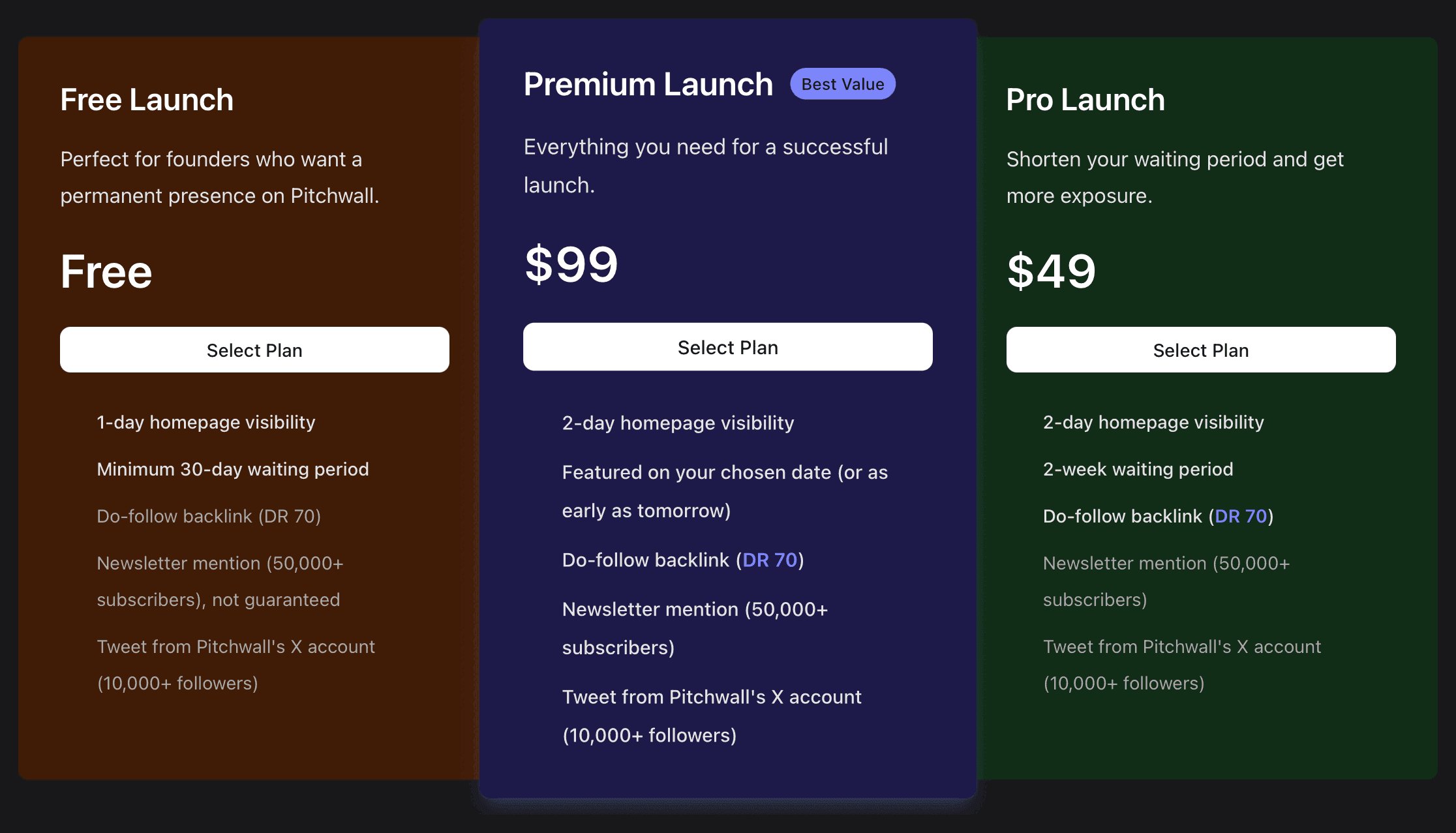
Pro Launch at $49 and Premium Launch at $99, the one marked "Best Value", sit beside it. Both list "2-day homepage visibility" and a "Do-follow backlink (DR 70)". Premium adds a newsletter mention and a tweet from PitchWall's X account. This guide follows the free card.
Sign in, then hand your URL to their AI
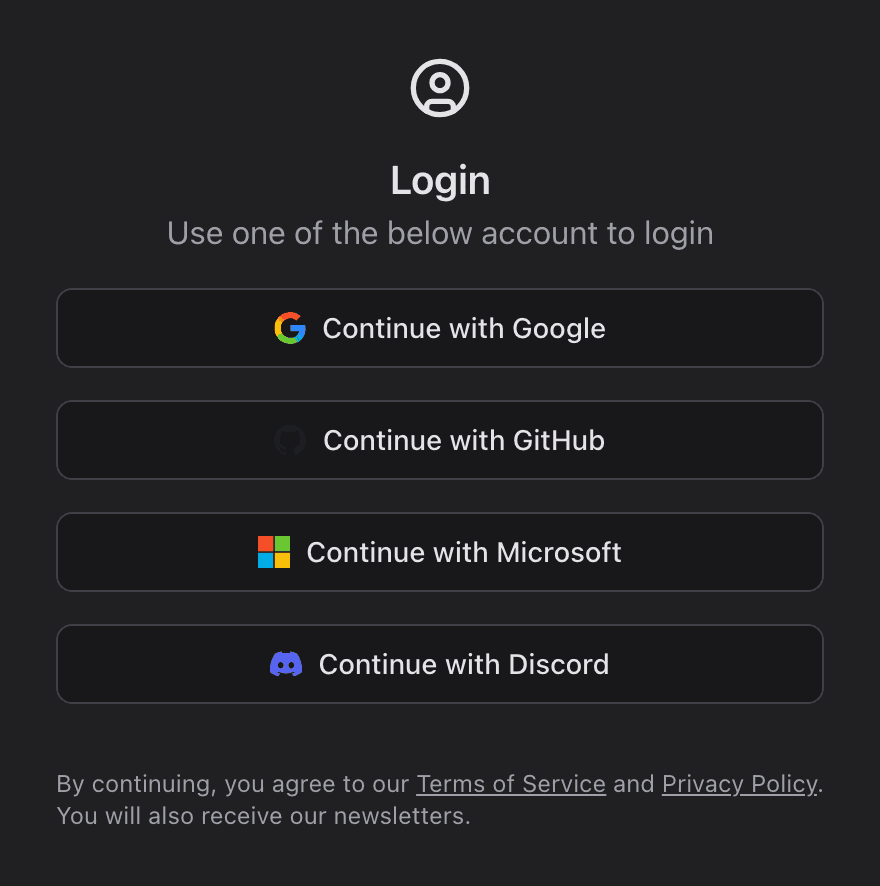
Select Plan asks you to sign in before the wizard opens. PitchWall has no email sign-up of its own: you continue with Google, GitHub, Microsoft or Discord.
The wizard opens on a single box, "Enter Your Product URL", with an Add button beside it. Paste the address your Visit Website button should open and check it before you press Add: the box locks as soon as you do. A status line then steps from "Reading website" to "Polishing your listing" while their AI reads your page and writes a name, a summary, a description and tags, picking up any social profiles linked from the page as well.

When it is done, a notice headed "AI-generated content" appears: "These product details were automatically generated. Please review them carefully before submitting." Do exactly that. If your page cannot be read, a message asks you to fill the details in yourself. If the AI step fails after reading it, the draft falls back on your page's own title and description, with a stock sentence added when that description runs short. Read the summary before going on.
Product Details, one field at a time
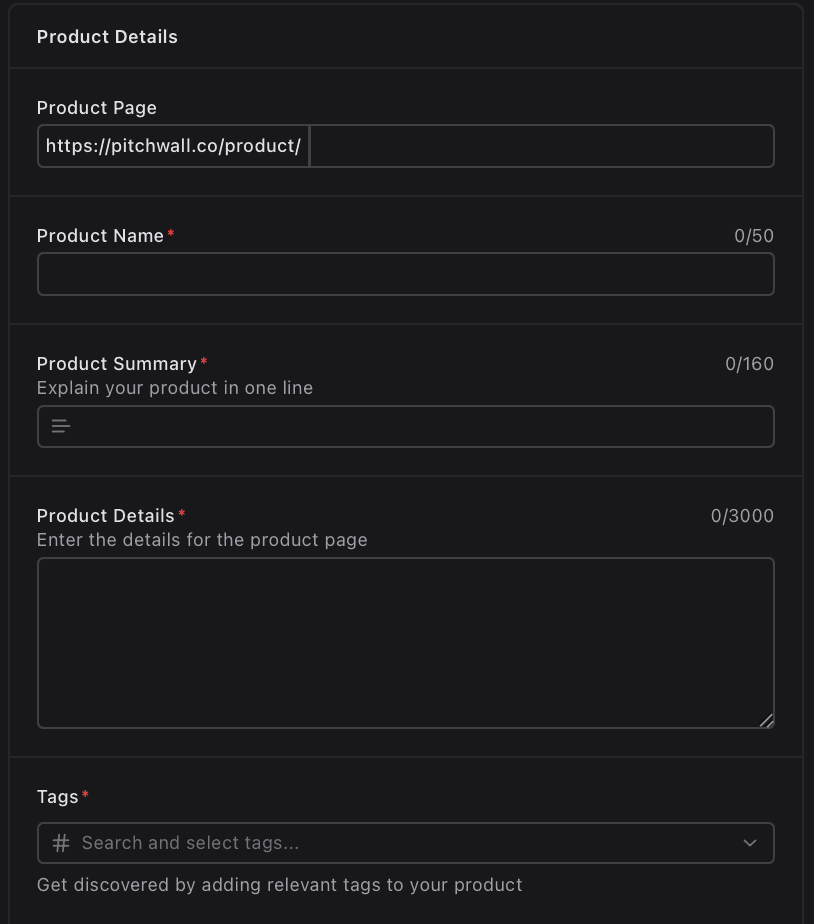
Product Name takes 2 to 50 characters and becomes the heading of your listing and the first part of its page title. Product Summary, under the prompt "Explain your product in one line", takes 100 to 160. It sits below your name, both on the listing and on its cards, it follows your name in the meta description and it is the text shown when the page is shared. Give both the words a buyer would search for.
Product Details takes 300 to 3,000 characters and shows on the listing as plain text, line breaks kept. Markdown marks and web addresses appear exactly as typed, so write in plain paragraphs: what the product solves, its main features, who it is for and how it is priced.
Product Page is your address on the site, pitchwall.co/product/ followed by a slug the AI makes from your name: lower case, hyphens for anything else, 50 characters at most. Check that it reads cleanly; the next page lets you change it.
Tags come from PitchWall's own list of about 2,800, three at most. Start typing in "Search and select tags..." and each match shows in brackets how many products already use it. Every tag you pick lists the product on that tag's page, newest first, so use all three, each one a topic your customers would look under.
Three optional sections close the form. Youtube Video takes a link to a promotional video, which plays on your listing and also puts it on PitchWall's Videos page. Download Links offers seven platforms (iOS, Android, Windows, Chrome, GitHub, macOS and Web), each shown as a button on the listing. Social Media Links covers GitHub, Twitter (X), Facebook, LinkedIn, Youtube and Instagram. Any profiles the AI found are already in place.
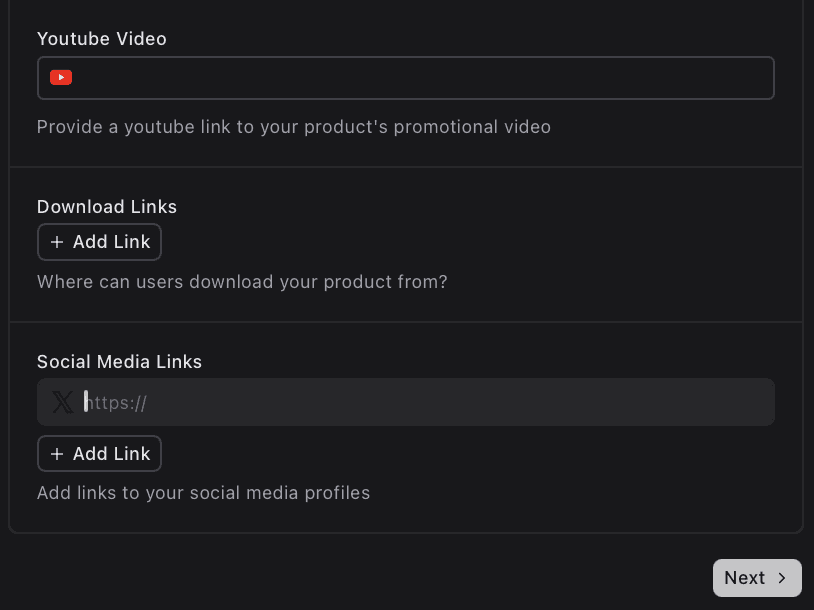
Next stays greyed out until the URL, name and summary are in. Pressing it checks every rule above, saves the listing as a draft and opens the edit page.
Images, a logo and Submit for Review
The edit page repeats the details and adds Images & Logo. Product Images is the one required upload: JPG or PNG, 50 KB to 2 MB each, resized to 500 pixels wide. With more than one on the listing, the page asks you to pick the lead: "Click on an image to set the preview image". Product Logo is optional, a JPEG or PNG of up to 1 MB between 100 × 100 and 512 × 512 pixels.
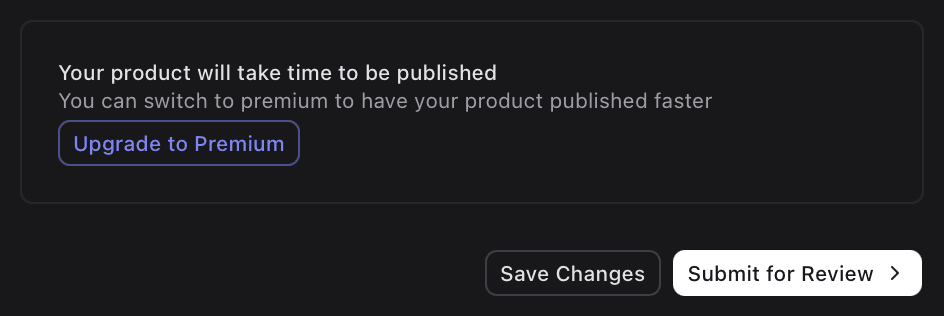
On the free plan the foot of the page offers Upgrade to Premium. Below it sit two buttons: Save Changes keeps the draft for later, and Submit for Review sends the listing to PitchWall for its review.
Every listing is checked by a person first. In the words of PitchWall's FAQ, "Every submission is manually reviewed to ensure the product is legitimate, active, and relevant to our audience before being approved."
What a free listing gives you
A page of your own at pitchwall.co/product/ and your slug, which search engines may index and which names itself as canonical. It shows your logo and name, the summary, a Visit Website button and a button per download link, then an upvote button, share buttons for X and Bluesky, your images, the publication date, the description and the video if you added one. Your tags and social profiles fill the sidebar.
Then the places it appears. The free card promises "1-day homepage visibility", and the home page leads with New Products, newest first. Each of your tags lists the product on its page, the Videos page carries it when you add a YouTube link and new listings go into PitchWall's products sitemap. And it lasts: listings published in 2016 still open, which is what a permanent presence looks like in practice.
One thing to plan around. A free listing's Visit Website button runs through PitchWall's own /out/ redirect with rel="noopener nofollow", a path its robots.txt disallows, so the free plan passes no link equity. The plans page says so itself: "Do-follow backlink (DR 70)" is one of the lines the free card leaves out, and both paid cards include it. A click still takes the visitor to your site. Count on PitchWall for the page that stays, the homepage day, the tag pages and the audience.
Reviewed by hand, with the rules in the open
PitchWall says plainly what it takes. Its FAQ welcomes makers building in AI, SaaS, open source and the wider tech space. It rules out service businesses such as agencies and studios, non-tech listings and "Landing pages without a working demo or product presence". A finished launch is not required: "Even Beta or Alpha-stage products are welcome", as long as the landing page is clear, the interface clean and the messaging concise.
The rest is just as open. The free card prints its waiting period and the lines it leaves out, every submission gets a human review and the AI fill asks you to check its work. Changes after publishing go through what the FAQ calls "a quick review", and the edit page keeps everything but the URL open to change.
Our side: Free Launch, every field written
We file PitchWall listings on the Free Launch plan. We run the AI fill from your URL and then replace its draft field by field: the name and summary written to their limits, a description composed for PitchWall alone and tags chosen from their list. Your images and logo are prepared to the sizes it accepts. The PitchWall account behind the listing uses an email address we set up for you.
PitchWall is filed on the same timetable as the rest of your package. We set out to file all of it within 2 to 3 days, with 21 days the most our terms allow; PitchWall's own review comes after that. If any directory rejects a submission, our terms credit you a replacement directory of your choice.
PitchWall review: launch on the free card
Yes, take the free card. It gives your product a page that stays, a day on the homepage and up to three tag pages, from one URL and a form their AI drafts for you. Check every field, write past the two minimums and lead with your best image.
How to submit to PitchWall, step by step
- 1
Open Submit Product
Submit Product sits in the menu; on the home page, look for Submit Your Product. Either one opens the plans page, headed “Submit your product”.
- 2
Select Plan on Free Launch
The first card, priced Free. Sign in with Google, GitHub, Microsoft or Discord when asked.
- 3
Enter your product URL and press Add
Use the exact page the Visit Website button should open, since the box locks as soon as you press Add. Their AI drafts the form from it.
- 4
Rewrite the draft where it needs it
Name 2 to 50 characters, summary 100 to 160, details 300 to 3,000 in plain paragraphs and up to three tags from their list.
- 5
Add the optional links and press Next
A YouTube link also lists you on the Videos page. Next saves a draft and opens the edit page.
- 6
Upload images and a logo
At least one JPG or PNG between 50 KB and 2 MB, then click the one you want as the preview. The logo is optional: JPEG or PNG, up to 1 MB, 100 to 512 pixels a side.
- 7
Press Submit for Review
Save Changes keeps the draft if you want to come back first. Submit for Review sends it to PitchWall's team, who check every submission by hand.
- 8
Or pick PitchWall in your Submitator dashboard
We file it on the Free Launch plan with every field written and the images prepared, alongside the rest of your directories.
$0 here. $29 for the thirty you have not filled in yet.
One payment, every directory named in your dashboard with its Domain Rating on the card, text written for each one and the ones you tick filed for you.
A free launch and a page that stays. $0 here, $29 for thirty.
PitchWall lists AI tools, SaaS products and tech startups. Its Free Launch plan costs nothing: your own page, a day on the homepage and up to three tag pages. Their AI drafts the form from your URL; check each field, write past the two minimums, add an image and press Submit for Review. We file it on the Free Launch plan with every field written, from $29 for thirty. The whole catalog.
FAQ
How do I submit to PitchWall?
Press Submit Product in the menu (the home page's Submit Your Product button works too), then Select Plan on the Free Launch card. Sign in with Google, GitHub, Microsoft or Discord, paste your product's address under “Enter Your Product URL” and press Add. PitchWall's AI then drafts the Product Details. Check every field, press Next, upload at least one product image on the page that follows and press Submit for Review.
Is PitchWall free?
Yes. Free Launch costs nothing, and its card lists “1-day homepage visibility” and “Minimum 30-day waiting period”. The FAQ on pitchwall.co says the same: “Founders can also list their products for free, with premium visibility and sponsorship options available.” The paid cards are Pro Launch at $49 and Premium Launch at $99. None of the three plans wants a badge or a backlink from your site.
Is the PitchWall link dofollow?
Not for a free listing. Every one of the 321 free listings read on 11 October 2026 routed its Visit Website button through PitchWall's own /out/ redirect with rel="noopener nofollow", and PitchWall's robots.txt disallows /out/. That matches the Free Launch card, which lists “Do-follow backlink (DR 70)” among the lines it does not include; Pro Launch and Premium Launch both include it. Search engines may still index the listing page, which names itself as canonical. A click on Visit Website still lands on your site.
What is PitchWall's Domain Rating?
Ahrefs scores pitchwall.co at 68; that is the reading our checker gave on 11 October 2026. PitchWall prints its own figure, “70 DR”, on its home and plans pages.
What does the PitchWall form ask for?
Your product URL first, which their AI turns into a draft. Then Product Details: a Product Page slug, a Product Name of 2 to 50 characters, a Product Summary of 100 to 160, Product Details of 300 to 3,000 and one to three Tags, with an optional YouTube video, download links and social links. After Next comes Images & Logo: at least one product image (JPG or PNG, 50 KB to 2 MB) and an optional logo of up to 1 MB.
Does PitchWall fill in the form with AI?
Yes, from your URL. Press Add under “Enter Your Product URL” and it reads your page, then writes a name, a summary, a description and tags. Social profiles linked from the page are filled in too. A notice headed “AI-generated content” follows: “These product details were automatically generated. Please review them carefully before submitting.” Every field it fills stays open to edit.
Does PitchWall review submissions?
Yes, every one, by hand. Their FAQ says: “Every submission is manually reviewed to ensure the product is legitimate, active, and relevant to our audience before being approved.” Submit for Review, on the last page of the wizard, is the button that sends a listing to that review. Save Changes keeps a draft if you would rather finish later.
What kind of products does PitchWall accept?
AI, SaaS, open-source and other tech products, including early ones: “Even Beta or Alpha-stage products are welcome”, says their FAQ, as long as the landing page is clear, the interface clean and the messaging concise. PitchWall turns away service businesses such as agencies and studios, non-tech listings and “Landing pages without a working demo or product presence”.
Does Submitator submit to PitchWall?
Yes, on the Free Launch plan. We run PitchWall's AI fill from your URL and then write every field ourselves: the description is composed for PitchWall alone and your images and logo are prepared to its limits. On Starter, $29 buys thirty directories of your choosing, and PitchWall can be one of them.
More submit-to guides.
PitchWall is free. Thirty directories are $29, each one measured.
One payment. Each directory is named with its Domain Rating on the card before you choose it, badges are installed and kept live where one is wanted and a rejection is swapped for another directory.