
One Free Page per Tool, With Followed Links Straight to Your Site.
The free form pictured below is the one Submitator fills in and sends for its customers. This guide reflects listedai.co on 10 October 2026.
ListedAI is a free directory of AI software, and a large one: the counter on its home page read 5,437 listings in 158 categories on 10 October 2026, up from 4,968 in mid-May. Its terms open the description of the service with this sentence: "ListedAI provides a free online directory that allows users to search and discover AI software."
Every tool on it gets a page of its own, open to search engines and titled with the tool's name. At the top sits a screenshot of the tool's site, and both the screenshot and the Visit website button link straight to that site with no rel attribute, which makes them followed links. Both also carry utm_source=listedai.
Listing is free and nothing goes on your own site: no fee, no badge and no paid tier to weigh up. The form asks for four things (a name, an address, a 220-character description and an email) and makes room for a 3,000-character write-up on top. With Submitator, you write neither description.
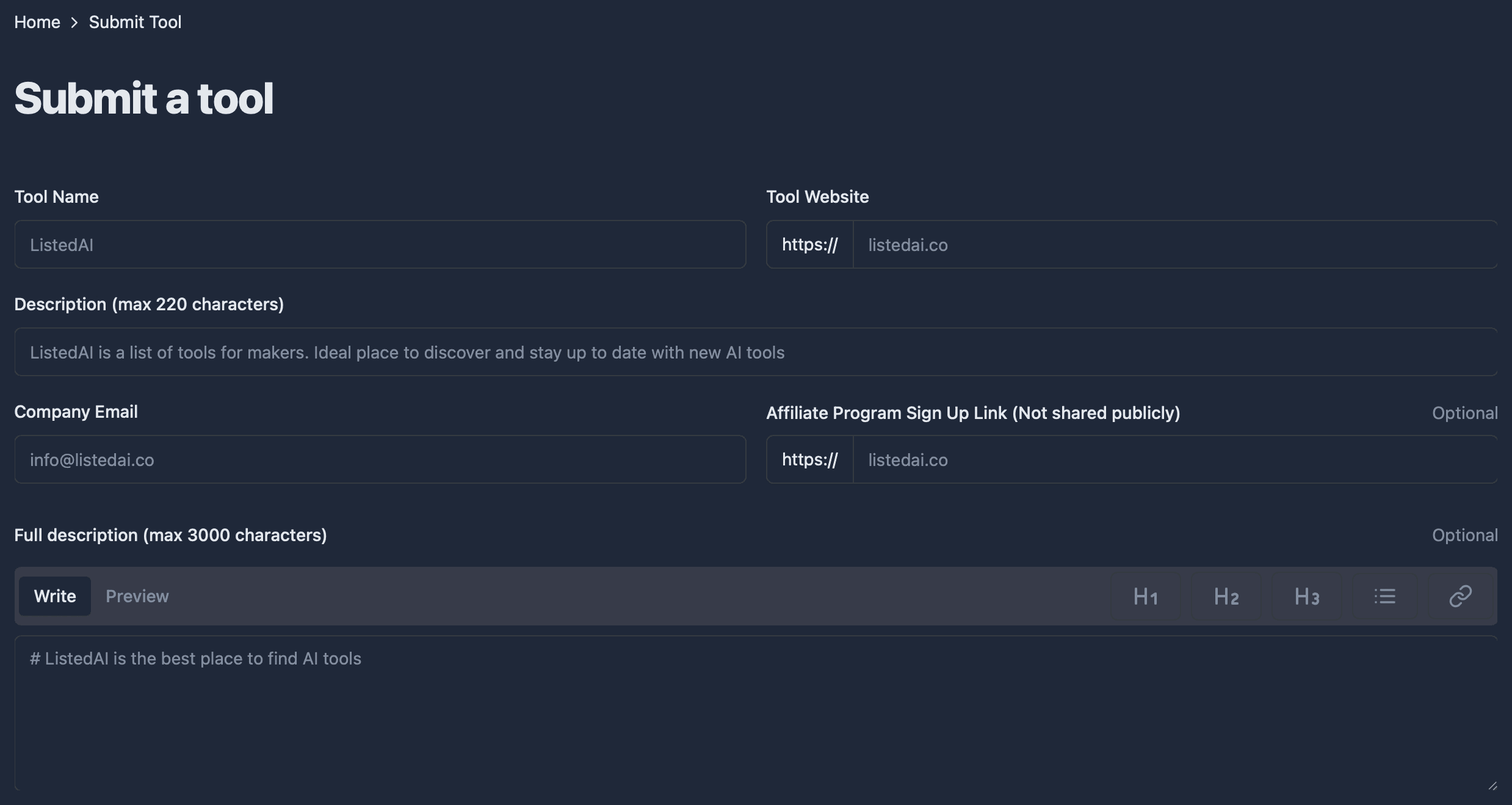
| On the form | Rule |
|---|---|
| Tool Name | Required |
| Tool Website | Required; https:// is printed in front, so type the rest in lowercase |
| Description | Required, up to 220 characters |
| Company Email | Required |
| Affiliate sign-up link | Optional, “Not shared publicly” |
| Full description | Optional, up to 3,000 characters of markdown |
| Socials | Optional: Twitter, Github, Linkedin, Youtube |
| Segments | Optional: 17 boxes for market, price and features |
| No field for | A category, a logo, an image or a fee |
Each listing page links to its tool four times in its HTML, through the screenshot and the Visit website buttons, and every one of the four points directly at the tool's own address, without a rel attribute. Across 80 pages read on 10 October 2026 that made 320 followed links, not one marked nofollow, sponsored or ugc, on pages that invite indexing and name themselves as canonical. Each adds ?utm_source=listedai, so ListedAI appears by name as a source in your traffic reports.
ListedAI at a glance
| What you get | ListedAI |
|---|---|
| Price to list | Free; no paid tier, featured slot or badge |
| Required fields | Four: name, website, short description, email |
| Full description | Optional, up to 3,000 characters in markdown |
| Your listing | A page of its own, open to indexing |
| Links to your tool | Direct and followed, 320 of 320 on 80 pages |
| Click tracking | Tagged utm_source=listedai |
| Catalog | 5,437 listings in 158 categories |
| Domain Rating | 12 (Ahrefs, 10 October 2026) |
| Filed for you by Submitator | Free route, both descriptions written, from $29 |
Per listedai.co on 10 October 2026: the home page, /submit and the script behind it, /about, /contact, /terms, /privacy-policy, /sponsor, /recent, /ai-tools, robots.txt and the sitemap, 16 of the 209 numbered index pages, two category pages and 80 listing pages at /ai/<slug>, five taken from each of those 16 index pages. The form's labels, limits and placeholders come from its served markup and script, and two screenshots our founder took of the same form that evening show the same fields; the website check and its "Invalid URL" message are read from that script. Every one of the 80 listing pages links to its tool four times, through the screenshot and three Visit website buttons of which one or two show at a time, all straight to the address given plus utm_source=listedai: 320 links without a rel attribute, so none nofollow, sponsored or ugc. Meta robots reads "index, follow" on all 80, every page names itself as canonical and robots.txt leaves listing pages open; a Googlebot re-fetch of three pages and a browser render of twelve returned identical links, and all 408 Link to website buttons on 18 grid pages are followed in the same way. Printed publish dates appear on 43 of the 80, from 15 July 2023 to 10 August 2026, 12 of them in 2026; those 12 sit in two to four categories each, and 9 of them show a short description longer than the form's 220 characters. The 32 listings dated 2024 to 2026 show no pricing, feature or market segment and no social link, and the home page's feature filter total (2,025) is unchanged since July 2024, its pricing total one lower (3,004 against 3,005). The listing count is the home page counter, which stood at 4,968 in the Internet Archive's capture of 14 May 2026. Ahrefs' Domain Rating for listedai.co came back as 12 on submitator.com/domain-rating-checker on 10 October 2026. Our founder is the source for the lines about Submitator: it files customers to ListedAI on its free route (10 October 2026), writes each directory its own description and enters the customer's own email on the form. Plans: Starter at $29 covers 30 directories, Growth at $49 covers 60 and Scale at $79 covers 100, each paid once, with each directory chosen by you in the dashboard; when a submission is rejected, a further directory of your choice takes its place, and refunds are handled under the conditions in our terms.
The website box wants lowercase
The Tool Website field prints https:// in front of the box, so you type only the rest. Before the form sends, a check in the page reads what you typed. A bare domain, a subdomain or a path passes, such as yourtool.com or app.yourtool.com/signup. A capital letter in the domain, anything after a question mark, a # and a port number do not, and the form answers "Invalid URL".
So type the address in lowercase and leave tracking parameters off. On a phone, watch for the keyboard capitalising the first letter, since the box is a plain text field. ListedAI adds its own ?utm_source=listedai to the links on a listing in any case, and the affiliate field runs the same check when you fill it.
The short description travels furthest
The Description field stops at 220 characters, and the short description reaches beyond the listing page. On a live listing it is the text on the tool's card in every grid ListedAI shows it in, from the category pages to the numbered index, and it is the page's meta description, the summary search engines are handed.
Their own placeholder makes a fair model: "ListedAI is a list of tools for makers. Ideal place to discover and stay up to date with new AI tools". A name, what it is and who it is for. Put your tool's name and its job in the first few words, because a card in a grid of 24 is read at a glance.
Three thousand characters for the write-up
The full description is optional, and it is the one place on the form with room for detail. The box takes up to 3,000 characters of markdown. Its toolbar has buttons for three sizes of heading, a bulleted list and a link, plus a Preview tab that shows how it renders. Raw HTML does not render in the preview, so build the structure from headings and lists.
Listings published in 2025 and 2026 follow much the same pattern: a section on what the tool is, then its features as a bulleted list, often closing on how it works or who it suits, a few hundred words in all. Write yours in that order. A feature list says more than a paragraph of adjectives, and 3,000 characters hold all of it.
No category box, so say what the tool does
There is no category field on the form, yet listings published in 2026 sit in two to four of the 158 categories, each one a link to that category's page. With no category to choose, the two descriptions are the form's only way to say what the tool does, so name the job and the audience plainly: an AI video editor for marketing teams, a writing assistant for students.
Those category pages list their tools as cards, and each card carries a Link to website button pointing directly at the tool, free of any rel attribute and tagged like the links on the listing. Every category your tool lands in adds another followed link to your site.
Your homepage is the listing image
The form has no upload of any kind. The image at the top of each listing is a screenshot of the tool's site, and it doubles as the first link to it, so the first screen of your site is the picture people see. Make sure it shows the product and a clear headline.
Affiliate link, socials and segments
The affiliate box takes the sign-up page of your referral programme and is labelled "Not shared publicly". Where referral-coded links do appear on the site, they still point at the product's own domain, not at a tracking service in between.
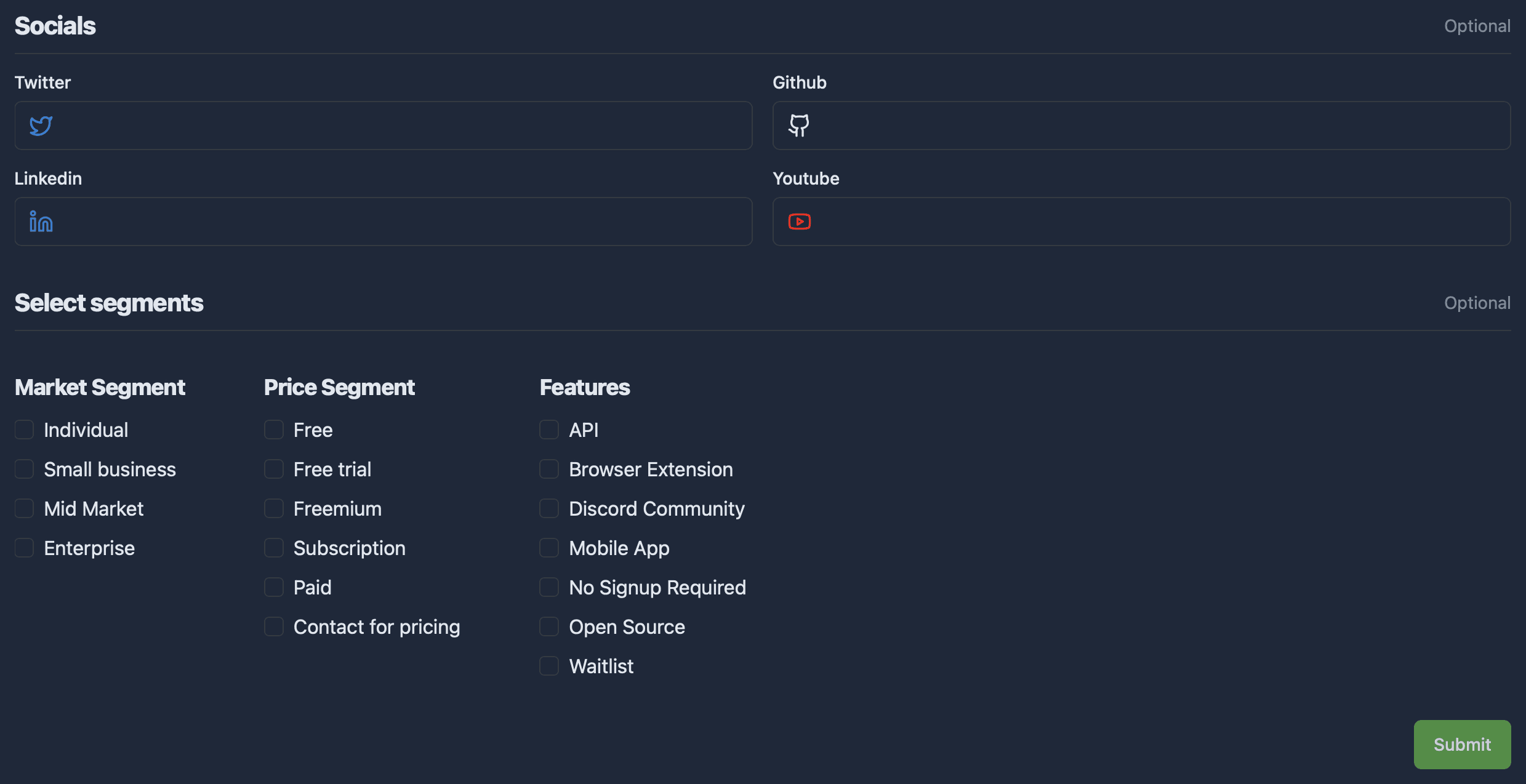
Further down the form sit four social fields (Twitter, Github, Linkedin and Youtube) and 17 segment boxes under Market Segment, Price Segment and Features. All of them are optional. Recent listings display neither social links nor segments, so give your time to the two descriptions first.
The page your tool gets
A listing lives at listedai.co/ai/ plus a slug made from the tool's name, and its title follows one pattern: the name, then "- What is it? How does it work? | ListedAI". Under a breadcrumb trail come the name, the screenshot, the Visit website button and the categories as links, then the description and a closing line giving the date the tool was published in the directory.
Three cards of other related tools end the page, each with its own followed Link to website button, so a tool can also pick up links from other listings when it appears in that slot.
We write both descriptions
Each of the two text boxes gets copy written for ListedAI and no other directory, kept within its own limit: 220 characters for the short description, 3,000 for the full one.
Your own address goes in the Company Email box, and we file the form through ListedAI's free route.
ListedAI review: the short answer
Send it. A free listing here comes with an indexable page in your tool's name and, on every category page the tool joins, a card with a followed link. On the listing itself, a screenshot and a button both link straight to your site, followed and tagged. Put the effort into the two descriptions: the 220-character summary and the write-up for the page.
How to submit to ListedAI, step by step
- 1
Open listedai.co/submit
The Submit link in the site's menu leads there, to a page headed “Submit a tool”.
- 2
Name the tool, then type its address in lowercase
https:// is already printed in front of the box. Leave out capitals, query strings and anything after a #, which the form turns away as “Invalid URL”.
- 3
Write the 220-character description
One sentence on what the tool does and who it is for. A listing's short description is its card text in every grid and the page's meta description.
- 4
Add a company email
Required, and listing pages do not print it.
- 5
Fill the full description
Up to 3,000 characters of markdown: a section on what the tool is, a bulleted feature list and a word on who it suits, checked in Preview before you send.
- 6
Decide on the optional extras
The affiliate link stays private. Socials and segment boxes can come last, after the two descriptions.
- 7
Press the green Submit button
It sits at the bottom right of the form, below the segment boxes.
- 8
Or leave the writing to Submitator
Tick ListedAI in your dashboard: both descriptions are written for it, your own email goes in and ListedAI goes out with the other directories you ticked.
$0 here. $29 for the thirty you have not filled in yet.
One payment, every directory named in your dashboard with its Domain Rating on the card, text written for each one and the ones you tick filed for you.
Followed links for $0 here. Thirty directories for $29.
ListedAI is a free AI tools directory of 5,437 listings in 158 categories. Each listing is an indexable page whose screenshot and Visit website button link straight to the tool, followed and tagged utm_source=listedai, and there is no fee, badge or paid tier anywhere. The form asks for four things; the two descriptions do most of the talking, and we write both: $0 here, $29 for thirty. The whole catalog.
FAQ
How do I submit to ListedAI?
Go to listedai.co/submit through the Submit link in the site's menu. Fill in Tool Name, Tool Website, a description of up to 220 characters and a company email, add the optional full description of up to 3,000 characters and press Submit. Type the website address in lowercase and without a query string, or the form stops with “Invalid URL”.
Is ListedAI free?
Yes. Under “Description of Service” its terms read: “ListedAI provides a free online directory that allows users to search and discover AI software.” The site sells no listing tier, featured slot or priority review, and nothing has to be added to your own site.
Is the ListedAI link dofollow?
Yes. The screenshots and Visit website buttons on 80 listing pages held 320 links to the listed tools on 10 October 2026, and not one had a rel attribute, so none was nofollow, sponsored or ugc. Each led directly to the tool's own address, tagged utm_source=listedai, and all 80 pages allowed indexing. ListedAI makes no promise about the link; its pages simply carry it.
What does the ListedAI form ask for?
Four required fields: Tool Name, Tool Website, Description (max 220 characters) and Company Email. The optional part holds an affiliate sign-up link marked “Not shared publicly”, a full description of up to 3,000 characters, four social links (Twitter, Github, Linkedin and Youtube) and 17 segment boxes for market, price and features. Nothing on it asks for a category, a logo or an image.
Why does the ListedAI form say Invalid URL?
The Tool Website field is checked before the form sends. A capital letter in the domain, a query string such as ?ref=, a #fragment or a port number fails the check, and the form shows “Invalid URL” with “Please enter a valid URL”. Type the address in lowercase without those parts; https:// is already printed in front of the box.
How long does ListedAI take to publish a tool?
The site gives no timescale and no approval criteria; neither appears anywhere on listedai.co. Recent listing pages print the date each tool was published in the directory.
Does ListedAI ask for a badge or a backlink?
No badge to embed, no reciprocal link to add: the form has no field for either, and nothing on the site asks for one.
How do categories work on ListedAI?
You do not pick them; the form has no category field. Listings published in 2026 each sit in two to four of the site's 158 categories, every one linked to a category page where the tool appears as a card, so make your description say plainly what the tool does and for whom.
What is ListedAI's Domain Rating?
Ahrefs rates listedai.co at 12, the figure our checker returned on 10 October 2026. The site's robots.txt does not shut Ahrefs' crawler out.
Does Submitator submit to ListedAI?
Yes, on its free route. Tick ListedAI in your dashboard: both the 220-character description and the full description are written for ListedAI alone, your own email goes on the form and the submission goes out with your plan. Starter, the smallest plan, is $29 for thirty directories.
More submit-to guides.
ListedAI is free. Thirty directories are $29, each one measured.
One payment. Each directory is named with its Domain Rating on the card before you choose it, badges are installed and kept live where one is wanted and a rejection is swapped for another directory.