
A DR 62 Page and a Public Timeline, for the Price of a Badge.
Submitator sends customers to SaaSGrow on its free route, with SaaSGrow's badge placed on their site. Everything quoted or counted below was read on 11 October 2026.
SaaSGrow is a home for products built in public. Every product listed gets its own page, with a timeline where you post wins, failures, lessons and what you have shipped, plus a public changelog and a widget that shows it on your site. Ahrefs puts the domain at 62, as read by our checker on 11 October 2026.
Listing costs nothing as long as their badge sits on your site. The Free plan reads "Badge verification required", and the FAQ beneath it sets the order of things: "Your listing will be approved once the badge is verified on your site." Basic, at $9 once, lists you without one.
The listing carries one link to you, and it is followed. On 11 October 2026, 821 of the 836 listing pages had a Visit button linking directly to the product, every listing approved in the previous 30 days among them. The free route is the one our customers take, and our component carries the badge for them.
| Field | What it takes |
|---|---|
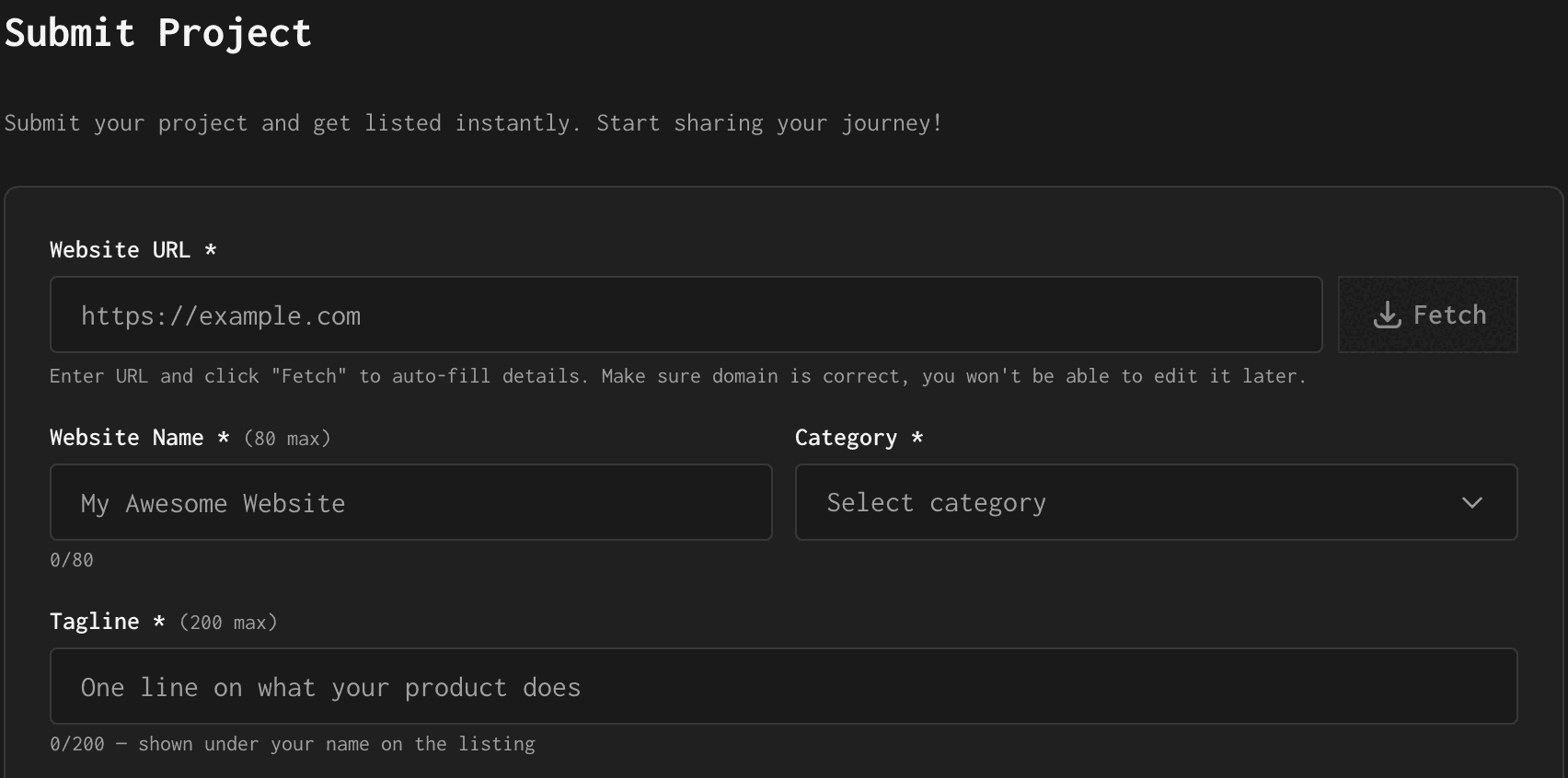
| Website URL | Required; Fetch auto-fills details from it, and it cannot be edited later |
| Website Name | Required, 80 characters at most; it heads the listing and forms its address |
| Category | Required; one per listing |
| Tagline | Required, 200 characters at most; printed under your name |
| Description | Required, 5,000 characters at most; the first 200 become the page's meta description |
| Logo URL | Required; filled in by Fetch or pasted, with a preview beside it |
A listing page has one Visit button, pointed at the address you submitted with ref=saasgrow.app added on the end. On 11 October 2026 it carried rel="noopener noreferrer" on all 821 pages that showed it, a followed link, and no listing page was set to noindex. Free listings get the same button: 777 of the 792 had it.
SaaSGrow at a glance
| What you get | SaaSGrow |
|---|---|
| Price to list | $0 if their badge is on your site, $9 once if not |
| On your site | Their badge, verified before approval |
| Account | Sign-in by Google, X, GitHub or email |
| The form | Six fields; the URL is fixed once sent |
| Link to your site | One Visit link, followed, on 821 of 836 pages |
| Your listing | A page, a timeline, a changelog and a widget |
| Domain Rating | 62 (Ahrefs) |
| Listings | 836, with 103 approved in the last 30 days |
| Filed for you by Submitator | Six fields written, badge maintained, from $29 |
Read from saasgrow.app between 13:38 and 14:05 UTC on 11 October 2026, using GET requests and nothing else: the home page, /startups and two category pages, /pricing and the scripts behind it, /changelog, /advertise, /terms, /privacy, /login, robots.txt, llms.txt, sitemap.xml and every one of the 836 listing pages the sitemap names, plus launchigniter.com/pricing. The form sits behind a SaaSGrow sign-in (Google, X, GitHub or email); its labels, placeholders and limits are quoted from a screenshot of it that our founder captured the same day, and the 836 listing records fit them, with no name over 80 characters and the longest tagline exactly 200. The pricing cards and the listing header are browser renders of those two pages as fetched that day, drawn with the site's own stylesheet. On 821 listing pages there is one Visit anchor, its href the address on record plus ref=saasgrow.app and its rel "noopener noreferrer", with none of nofollow, sponsored or ugc; no listing page has a meta robots tag or an X-Robots-Tag header, every canonical names its own page and the link goes direct, with no redirect in between. Finding the link two ways, by its Visit label and by the product's host name, returned identical counts; two pages requested as Googlebot and a browser render of 15 pages matched. The remaining 15 are free listings that the page data marks as without the badge (hasBadge false), approved between 31 January and 29 May 2026; the page code shows the Visit link to signed-out visitors on Basic listings and badge-marked free ones only, and to signed-in visitors on the rest with rel="noopener noreferrer nofollow ugc". Tiers in the data: 792 free, 777 of them with the badge, and 44 Basic; the code requires the badge on the free tier without auto-approval and lets Basic skip it with auto-approval. The 103 listings approved in the 30 days to 11 October all carry the link, 96 of them free. The badge's markup is read from listed sites that display it: an image from saasgrow.app/api/badge in a light or dark style, linked to saasgrow.app with ref set to the site's domain. Nowhere does SaaSGrow say whether the badge is checked again after approval. The changelog quotes come from /changelog, and llms.txt describes the home page leaderboard as ranked by number of public logs. SaaSGrow names no company or address; its home page leaderboard names Maulik Dhameliya as founder of SaaSGrow, LaunchIgniter and StartupTrusted, its footer lists the other two under Projects and its Support link goes to that founder's X account. Ahrefs' Domain Rating for saasgrow.app is 62 via submitator.com/domain-rating-checker, read at 13:43 UTC and again at 17:03 UTC; LaunchIgniter's pricing page shows the same DR 62 on its SaaSGrow card. No submission or payment was made for this page. What it says about Submitator comes from our founder, who confirmed on 11 October 2026 that we file customers to SaaSGrow on its free route, with SaaSGrow's badge placed through our badge component; completing every required field ourselves after Fetch and opening the account under a new mailbox we create for the customer are standing rules from the same source. From earlier statements by our founder: every directory receives a description written for it, and a single component, installed once on the customer's site, holds every badge a directory asks for, which we put up and keep up with no commit per directory. Plans are one-off payments of $29 (Starter, thirty directories), $49 (Growth, sixty) or $79 (Scale, a hundred), and the customer chooses each directory from the dashboard. Any rejection adds one more directory to the customer's selection, as our terms provide.
What the free route asks: their badge on your site
The Free card is short: $0, "Badge verification required" and a feature list that ends with "Requires SaaSGrow badge". For that you get a public profile page, a project timeline, the changelog with its widget and posting to LaunchIgniter. Approval comes once they have verified the badge.
The badge itself is an image served from saasgrow.app, in a light or a dark style, wrapped in a link to SaaSGrow's home page with your domain as its ref parameter. It also decides whether search engines see your link. A free listing shows its Visit button to visitors who are not signed in only when SaaSGrow has the badge on record, and the 15 free listings without it showed no link to their product on 11 October. Put the badge up and leave it there.
That badge is the piece we take on. You add one Submitator component to your site a single time; SaaSGrow's badge goes up through it ahead of their verification, and keeping it up is then our job rather than a ticket for your developers. One install covers SaaSGrow and whichever badge directories you tick alongside it.
More directory badges on the same install
What a SaaSGrow listing gives you

A listing lives at saasgrow.app/saas/your-name/timeline. Your logo and name head the page, with three buttons beside them, Share, Changelog and Visit, and your tagline underneath. The full description follows under About, and the timeline runs below that.
The timeline is the heart of the site. Each post carries one of five labels, Win, Failure, Learning, Shipped or Update, and on the free plan it can go out to LaunchIgniter as well. The Leaderboard on the home page ranks products by how many updates they have posted, so posting regularly is how a listing climbs it.
Every approved project also gets a public changelog page, and a single script tag adds a floating changelog button to your own site. Their changelog FAQ calls the feature "completely free for all approved projects on SaaSGrow".
Six fields, and what each one turns into
Website URL is the one you cannot take back. The note under it is blunt: "Make sure domain is correct, you won't be able to edit it later." That address becomes your Visit link, with ref=saasgrow.app added, so enter the canonical version, exactly as your site serves it, down to https and whether it uses www. Then press Fetch and let it fill in what it can.
Website Name allows 80 characters and does three jobs: it heads the listing, it forms the address and it fills the page title, which reads your name followed by "Timeline | SaaSGrow". The address is built from lowercase Latin letters, digits and hyphens and drops everything else, so write the name the way people search for the product.
Category takes one choice. SaaS is the crowded one, holding 364 of the 836 listings, so if a narrower category describes the product honestly, it puts you among fewer neighbours.
Tagline allows 200 characters and sits directly under your name on the listing. The placeholder asks for "One line on what your product does", and that line is what a visitor reads before deciding whether to press Visit.
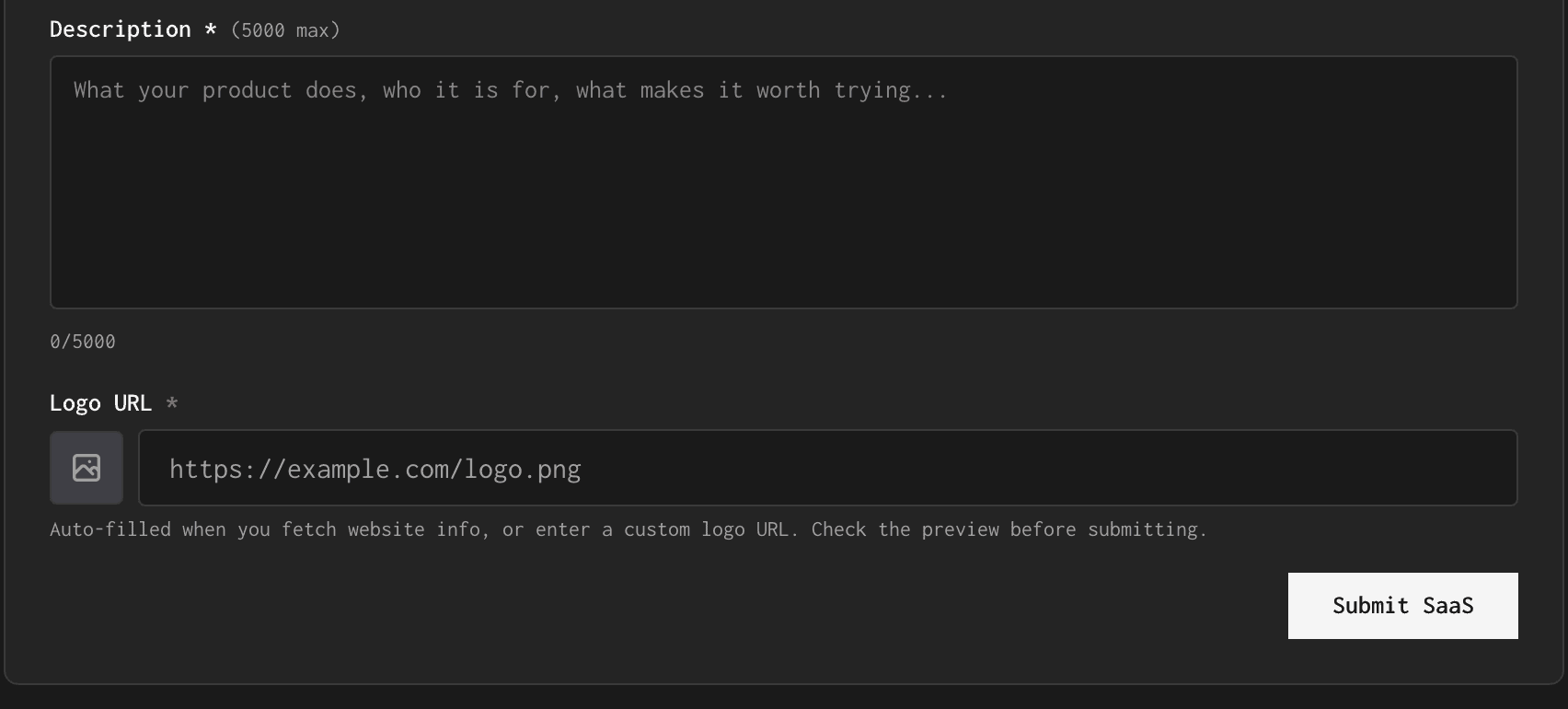
Description runs to 5,000 characters and is printed in full under About. Its opening matters most: the first 200 characters, cut with an ellipsis when the text runs on, are what SaaSGrow uses as the page's meta description and as your card text on the startups page and the category pages. Write those 200 characters so they stand on their own.
Logo URL is filled in by Fetch, or you paste a link to the file yourself. The small box beside the field is the preview, and the note underneath ends with "Check the preview before submitting."
What we fill in for you
Choose SaaSGrow when you build your list, and every field on that form becomes our job. We press Fetch, then write the name, the tagline and the description ourselves and choose the category. The description is fresh for this listing and sized to SaaSGrow's limits, with the tagline inside its 200 characters.
SaaSGrow asks for a sign-in before the form, and we open that account with an email address created for you. The badge goes up through your component as described above, and the listing goes out alongside your other directories.
From the maker of LaunchIgniter
SaaSGrow is built by Maulik Dhameliya, who also runs LaunchIgniter and StartupTrusted. LaunchIgniter's pricing page lists SaaSGrow among the sites it recommends, with the line "Free listing with a dofollow link for SaaS products and indie tools."
The two sites are wired together. A free SaaSGrow listing can post its updates to LaunchIgniter, and SaaSGrow's own copy matches what LaunchIgniter says of it: its startups page carries the heading "Get a lifetime dofollow backlink", over "Add your project to SaaSGrow and boost your SEO with a permanent backlink."
What Basic's $9 changes
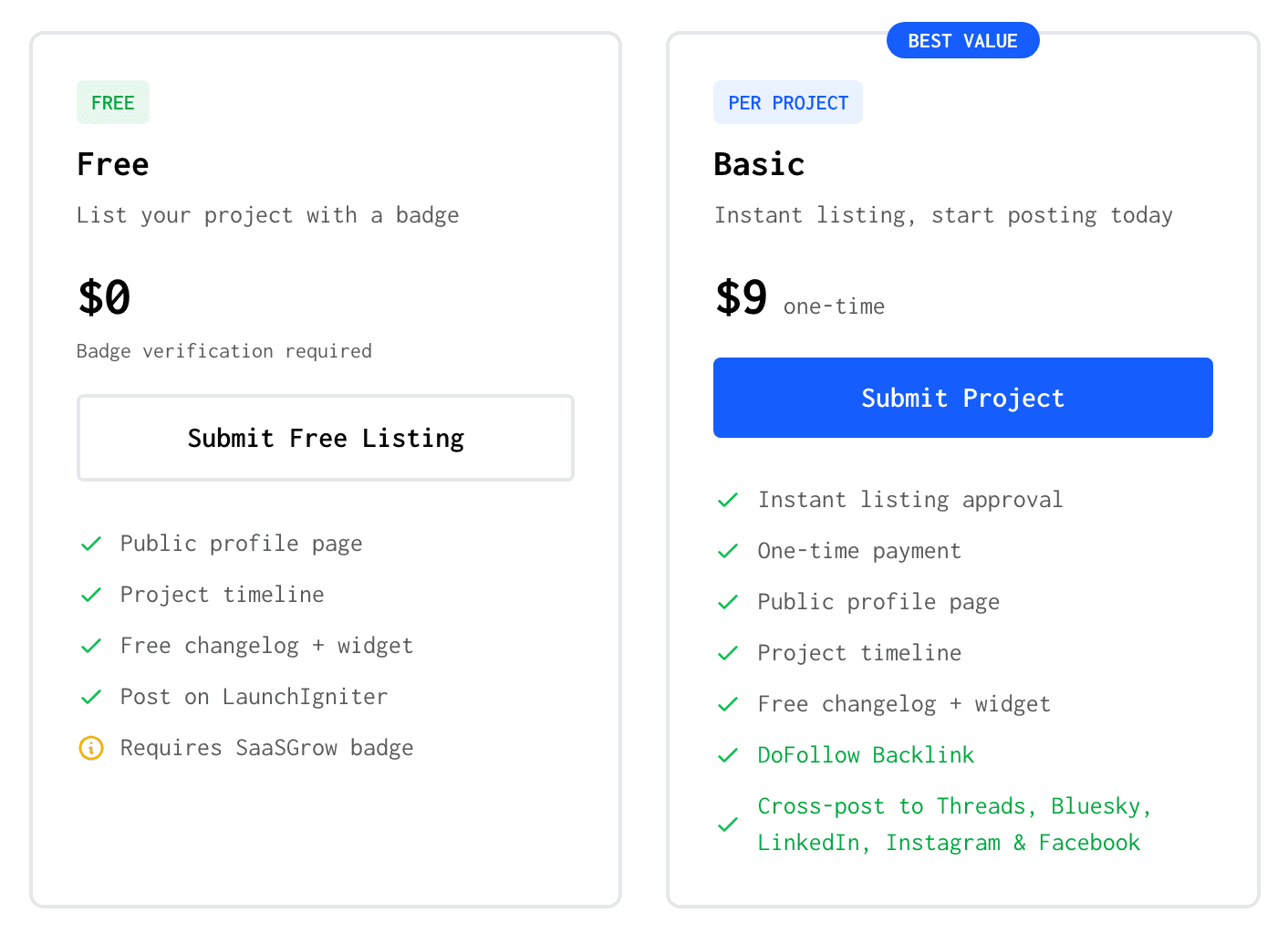
Basic costs $9 once per listing and drops the badge requirement, with "Instant listing approval" at the top of its card. It adds cross-posting to Threads, Bluesky, LinkedIn, Instagram and Facebook and, per their FAQ, importing from X. Pro, at $9 a month, covers up to 10 listings and adds cross-posting to X and priority support.
Both routes end at the same followed Visit button: 777 of the 792 free listings carried it on 11 October. Once our component has the badge in place, the $9 is left buying instant approval, five more networks to post to and importing from X, not a better link.
SaaSGrow review: the short answer
List here. A DR 62 domain gives your product its own page, one followed link to your site and a timeline that rewards shipping in public. The free route costs their badge and nothing else: get the address right before you press Fetch, write the first 200 characters of the description as the snippet they become and keep the badge on your site.
How to submit to SaaSGrow, step by step
- 1
Sign in at saasgrow.app/submit
Submit your Startup on the home page and Submit Free Listing on the pricing page both lead there. Sign in with Google, X, GitHub or an email address.
- 2
Enter the canonical URL, then press Fetch
Type the address exactly as your site serves it: it becomes your Visit link and cannot be edited later. Fetch then fills in details from the site, the logo included.
- 3
Check the name and choose one category
Up to 80 characters, written as people search for your product, since the name also forms the listing's address. For the category, choose the one a customer would look under.
- 4
Fill in the tagline, then the description
The tagline takes 200 characters and sits under your name. The description takes 5,000, and its first 200 become the page's meta description and card text, so make them a complete sentence or two.
- 5
Check the logo preview and press Submit SaaS
Fetch fills in the logo URL, or paste your own. The preview box beside the field shows the image the listing will carry.
- 6
Put their badge on your site
On the free route, “Your listing will be approved once the badge is verified on your site.” Leave it up afterwards: a free listing shows its Visit link to visitors who are not signed in only when SaaSGrow has the badge on record.
- 7
Post your first update
The home page Leaderboard ranks products by the updates on their timeline, and a free listing can send each post on to LaunchIgniter too.
- 8
Or hand the form and the badge to Submitator
We press Fetch, write the name, tagline and description for SaaSGrow and choose the category, and our component places the badge and keeps it live.
Their $9 skips the badge. Our $29 installs it, on thirty directories.
One payment, every directory named in your dashboard with its Domain Rating on the card, a rejection replaced by another directory you pick and one component that places every badge a directory asks for and keeps it live.
$9 skips their badge. $29 places it for you, on thirty directories.
SaaSGrow gives each product a page with a timeline, a changelog and one Visit link, followed on 821 of its 836 listing pages, on a domain Ahrefs rates 62. The free route means showing their badge on your site, and $9 once lifts that condition. Submit your canonical address, write the first 200 characters of the description to stand alone and keep the badge up. The whole catalog.
FAQ
How do I submit to SaaSGrow?
Open saasgrow.app/submit and sign in with Google, X, GitHub or an email address. Enter your Website URL and press Fetch, then complete Website Name (up to 80 characters), Category, Tagline (up to 200), Description (up to 5,000) and Logo URL, and press Submit SaaS. The free route also needs their badge on your site: “Your listing will be approved once the badge is verified on your site.”
Is SaaSGrow free?
Yes, with their badge. The Free plan costs $0 and carries the line “Badge verification required”. Basic costs $9 once per listing, needs no badge and lists “Instant listing approval”; Pro is $9 a month for up to 10 listings, with cross-posting to X.
Is the SaaSGrow link dofollow?
Yes. On 11 October 2026, 821 of the 836 listing pages carried a Visit link straight to the product's own address, with ref=saasgrow.app added and rel="noopener noreferrer", which leaves it followed. Not one of those links was marked nofollow, sponsored or ugc, and all of the listings approved in the previous 30 days had one. On a free listing, visitors who are not signed in, search engines included, see that link when SaaSGrow has the badge on record, so keep yours on your site.
Does SaaSGrow require a badge?
Yes, if you take the free route. The Free card reads “Requires SaaSGrow badge”, and the FAQ under it says “Your listing will be approved once the badge is verified on your site.” Basic, at $9 once, needs none. The badge is an image served by saasgrow.app in a light or a dark style, linked to SaaSGrow's home page with your domain as its ref parameter.
What does the SaaSGrow form ask for?
Six fields, all required. Website URL comes with a Fetch button that fills in details from your site, and the rest are Website Name (up to 80 characters), Category, Tagline (up to 200), Description (up to 5,000) and Logo URL, which shows a preview. There is no email, pricing or screenshot field.
How long does SaaSGrow take to approve a listing?
SaaSGrow publishes no timescale for the free route. Its pricing FAQ ties approval to the badge: “Your listing will be approved once the badge is verified on your site.” Basic, at $9 once, lists “Instant listing approval”, and the form page opens with “Submit your project and get listed instantly.”
Can I change my URL on SaaSGrow later?
No. The note under the field reads “Make sure domain is correct, you won't be able to edit it later.” That address becomes your listing's Visit link, with ref=saasgrow.app appended, so enter the exact canonical address you want visitors and search engines to reach.
What is SaaSGrow's Domain Rating?
62. That is Ahrefs' rating of saasgrow.app as our own checker read it on 11 October 2026. LaunchIgniter's pricing page, from the same maker, prints the same DR 62 on its SaaSGrow card.
Who runs SaaSGrow?
Maulik Dhameliya, who also runs LaunchIgniter and StartupTrusted. LaunchIgniter's pricing page recommends SaaSGrow as a “Free listing with a dofollow link for SaaS products and indie tools.”
Does Submitator submit to SaaSGrow?
Yes, on its free route. We press Fetch, then write the name, tagline and description ourselves and choose the category, with a description made for this listing rather than reused. SaaSGrow's badge goes on your site through the Submitator component you install once, and we keep it there. Thirty directories cost $29.
More submit-to guides.
Their $9 skips the badge. Our $29 installs it, on thirty directories.
One payment, each directory named with its Domain Rating on the card before you choose it, a rejection swapped for another directory and one component that installs every badge and keeps it live.