
Neeed Directory Lists You Free. Its Badge Makes the Link Dofollow.
This guide comes from Submitator, which files customers to Neeed Directory with its badge on their site or without it, so read it as a working guide rather than a neutral review. Prices, rules and quotes are Neeed's own, read on 23 October 2026.
Neeed Directory lists software and digital products for developers, designers and makers. On 23 October 2026 it held 2,660 live listings in 39 categories, with Productivity, SaaS and AI Agents the largest, and Ahrefs rated the domain 74 on our Domain Rating checker. It is run by Supacat, which their about page calls "an independent product studio".
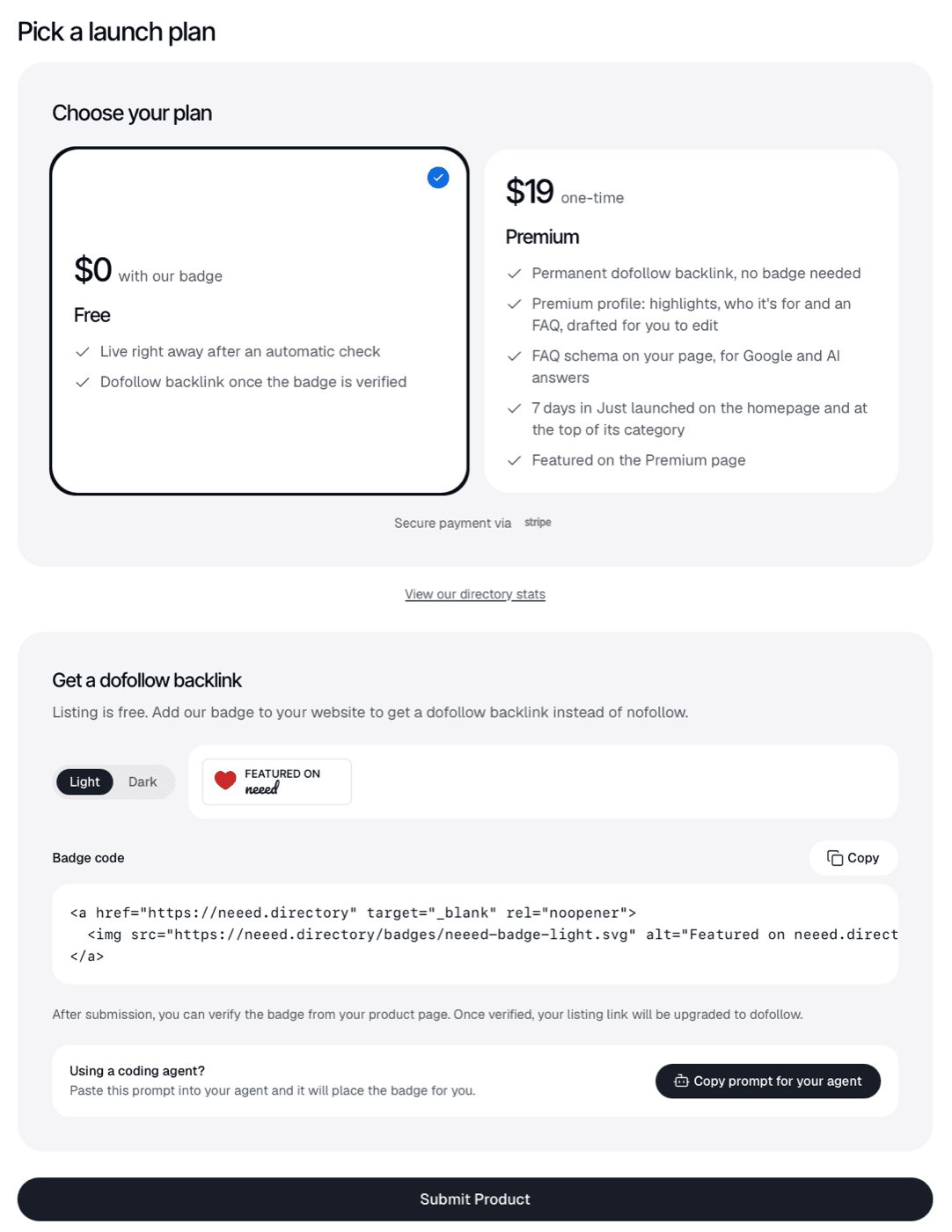
Listing costs nothing, and the plan card prints the condition beside the price: "$0 with our badge". A free listing goes live once their automatic check passes, with a nofollow link to your site; when their badge is verified on your site, that link turns dofollow. Premium costs $19 once and drops the condition: "Permanent dofollow backlink, no badge needed".
On 158 live listings read on 23 October, the 100 newest and 58 spread across the catalog, the rule held without exception. Every free listing with a verified badge (70) and every Premium listing (6) carried a followed link; every free listing without one (81) carried nofollow, as did one still waiting on its Premium payment.
The badge is the step we handle. We file Neeed on its free route, and with our badge component on your site their badge is verified and stays live, so the link stays dofollow.
"A free listing whose badge disappears from its site is hidden until the badge is back." Neeed prints that under the free listing on its about page, plainly and in advance. It means the badge carries the listing as well as the dofollow. With our component on your site, their badge sits in one install beside every other directory's, and we keep it live.
Neeed Directory at a glance
| What you get | Neeed Directory |
|---|---|
| Price to list | $0; Premium $19 once, with no badge |
| Goes live | Right away once their automatic check passes; anything else waits for a person |
| Their badge | Optional; verified, it turns your link dofollow |
| The link | Followed on 76 of 158 pages: every verified badge and every Premium listing; nofollow on the other 82 |
| If the badge goes | Verification is revoked and the link is nofollow; a badge that stays gone hides a free listing |
| Listing page | index, follow with a self canonical, 158 of 158 |
| Domain Rating | 74 (Ahrefs) |
| Listings | 2,660 in 39 categories, 149 of them Premium |
| Ads | Featured Spot $29 and Ad Spot $49, 30 days each, sponsored nofollow |
| Filed for you by Submitator | Free route, badge placed and kept live, from $29 |
Read from neeed.directory with GET requests on 23 October 2026, 12:29 to 12:37 UTC: the home page, robots.txt, the sitemap index and its products sitemap (2,660 URLs), llms.txt, the markdown versions of the pricing, submit, advertise, about, overview and API pages, the rendered /pricing, /submit, /about, /premium, /stats, /advertise and /terms pages, the public API's /api/v1/categories and the first two pages of /api/v1/search, newest first. Listing pages: the 100 newest (listed between 10:41 UTC on 21 October and 11:17 UTC on 23 October 2026) and 58 more taken at an even stride through the products sitemap (listed from January to October 2026), 158 in all, fetched one at a time with a pause between requests, every one answering 200 with no errors. Each page's plan and badge state was read from that listing's own record in the page data (listing_type and badge_verified), and its link from the Visit Site anchor whose host is the product's own: 70 free listings with a verified badge, all rel="noopener"; 6 Premium listings, all rel="noopener"; 81 free listings without a verified badge, all rel="nofollow noopener"; and one listing whose Premium payment was not yet confirmed, rel="nofollow noopener", in line with their note that Premium perks apply once payment is confirmed. In the newest 100 the split was 53 verified, 45 unverified, one Premium and one awaiting payment; in the stride sample 17, 36 and 5. One page carried a promo code, whose Redeem button repeats the Visit Site anchor and its rel. Five links to the product's own site written into descriptions, two of them on listings with a verified badge, all carried rel="noopener noreferrer nofollow". The sidebar ad on all 158 pages linked rel="noopener noreferrer nofollow sponsored". All 158 pages carry meta robots "index, follow", no X-Robots-Tag header and a canonical pointing at themselves. Three pages, one per state, were fetched again as Googlebot and returned the same rel. One listing in the stride sample had its badge revoked at 05:01 UTC on 18 October 2026 and on the 23rd was live with a nofollow button. Catalog size is the same 2,660 in the products sitemap, the API total and the stats page; category sizes are the API's counts; the Premium page listed 149 products. Quotes come from the rendered pricing and about pages, the markdown version of the submit page (the "notes on submitting") and llms.txt; the rule that a free listing whose badge disappears is hidden appears on /about and in the markdown pricing and submit pages. The home page's Newly Submitted list showed each listing's punchline under its name. Form labels, limits and the plan screen are transcribed from screenshots of the signed-in form supplied by Submitator's founder; the 80-character name limit and the four pricing values come from their API documentation, and the 10-checks-an-hour Verify budget from the same page. Ahrefs puts neeed.directory at Domain Rating 74, the figure submitator.com/domain-rating-checker returned on 23 October 2026. No listing was filed and nothing was bought for this write-up. Submitator's part is as our founder set it out on 23 October 2026: we submit customers to Neeed Directory with the badge and without it; without it the listing link is nofollow, and the badge can be added and verified later from the listing page. Our badge component is a single install on the customer's site and carries every badge the plan's directories ask for, Neeed's included, so a new directory needs no commit from the customer. Our plans are one-off: $29 buys 30 directories, $49 buys 60 and $79 buys 100. Customers pick their directories in a dashboard that shows each one's Domain Rating, and each rejection earns one extra directory to pick, as our terms set out.
What the badge switches on
A Neeed listing has one Visit Site button, at the top of the page, and it goes straight to your site with ?utm_source=neeed.directory on the end. Its rel attribute is the whole difference between the two kinds of free listing. With the badge verified it reads rel="noopener", an ordinary followed link; without it, rel="nofollow noopener". Premium listings get the followed version with no badge at all.
That is exactly what the free card promises: "Dofollow backlink once the badge is verified". The rule held on all 158 pages in our read, and three of them (unverified, verified and Premium) showed the same rel to a Googlebot user agent. Links you write into the description are another matter: they render as rel="noopener noreferrer nofollow", including on listings with a verified badge, so Visit Site is the link that counts.
Every listing page is also a page Google is invited to keep. All 158 carry index, follow and name themselves as canonical, and Neeed adds labels and tags of its own to each one. The form asks for neither, yet every one of the 100 newest listings carries both, a median of five labels and nine tags, and their about page says visitors browse "by category, tag and label".
Placing the badge and pressing Verify
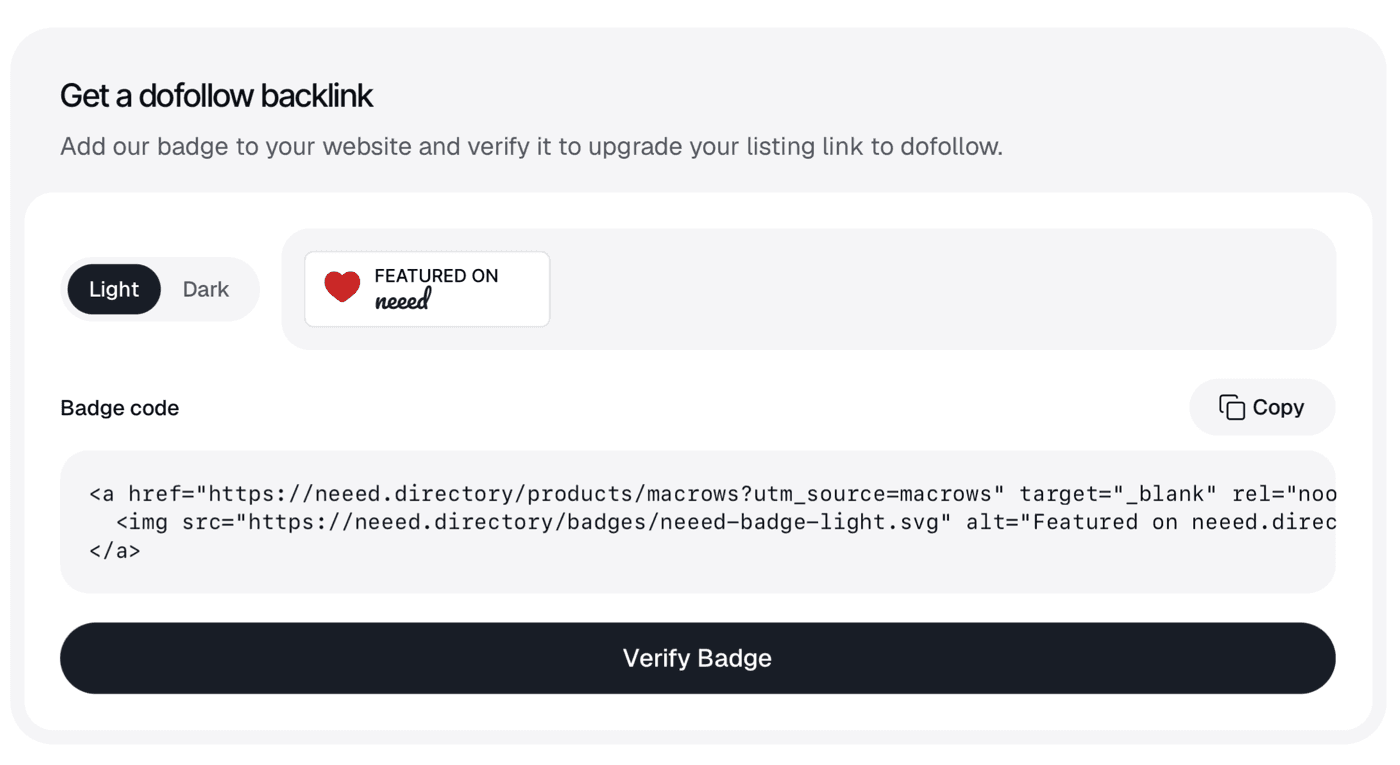
Neeed's notes on submitting describe the badge as "A link to your listing wrapping our artwork, on a page of your site." It comes in a light and a dark version, and the code is a plain linked image. The copy on the plan screen points at neeed.directory; the version in their submit document carries your listing's slug and points at your listing page instead. The plan screen also offers a prompt to paste into a coding agent, which writes the badge into your code.
Verification comes after you submit: "After submission, you can verify the badge from your product page. Once verified, your listing link will be upgraded to dofollow." Open your live listing while signed in and press Verify Badge there. Their API page gives Verify a budget of 10 checks an hour, so deploy the badge first and press the button once it shows on your site.
Badges our one component already carries
Why the badge has to stay
Neeed keeps checking. Their about page: "Free listings are rechecked for their badge; a badge that stays gone hides the listing until it is back." The listing data shows the first step of that. One listing in our read carries a badge revocation dated 18 October; on the 23rd it was still live, its Visit Site button nofollow.
So the badge is not a box you tick on submission day. It is a line of code that has to survive every redesign, theme change and footer rewrite while you want to stay listed: a failed recheck costs the dofollow first and, if the badge stays gone, the listing after. That is the job our component does: one install carries Neeed's badge beside every other directory's, and we keep each one live.
The form, field by field
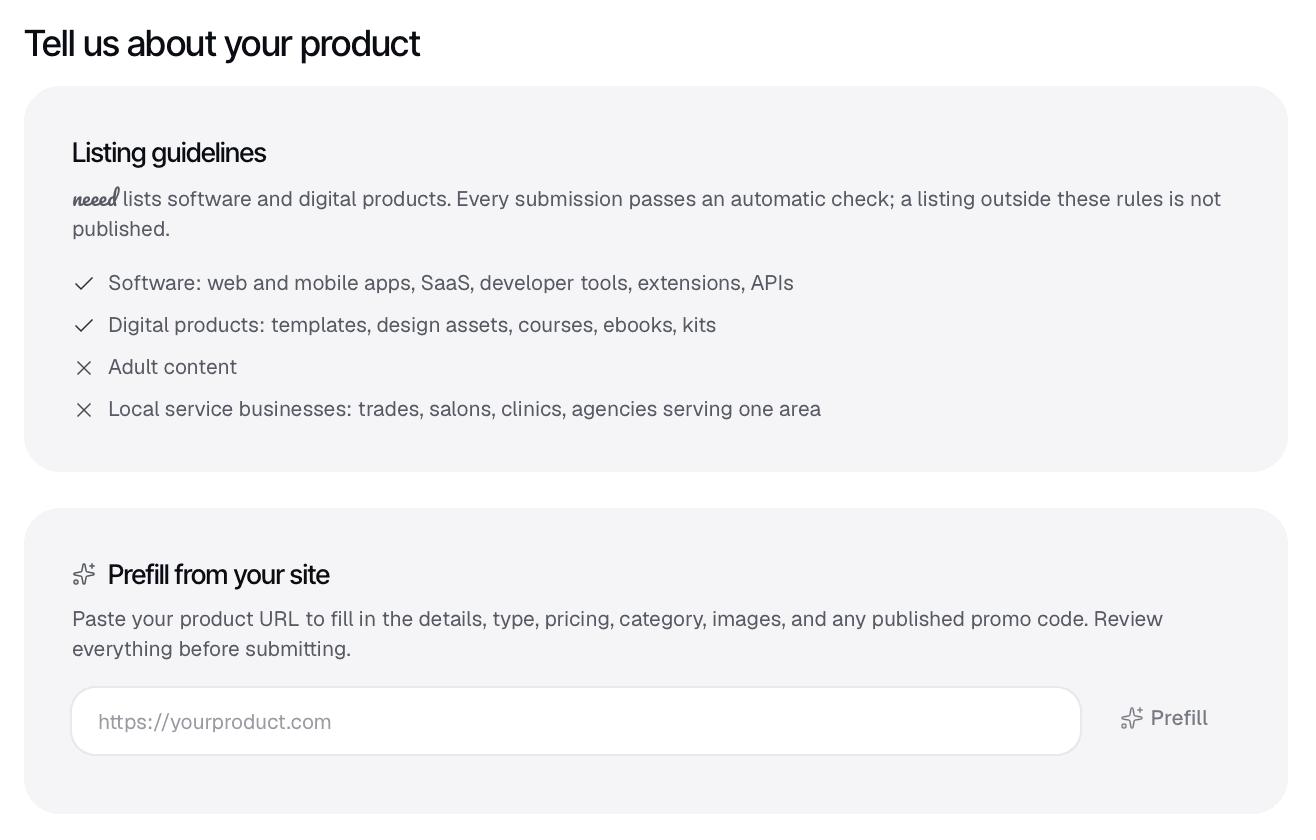
Read the guidelines at the top first, because they decide whether you are listed at all. Neeed takes software (web and mobile apps, SaaS, developer tools, extensions, APIs) and digital products (templates, design assets, courses, ebooks, kits), and turns away adult content and local service businesses. Under them, Prefill from your site drafts most of the form from your URL. Their own instruction is the right one: "Review everything before submitting."
| Field | What it asks for |
|---|---|
| Prefill from your site | Optional; your product URL drafts the details, type, pricing, category, images and any published promo code for you to review |
| Product Name | Required; your listing's address on Neeed is generated from it after submission |
| Product Punchline | Required; one complete sentence, 200 characters at most |
| Description | Required; 1,000 characters at most, with bold, italics, two kinds of list and links; the hint asks for around 70 words |
| Product Website | Required; an https address, opened by your Visit Site button |
| Product Type | Required; software or digital product |
| Pricing | Required and shown on your listing; freemium means a free plan with paid upgrades |
| Product Category | Required; one of 39 |
| Product Logo | Required; square, 256 x 256 recommended, PNG, JPG, GIF, WebP or AVIF, 2MB at most |
| Product Cover | Required; 1280 x 720 (16:9), shown as is on your listing, 8MB at most |
| Promo code | Optional; a discount shown on your listing |
| Launch plan | Free with their badge, or Premium at $19 once |
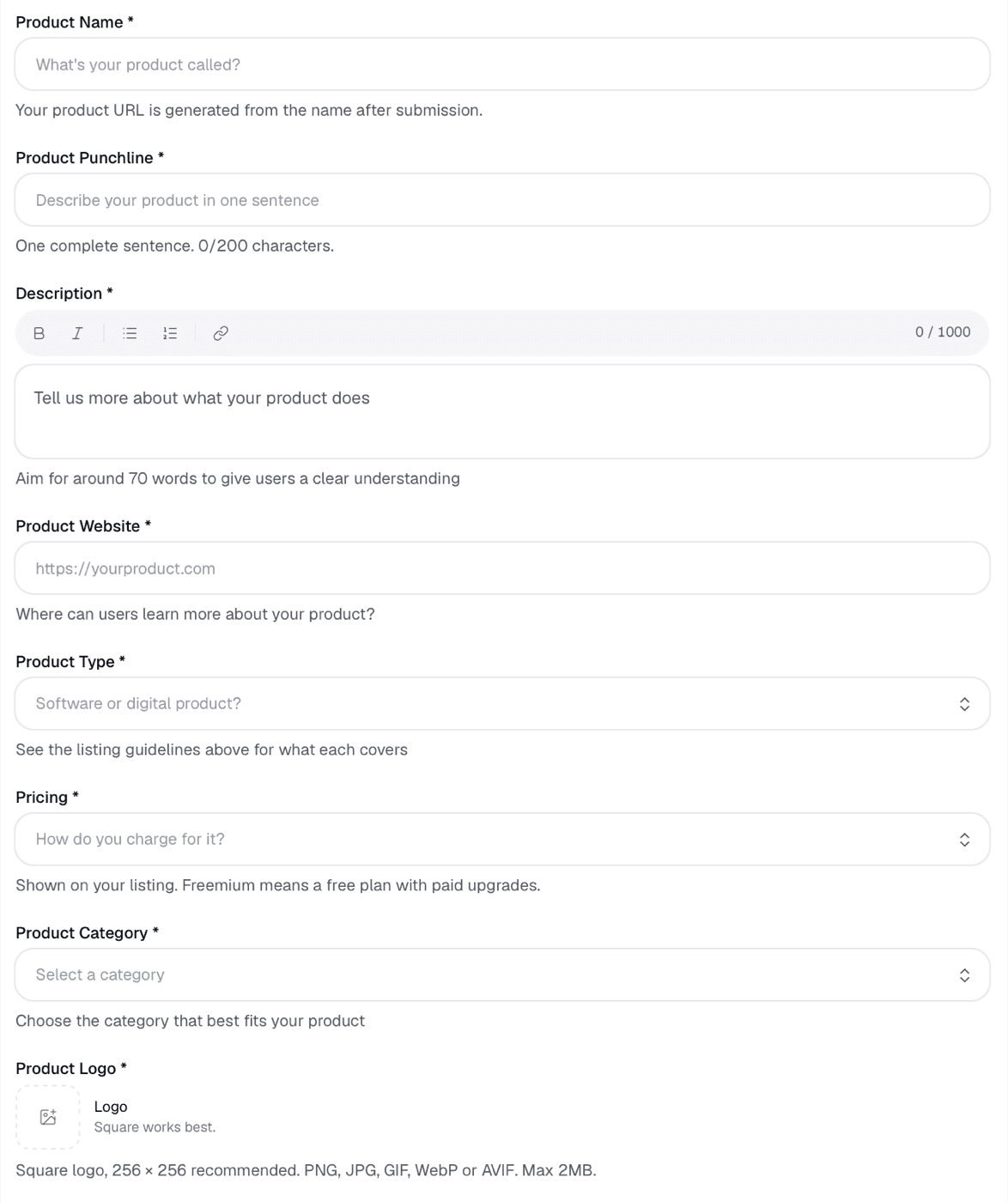
Product Name matters more than it looks, because "Your product URL is generated from the name after submission." Their API caps it at 80 characters; use the name people search for, since that address is the one you keep. Product Punchline wants "One complete sentence" in 200 characters. It is printed right under your product's name on the listing and again in the home page's Newly Submitted list.
Description takes 1,000 characters, and the hint asks for "around 70 words": what it does, who it is for, how it works and what it costs. The toolbar has a link button, but those links are nofollow, so spend the words on the product. Pricing is shown on your listing; their API knows four answers: free, freemium, paid and open source.
Product Category is a single choice among 39, so pick the narrowest one that is true. On 23 October Productivity held 481 listings, SaaS 242 and AI Agents 239, while Analytics held 64: a narrow category is a shorter page to be found on. The logo should be square, 256 by 256 pixels, 2MB at most.
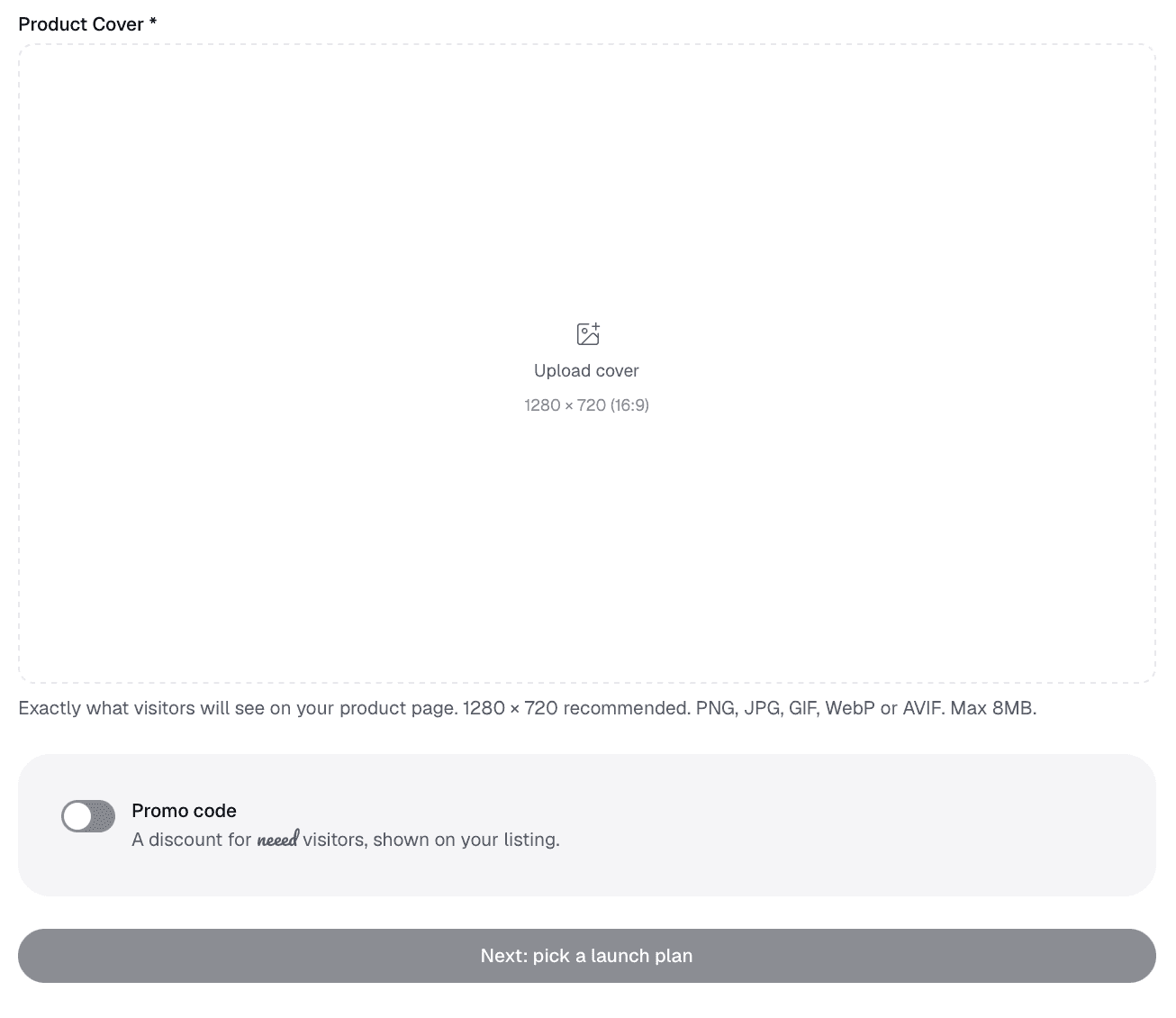
Product Cover is the image at the top of your listing, and the form says so: "Exactly what visitors will see on your product page." Make it 1280 by 720, under 8MB, with the product itself in frame rather than a slogan. The Promo code switch adds a discount "shown on your listing", with a Copy button and a Redeem the code button that leads to your site. Then comes the plan screen, Free or Premium.
After you press Submit
The check is immediate. In their notes on submitting, "The automatic check runs at once: a listing it accepts is live right away, on either plan. Anything else waits for a person, and the decision reaches your dashboard with its reason." Neeed publishes no turnaround for the second case, so a listing held for a person is live when that person says so.
Once you are live, edits happen on your listing page while you are signed in, with one rule worth knowing: "editing a listing that is not live sends it back for review." Upgrading is open later as well. Paying $19 on a free listing makes it Premium, and "the listing keeps its URL."
What Premium's $19 adds
Premium is the route without a badge. For $19, paid once, the card lists a "Permanent dofollow backlink, no badge needed", a Premium profile with highlights, who it is for and an FAQ drafted for you to edit, FAQ schema on your page and seven days in Just launched on the homepage and at the top of your category. It also puts you on the Premium page, which listed 149 products on 23 October.
Ads are sold on their own and labelled as ads. A Featured Spot costs $29 and an Ad Spot $49, each for 30 days. Their about page says both "are marked as sponsored" and link with rel="sponsored nofollow", and the sidebar ad on every page we read did exactly that. Their notes for AI assistants add that Neeed "does not sell rankings, Domain Rating or traffic". For a directory that runs on a badge, that is a clean set of rules, published where anyone can read them.
The followed Visit Site button is the same on both routes. Premium buys it without a badge, plus the profile and the week of placement. Our route reaches the same button on the free listing, with your badge carried by our component and kept up.
What we file for you on Neeed
Pick Neeed in your plan and the form is ours: a punchline that fits their one sentence and 200 characters, a description written for Neeed to their 1,000-character limit, the product type, pricing and category, your logo and a cover cut to their 1280 by 720.
The badge goes up with it. Our component carries Neeed's badge on your site, the badge is verified and your Visit Site button turns dofollow. We keep it live from then on. Without the component the listing still goes up, with a nofollow link, and the badge can be verified from the listing page whenever it is in place. Most directories in a plan are delivered in 24 to 48 hours, and every directory within 21 days at most.
30 directories cost $29, 60 cost $49 and 100 cost $79, and the dashboard prints each one's Domain Rating so you can pick by it. The SaaS directories page lists the others in Neeed's group that we file to.
Neeed Directory review: the short answer
List free and get the badge verified. The listing is live once their check passes, an indexable page of its own on a DR 74 domain, with labels and tags around it and a Visit Site button that turns dofollow the moment the badge is verified. Keep the badge on your site while you want to be listed, or pay $19 once to list without one.
How to submit to Neeed Directory, step by step
- 1
Check that your product fits
Software or a digital product: apps, SaaS, developer tools, extensions, APIs, templates, design assets, courses, ebooks or kits. Adult content and local service businesses are not listed.
- 2
Sign in and prefill from your URL
Open Submit, pick a plan, sign in with Google or an email code, then paste your product URL into Prefill and read every field it fills before you keep it.
- 3
Choose the name you want in your address
Your listing's URL is generated from the product name and stays when you upgrade, so use the name people search for.
- 4
Write one sentence, then about 70 words
A punchline of one complete sentence within 200 characters, then a description within 1,000 characters on what it does, who it is for and what it costs.
- 5
Set the type, the pricing and one category
Software or digital product, how you charge and the narrowest of the 39 categories that is true.
- 6
Upload a square logo and a 16:9 cover
The logo at 256 by 256 within 2MB, the cover at 1280 by 720 within 8MB. The cover is the first thing visitors see on your page.
- 7
Pick Free, submit, then verify the badge
Put their badge on your site, wait until it shows, then open your listing while signed in and press Verify Badge. Verification allows 10 checks an hour.
- 8
Leave the badge where it is
Free listings are rechecked. A missing badge costs the dofollow, and a badge that stays gone hides the listing until it is back.
- 9
Or let Submitator file it
We write the form for Neeed, place their badge through our component on your site and keep it live with the other directories' badges.
Their $19 skips the badge. Our $29 places it, on 30 directories.
One payment, every directory named in your dashboard with its Domain Rating on the card, a rejection replaced by another directory you pick and one component that places every badge a directory asks for and keeps it live.
$19 skips their badge. $29 places it, on 30 directories.
Neeed Directory is a DR 74 directory of 2,660 software and digital products. A free listing goes live once their automatic check passes, and its Visit Site button is nofollow until their badge is verified on your site, dofollow after; in our read of 158 listings that held on every one. A free listing whose badge stays gone is hidden, and Premium at $19 once lists you with no badge. Write a sharp punchline, choose the name you want in your address and keep the badge up. More SaaS directories and the whole catalog.
FAQ
How do I submit to Neeed Directory?
Open Submit, pick Free or Premium and sign in with Google or an email code. Paste your product URL into Prefill to draft the details, then check the name, punchline, description, website, product type, pricing, category, logo and cover before you submit. Their automatic check runs at once and a listing it accepts is live right away. On the free route, place their badge on your site and verify it from your listing page to make the link dofollow.
Is Neeed Directory free?
Yes. A free listing costs $0 and goes live after their automatic check, with a nofollow link to your site until their badge is verified. Premium costs $19 once and needs no badge. Ads are sold apart from listings: a Featured Spot at $29 and an Ad Spot at $49, each for 30 days. Nothing on the site is a subscription.
Is the Neeed Directory link dofollow?
Once their badge is verified, or on Premium. Each listing has one Visit Site button pointing at your site. Of 158 listing pages read on 23 October 2026, that button was followed (rel="noopener") on all 70 free listings with a verified badge and all 6 Premium listings, and nofollow on all 81 free listings without one. Every one of those pages was open to indexing, with a canonical pointing at itself.
How does the Neeed badge work?
Their badge is a linked image, in a light or a dark version, which their notes on submitting describe as "A link to your listing wrapping our artwork, on a page of your site." The plan screen hands you the code before you submit; verification comes after, when you open your live listing while signed in and press Verify Badge. Once it passes, the Visit Site button becomes dofollow. Verification allows 10 checks an hour, so put the badge live first.
Is a free Neeed listing permanent?
A free listing verified with their badge stays visible while the badge stays up. Their about page says "Free listings are rechecked for their badge; a badge that stays gone hides the listing until it is back." A free listing filed without the badge stays up with a nofollow link: free listings without a verified badge, dating back to January 2026, were still live on 23 October. Premium listings need no badge, and their pricing page says ad placements end after 30 days while "listings stay".
What is Neeed Directory's Domain Rating?
Ahrefs rates neeed.directory 74, which is what our Domain Rating checker read for it on 23 October 2026. The rating describes the domain; whether the link on your listing is followed depends on the badge or on Premium.
What does the Neeed Directory form ask for?
The form requires seven fields and two images: a product name (your listing's address is generated from it), a one-sentence punchline of up to 200 characters, a description of up to 1,000 characters with about 70 words suggested, your website, the product type (software or digital product), pricing, one category, a square logo (256 x 256 recommended, 2MB at most) and a 1280 x 720 cover (8MB at most). A promo code is optional.
How long does Neeed Directory take to publish a listing?
A listing their automatic check accepts is live right away, on either plan. Anything the check cannot vouch for waits for a person, who publishes it, asks for changes or declines it; the reason reaches your dashboard. Neeed publishes no turnaround for that second case.
What does Neeed Directory accept?
Software (web and mobile apps, SaaS, developer tools, extensions and APIs) and digital products (templates, design assets, courses, ebooks and kits). Adult content and local service businesses such as trades, salons, clinics and agencies serving one area are not listed. A listing outside those rules is not published.
What does Neeed Premium include?
For $19 paid once: a permanent dofollow link with no badge, a Premium profile with highlights, who it is for and an FAQ drafted for you to edit, FAQ schema on your page and 7 days in Just launched on the homepage and at the top of your category. It also puts you on their Premium page, which listed 149 products on 23 October 2026. A free listing can be upgraded later at the same price and keeps its URL.
Does Submitator submit to Neeed Directory?
Yes, on its free route, with the badge or without it. With our badge component on your site, their badge is verified, your link turns dofollow and we keep the badge live; without it the listing still goes live with a nofollow link, and the badge can be verified later from the listing page. We write the punchline and description for Neeed and cut your cover to their 1280 x 720. 30 directories cost $29.
More submit-to guides.
Their $19 skips the badge. Our $29 places it, on 30 directories.
One payment, each directory named with its Domain Rating on the card before you choose it, a rejection swapped for another directory and one component that installs every badge and keeps it live.