
Your Website Is the Only Field. MOGE Builds the Rest in Ten Languages.
Submitator sends customers' products to MOGE through the free modal shown below. The modal, the listings and every count on this page are as moge.ai showed them on 10 October 2026.
MOGE lists AI tools, 8,702 of them in 197 categories, and its maker, Ray, sets out the aim on the About Me page: "I want to make AI accessible and valuable to people outside the tech industry."
A product goes in free, with no account to create. A button in the footer opens a modal with a single field for your website and a line that settles the price: "To support outstanding developers, listing products is completely free."
Everything else on the listing is MOGE's work, assembled from the site behind that address and published in ten languages. So the preparation happens on your own pages, before the modal is ever opened. We file customers here through the same free modal.
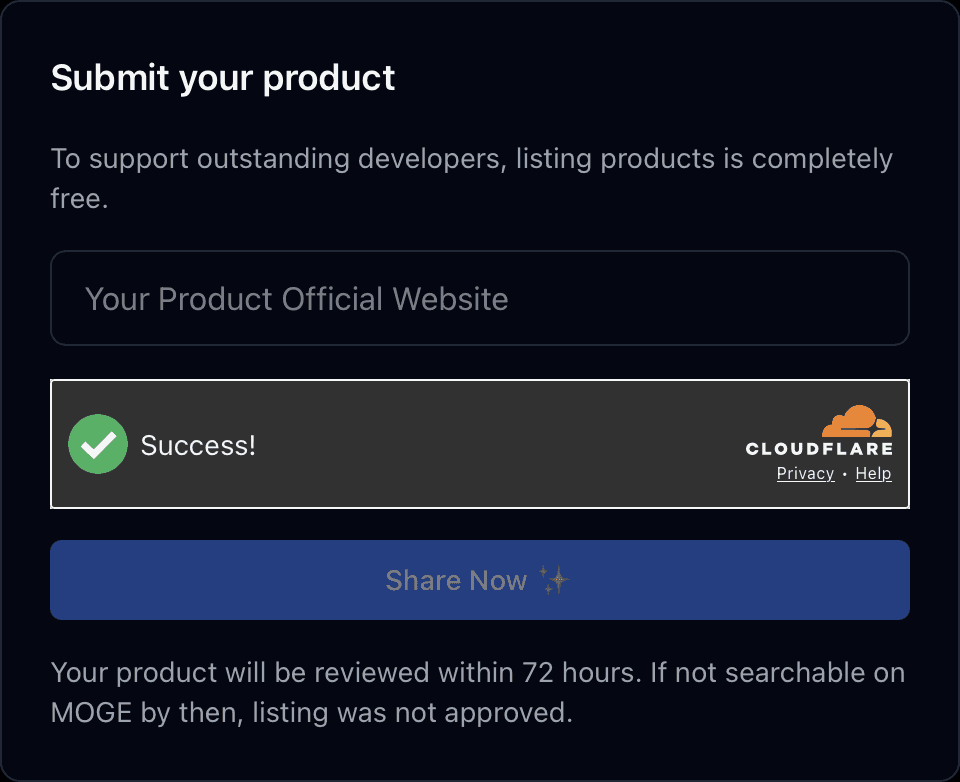
| On the modal | What it says or asks |
|---|---|
| Opened by | Submit Product, a button under About in the footer |
| Heading | “Submit your product” |
| First line | “To support outstanding developers, listing products is completely free.” |
| The one field | Placeholder “Your Product Official Website”; required, no label |
| Check | Cloudflare Turnstile |
| Button | “Share Now ✨” |
| Under the button | “Your product will be reviewed within 72 hours. If not searchable on MOGE by then, listing was not approved.” |
| Not asked | Email, account, category, description, logo or payment |
From your website alone, MOGE makes a listing with a screenshot of your home page, a tagline, an overview, key features, use cases, FAQs, up to six categories and eight alternatives, then publishes it in ten languages. Each version is a separate page in MOGE's sitemap, open to indexing, with its own canonical.
MOGE at a glance
| What you get | MOGE |
|---|---|
| Price to list | Free; no price printed anywhere on the site |
| Where to submit | Submit Product, under About in the footer |
| What it asks | Your website; no account or email |
| Review | Within 72 hours by their line; search to check |
| Listing | Built by MOGE from your site, in ten languages |
| Link to your product | nofollow, 360 of 360 across 120 listings |
| Directory size | 8,702 products in 197 categories |
| Domain Rating | 31 on our checker |
| Filed for you by Submitator | Free route, website entered, from $29 |
Read from moge.ai on 10 October 2026: the home page, including the listing total behind its New Arrivals grid, robots.txt, the sitemap index and its five files, /aboutme, /terms, /privacy, /category and one category page, /rank, /best, /agent-skills, a search results page, a sweep of likely routes (/submit, /pricing, /advertise and /sponsor among them answer 404) and the submit modal, opened from the footer while signed out. The modal's wording is quoted from the live site and agrees with our founder's own capture of it from that evening; its one input is a required text field with no label, no length limit and a single rule, that the value contain a dot. Size: 8,702 English /product/ addresses in the sitemap and a total of 8,702 reported by the home grid, against "10,000 AI tools" in the site's description; 197 categories in the sitemap and 197 on /category, under 13 headings. Links: 120 listing pages, 80 spaced evenly through the sitemap and the 40 most recently dated, each linking its product three times (the Visit Website button and the screenshot, which appears twice in the markup for desktop and mobile), straight to the root of the product's domain with ?utm_source=moge.ai. All 360 of those links carry nofollow and the 120 buttons carry rel="sponsored nofollow noopener"; none carries ugc, no page sets a robots noindex in a meta tag or a header and every canonical names the page itself. Three extraction methods agreed on every page, and the same attributes appeared on 12 of the listings rendered in a browser, on 3 re-fetched with a Googlebot user agent, on three of the footer's Featured products, on the sponsor card and on all ten language versions of one listing. Every external link counted elsewhere on the site is nofollow as well (/rank 132 of 132, /best 444 of 444, /agent-skills 339 of 339, the home page 10 of 10), and nothing read on the site, its code included, mentions dofollow or offers a backlink. Listing contents are read from the 120 pages; the screenshot, logo and Community links were compared with five listed products' own home pages, and the Community row matched the site's footer links on four of the five. Translated versions live under /zh, /br, /es, /ru, /de, /fr, /ja, /ko and /tw with hreflang. Dates are sitemap lastmod values, which can reflect edits as well as additions: 193 fall in the 30 days up to 9 October 2026, 11 of them on 9 October itself, the eleven listings at the head of the home grid on the 10th. Domain Rating is Ahrefs' figure for moge.ai via submitator.com/domain-rating-checker, which returned 31; robots.txt blocks no crawler by name. Per Submitator's founder, customers are filed to MOGE through its free modal (10 October 2026), any CAPTCHA met on the way is handled on our side and a directory that asks for a description gets one written for it alone. Our plans: $29 for thirty directories, $49 for sixty and $79 for a hundred, each a one-time payment, with you picking every directory in the dashboard; if a directory turns a submission down, one more directory is added for you to choose, and refunds depend on the conditions written into our terms.
A button in the footer, not a page
Nothing in MOGE's header leads to the form, and moge.ai/submit answers with a 404. Scroll to the footer instead, which is the same on every page. The column headed About starts with Submit Product, and pressing it opens a modal headed "Submit your product".
There is no sign-in in front of it. The modal opens for a visitor who is logged out, and nothing in it mentions an account.
One field, and the address to put in it
The modal holds a single input with no label, only the placeholder "Your Product Official Website". It is required, and the one rule it checks is that the value contains a dot, so the form itself will not catch a typo. Type the full address of your home page and read it back before you send it.
On every one of the 120 listings, the links go to the home page at the root of the product's domain, with no path after it, so make sure the root of yours is the page you want a visitor to land on.
A Cloudflare check sits under the field, and the Share Now ✨ button stays disabled until the field is filled and the check has passed. Once the submission goes through, the button reads "Submitted ✅".
What MOGE builds from that address
A listing opens with your logo, the product's name, a tagline, a Community row of social links, up to six category tags and a Visit Website button, with a screenshot of your home page beside them. Three tabs follow. Overview holds a summary of what the product is, then key features, use cases and FAQs. Alternatives shows eight similar tools, and Analytics shows traffic figures drawn from third-party data.
None of it is typed into the modal, whose one field takes only your site's address. The tagline is MOGE's own summary of your site and becomes the page title after your product's name, while the overview fills the page's meta description. Nearly every listing also gets a pricing label: Freemium, Free Trial, Paid or Free. Here is what MOGE reads and what to check first.
| On your site | On the listing | Before you submit |
|---|---|---|
| Home page, first screen | The listing picture, a 1024 x 576 screenshot | Make it read at 16:9, with no cookie banner or pop-up over it |
| Favicon | The logo beside your product's name | Use a mark that holds up at icon size |
| Footer links | The Community row | Link your social profiles and a contact email there |
| Home page copy | Tagline, page title and overview | Say in one plain line what the product does |
| Pricing page | The pricing label | Make prices easy to reach from the home page |
The Community row usually repeats the social links and email in your footer. Each of these fixes lives on your own site, so it also serves any other directory that builds a listing by reading your pages.
Ten languages, and the ways readers find you
Every listing is published in ten languages: English, Chinese in simplified and traditional script, Portuguese, Spanish, Russian, German, French, Japanese and Korean. The title, the tagline and the overview are translated, and each version gets its own address and canonical, with none set to noindex.
Readers get to a listing through up to six category pages, the site search and the Alternatives tab on similar tools. New listings also lead the home page's New Arrivals grid: on 10 October it opened with the eleven listings dated the day before. MOGE's sitemap dates 193 listings to the 30 days up to 9 October 2026.
Look for utm_source=moge.ai in your analytics
A listing links its product through the Visit Website button and the screenshot, each going straight to your home page with ?utm_source=moge.ai on the end, so those visits show up in your analytics with moge.ai as their source.
Those links carry rel="nofollow", and the button is marked sponsored as well. That held for all 360 product links across 120 listings, the same in every language. MOGE does not sell or claim a followed link anywhere on the site, so count the listing as what it is: an indexable page in ten languages plus the traffic that tag lets you measure.
After their 72 hours, search for it
MOGE states its review in one line under the button: "Your product will be reviewed within 72 hours. If not searchable on MOGE by then, listing was not approved." The modal takes no email address, so the search is where the answer turns up.
Search for your product's name with the icon in the header or the box on the home page; the address moge.ai/search/ followed by the name works too. When a card for it comes up, open the listing and read what MOGE made of your site: the tagline, the categories, the Community links and the pricing label.
From your dashboard to their one field
Our submissions to MOGE go through the same free modal you have just read about. Choose it in your dashboard and your website goes into the one field, with the Cloudflare check handled on our side.
Nothing needs writing for MOGE, because it writes the listing itself. The directories in your plan that do ask for a description each get one written for that site alone. If any directory in your plan rejects a submission, another one is added to your selection to choose instead.
MOGE review: the short answer
One field for a ten-language listing is a good trade. MOGE is free, needs no account and builds the page itself, from the screenshot to the FAQs, with every language version open to indexing. Put the work into your home page first, then search for the listing once their 72 hours are up.
How to submit to MOGE, step by step
- 1
Get your home page ready
MOGE builds the listing from it. Make the first screen read at 16:9 with nothing covering it, pick a favicon that holds up small, keep your social profiles and a contact email in the footer, then say in one plain line what the product does.
- 2
Press Submit Product in the footer
It is the first item under About at the bottom of any MOGE page. There is no submit page to look for and no sign-in step.
- 3
Type your website
The one field reads “Your Product Official Website”. MOGE listings link to the root of each product's domain, so give your home page address and check the spelling: the field only asks for a dot.
- 4
Pass the check and press Share Now ✨
The button stays disabled until the field is filled and the Cloudflare check has passed. When the submission goes through, the button reads “Submitted ✅”.
- 5
Search MOGE once 72 hours are up
Their line: “If not searchable on MOGE by then, listing was not approved.” Search your product's name from the header icon, the home page box or moge.ai/search/.
- 6
Read the listing MOGE built
Check the tagline, the categories, the Community links and the pricing label, then watch your analytics for visits tagged utm_source=moge.ai.
- 7
Or choose MOGE in your Submitator dashboard
We file it through the free modal with your website in the field and the Cloudflare check handled on our side, and it counts towards the thirty directories that $29 buys.
$0 here. $29 for the thirty you have not filled in yet.
One payment, every directory named in your dashboard with its Domain Rating on the card, text written for each form that asks for it and the ones you tick filed for you.
One field, ten languages. $0 here, $29 for thirty.
MOGE lists AI tools free from a footer modal that asks only for your website. It builds the page itself, from a home page screenshot to FAQs and up to six categories, then publishes it in ten languages. Get your home page right before you submit and search for the listing after their 72 hours. We file it through the free modal: $0 here, $29 for thirty. The whole catalog.
FAQ
How do I submit to MOGE?
Go to the footer of any page on moge.ai and press Submit Product under About. In the modal that opens, type your site's address into the one field, “Your Product Official Website”, let the Cloudflare check pass and press “Share Now ✨”. You do not need an account or an email address.
Is MOGE free?
Yes, and the modal says so first: “To support outstanding developers, listing products is completely free.” The site has no pricing or advertising page and prints no price for anything.
Is the MOGE link dofollow?
No. On 10 October 2026 all 360 links to the product across 120 listings carried nofollow: the Visit Website button as rel="sponsored nofollow noopener" and the screenshot as rel="nofollow". MOGE does not offer or claim a followed link anywhere on its site. Every one of those links goes straight to your home page with ?utm_source=moge.ai, so your analytics can tell MOGE's traffic apart from the rest.
What is MOGE's Domain Rating?
Ahrefs rates moge.ai at 31, according to our Domain Rating checker on 10 October 2026. MOGE's robots.txt blocks no crawler by name, AhrefsBot included, so Ahrefs is free to crawl the site it is rating.
What does the MOGE form ask for?
Your product's website and nothing more. The field is required and unlabelled, with the placeholder “Your Product Official Website”. A Cloudflare check and the “Share Now ✨” button follow it. The modal asks for no email, account, category, description, logo or payment.
How long does MOGE take to review a product?
MOGE answers under the button: “Your product will be reviewed within 72 hours. If not searchable on MOGE by then, listing was not approved.” The form collects no email address, so search MOGE for your product's name once that window has passed.
Who writes a MOGE listing?
MOGE, from your site. With no description box in the modal, the tagline, overview, key features, use cases, FAQs, categories and pricing label are its own reading of your pages, so your home page copy is the way to shape them.
In how many languages does MOGE publish a listing?
Ten. Alongside the English page, every listing has versions in simplified and traditional Chinese, Portuguese, Spanish, Russian, German, French, Japanese and Korean, under prefixes such as /zh and /de. Each version has its own canonical and none is set to noindex.
Does Submitator submit to MOGE?
Yes, and MOGE goes in on its free route: choose it in your dashboard and we enter your website in the one field, with the Cloudflare check handled on our side. A plan of thirty directories is $29.
More submit-to guides.
MOGE is free. Thirty directories are $29, each one measured.
One payment. Each directory is named with its Domain Rating on the card before you choose it, badges are installed and kept live where one is wanted and a rejection is swapped for another directory.