
A Free Week on the Front Page. Their Badge Speeds Up Approval.
We file customers to Super Launch on its free plan, badge included, which makes this a user's guide rather than an outside review. Figures and quotes come from superlaun.ch as it stood on 11 October 2026.
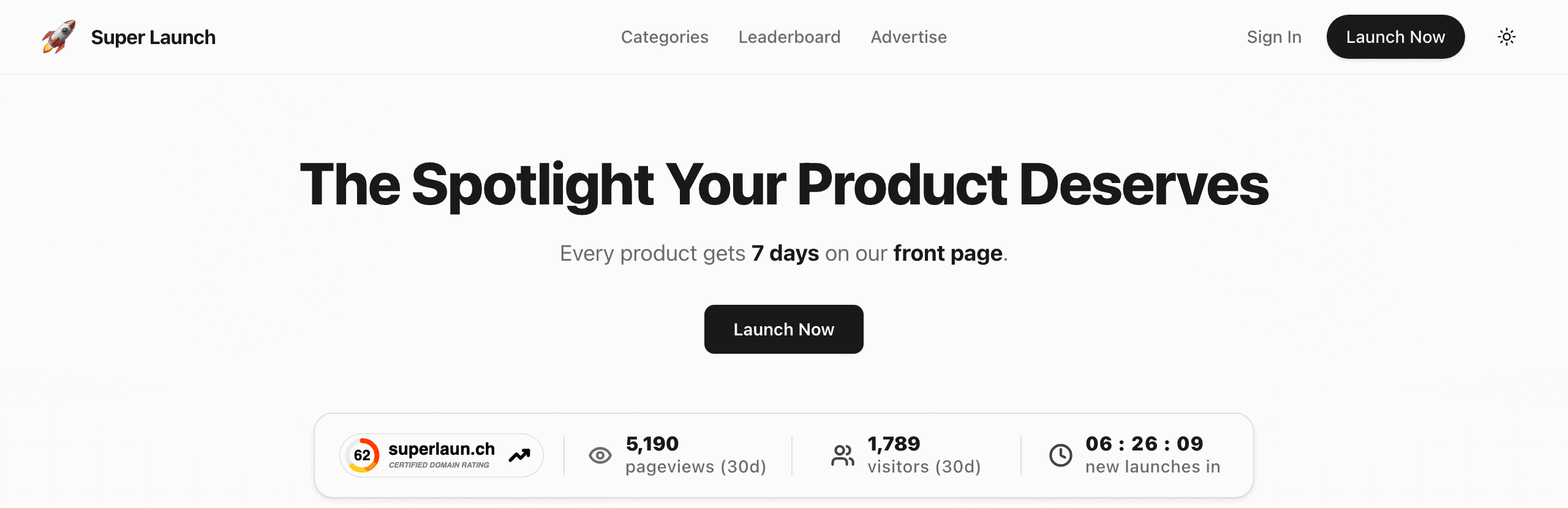
Super Launch is a launch platform for software products, rated 62 by Ahrefs through our checker on 11 October 2026. Its promise sits right under the headline: "Every product gets 7 days on our front page." Launches start at 12:01 AM Pacific, spend that week ranked by votes and then settle on one of 20 category pages. The site held 661 listings that day.
The free plan costs nothing. Their badge is the one extra, and it is optional: the Free card lists it as "Badge needed for faster approval", and the dialog that follows your submission lets you skip it.
We submit customers here on the free plan, with Super Launch's badge placed on their site, which speeds approval. We place it with our badge component and keep it live.
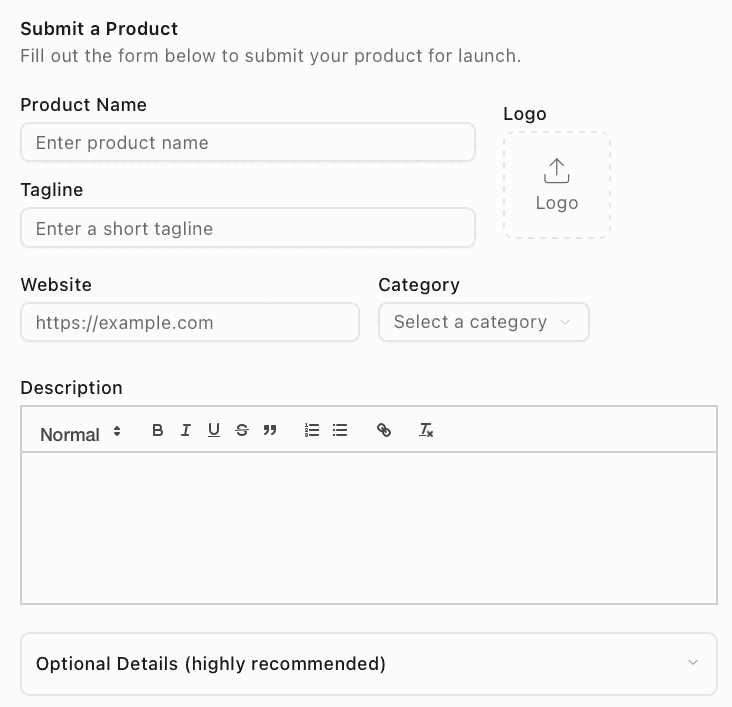
| Field | What to enter |
|---|---|
| Product Name | Required; the name that heads your listing and its cards |
| Tagline | Required; one short line, 44 characters at the median on listed products |
| Logo | Not marked required, yet every listing has one; an image under 3 MB |
| Website | Required; a full address, used as typed by the Visit links |
| Category | One of 20, which sets your page after the front-page week |
| Description | Rich text with headings, lists and links, under 100,000 characters |
| Optional Details | Founder Name, X (Twitter) Handle, Discount Code, Discount Amount (%) and Landing Page Screenshot |
| Launch plan | Free at $0 or Premium at $19 once, fixed after submission |
"Badge needed for faster approval" is how the card puts it, and the dialog after you submit offers Skip for Now right beside Verify Badge, so the badge is optional. Placed, it shortens the way to approval and leaves a standing link to your listing. Our component, installed on your site once, carries it with no commit for this directory, and we keep it live.
Super Launch at a glance
| What you get | Super Launch |
|---|---|
| Price to list | $0 on Free, $19 once for Premium |
| Their badge | Optional on Free, for faster approval |
| Launch date | From their queue on Free, your pick on Premium |
| Front page | Seven days for every product, ranked by votes |
| Link to your site | Direct Visit links; nofollow on the free plan |
| Domain Rating | 62 (Ahrefs) |
| Listings | 661, in 20 categories |
| Filed for you by Submitator | Free plan, badge placed and kept live, from $29 |
Read from superlaun.ch on 11 October 2026, between 00:00 and 00:26 UTC and with GET requests only: the home page, /categories and its 20 category pages, /leaderboard, /advertise, /terms, /privacy-policy, /contact, robots.txt, /api/categories and every public listing page, 661 in all (the 656 that /categories counts plus those on the front page). The form's labels, placeholders and limits, the 20 categories and both plan cards are quoted from the site's public scripts and agree with a screenshot of the form that Submitator's founder took that day; the badge dialog is quoted from his screenshot of it, shown here with the listing number blacked out. The home and category page images are browser captures from the same day. Each listing page links the product through two Visit anchors, one laid out for phones and one for wider screens, whose href is the submitted address itself, with no redirect, no meta robots or X-Robots-Tag and a canonical pointing at the page. Free listings: rel="noopener nofollow" on 550 of 552 pages, the other two being July 2025 listings with a followed rel. Premium listings: rel="noopener" on 109 of 109. Neither sponsored nor ugc appears in any rel. Matching the anchors by their Visit text and by the product's host gave the same result; 16 pages rendered in a browser and 5 requested as Googlebot showed the same links; the page code sets the rel from a dofollow flag carried by each listing. On category pages, every Premium card adds one followed link to the product and free cards add none. Of 67 sites behind free listings, each requested once, 57 loaded and 38 showed a Super Launch badge or link; all 38 of those listings link out nofollow, and on 36 of the 38 sites the badge or link points at the site's own listing, on the other two at a different listing number. No page on the site carries a plain anchor to a listing page, whether in the 748 saved pages or in three rendered ones, and there is no sitemap at the usual addresses or in robots.txt. Daily podium labels appear on 156 listing pages, 94 of them free. Tagline and description medians cover the 656 listings on category pages. The Domain Rating is Ahrefs' figure for superlaun.ch, 62, returned by our checker at submitator.com/domain-rating-checker; the FrogDR badge on their home page shows 62 as well. Nothing was submitted, voted on or bought for this page. Submitator's founder confirmed on 11 October 2026 that customers are filed here on the free plan with the badge placed on their site, which speeds approval, using our badge component and keeping the badge live; the component is installed on the customer's site a single time, carries the badge or link any directory requires and asks for no commit per directory. Pricing is one payment per plan, $29 for thirty directories, $49 for sixty or $79 for a hundred, each directory chosen by you in the dashboard; when a submission is rejected, our terms add another directory for you to choose.
Their badge is optional, and the faster way to approval
Press Submit for Review on the free plan and a dialog opens with the badge. Its heading reads "Badge Required for Immediate Approval", and the lines under it explain what is pending: "Your product has been submitted. It needs to be approved for it to be visible and be assigned a launch date." Then comes the case for the badge: "Adding the badge to your website helps ensure immediate approval."
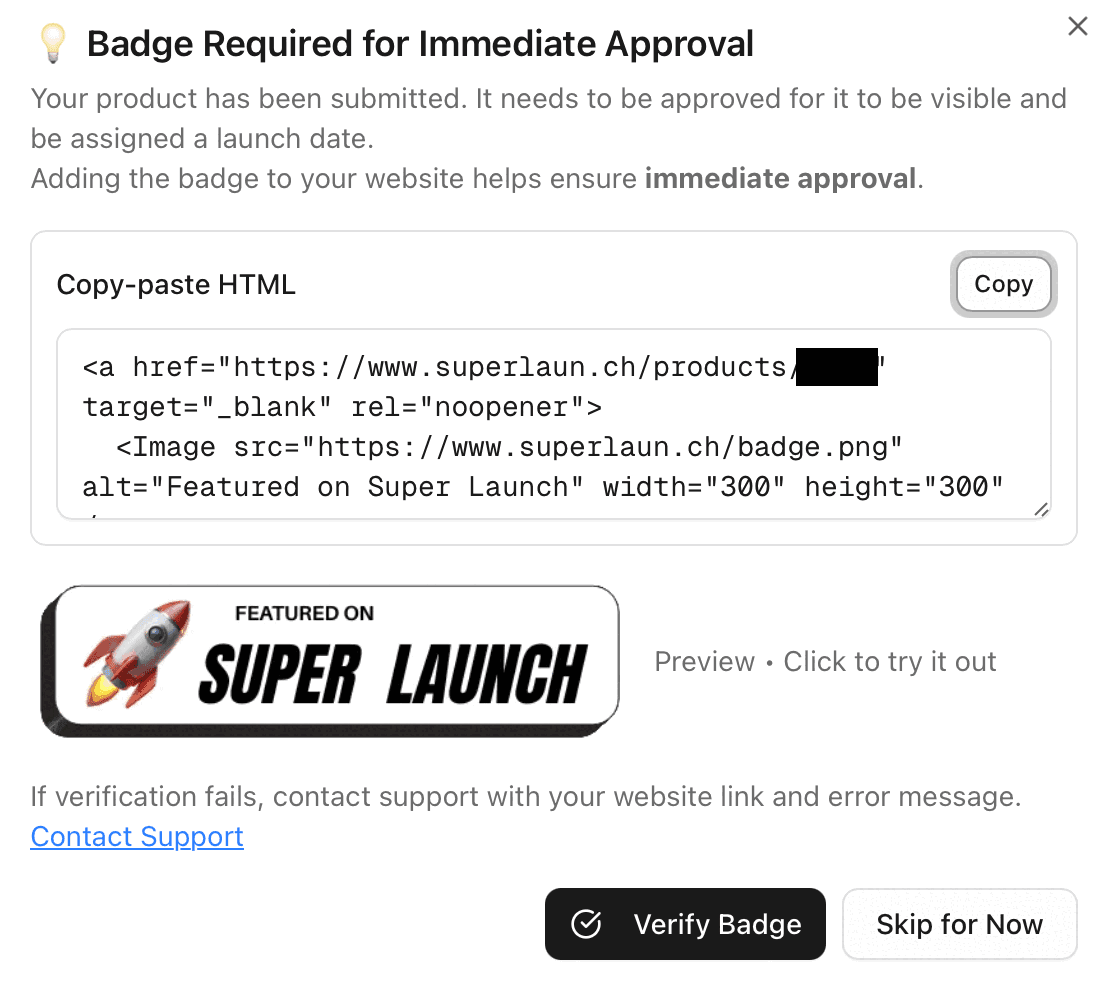
Read the heading together with the buttons. Skip for Now sits next to Verify Badge, and the Free card itself says "Badge needed for faster approval". On the free plan the badge is a choice, and choosing it moves your submission along faster.
Placing that badge is what we handle. Our badge component goes into your site one time, in the footer, and carries the badge or link that any directory in your plan requires. When we file you on Super Launch's free plan, its badge appears through that component, and we keep it live afterwards, with no commit from you for this directory or any other.
Other directory badges the same component carries
Where the snippet goes
Put it on the site you entered as Website, then click it once you are approved. It links to your own listing page, superlaun.ch/products/ followed by its number. Of 38 listed sites carrying a Super Launch badge or link, two point at a different listing number.
Why the badge is worth keeping after approval
Super Launch opens listing pages by script. Click a card on the home page, a category page or the leaderboard and code takes you to the listing; none of those pages carries an ordinary link to it, and the site has no sitemap. A badge pointing at your listing is an ordinary link, so for many listings it is the chief way in for a search engine.
So leave it up once you are approved. The site sets no rule about keeping it, but its use to your listing lasts exactly as long as it stays. Our component holds it in place, so nobody on your side has to remember it is there.
What a free launch gets you
A listing page of your own: logo, name, tagline and category, any optional details you filled in, a Vote button, a Visit button to your site and your description. On launch day it joins the front page for seven days, ranked by votes. After that it moves to its category page, which is also ordered by votes, and it can climb into the all-time Top 50 Leaderboard.
The top three of each launch day carry a place label on their page, and free listings hold 94 of the 156 labels handed out so far. The terms set the voting rule: "Each registered user may upvote a product once." Tell your own users on the day you launch.
The Visit links on a free listing carry rel="noopener nofollow", as the Free card's "Nofollow backlink" says, and the badge does not change that: free listings whose sites show it link out the same way. The followed links belong to Premium. What the free plan gives you is the launch itself: the week on the front page, a page that names your product and a place in your category.
The form, field by field
Website is the address the Visit links use, exactly as you type it, so give the precise page a visitor should arrive at. Put the badge on that same site.
Product Name and Tagline head your listing and every card it appears on. Keep the tagline to a single line; the median on listed products is 44 characters.
Description is the longest piece of writing on your listing, so write it as the page itself: the problem the product solves, the people it serves and its price, with headings and lists where they help. The editor takes up to 100,000 characters, and the median description there runs under 40 words, so a full one stands out.
Logo carries no required mark, but every listing on the site has one. It has to be an image under 3 MB.
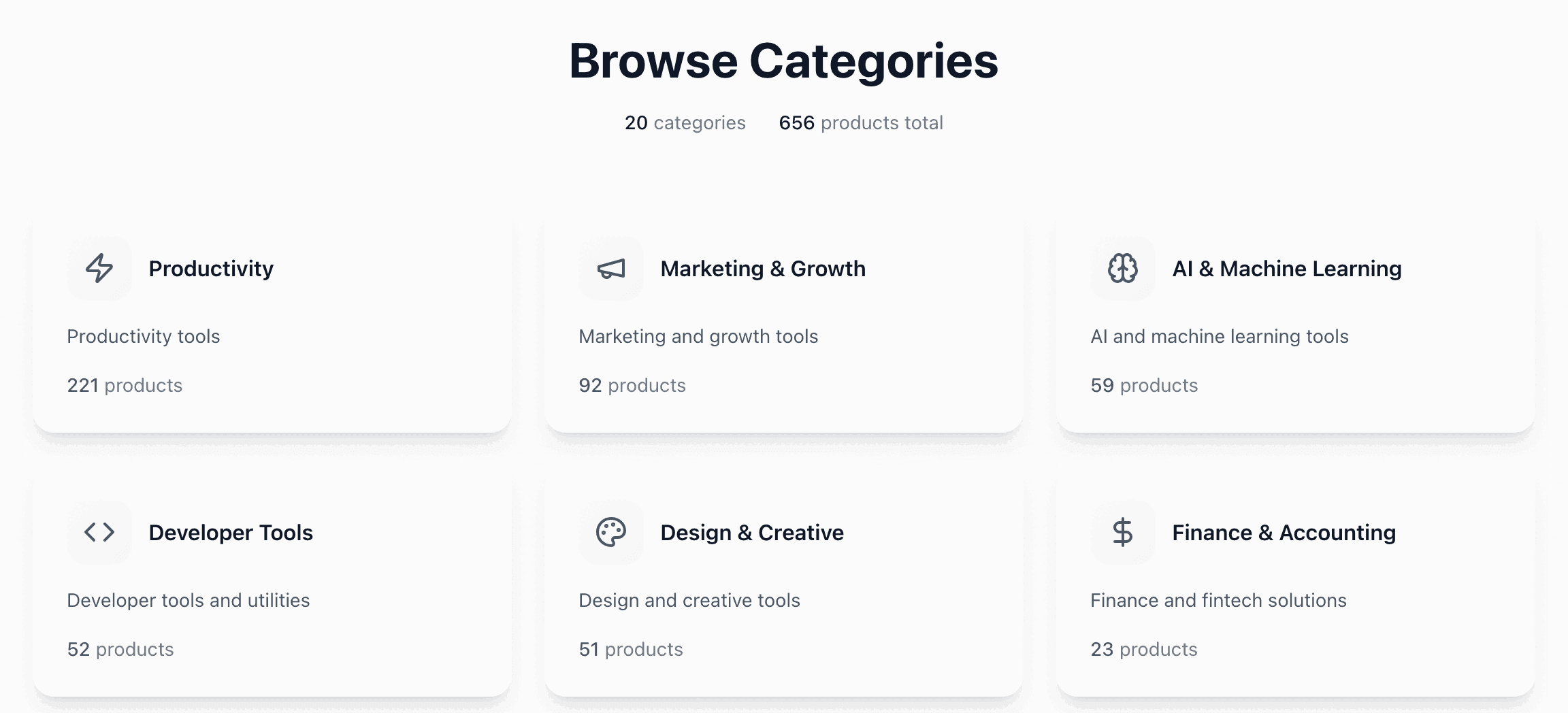
Category is one of 20 and decides the page your listing moves to after its week on the front page, where cards are ordered by votes. Productivity is the largest at 221 listings. Pick the category your buyers would browse.
Optional Details (highly recommended) is worth opening. Founder Name shows as by and your name, the X (Twitter) Handle as a link to your profile, the Landing Page Screenshot on the listing itself and a Discount Code as an offer box with a copy button, which appears only when Discount Amount (%) is filled in too.
Last comes the plan. With Free selected the button reads Submit for Review; check that it does before you press it, because "Plan cannot be changed after submission." On Free the launch date "is automatically assigned and cannot be changed", and the terms let you edit your details "up until 11:59 PM PT the day before launch".
What Premium's $19 adds
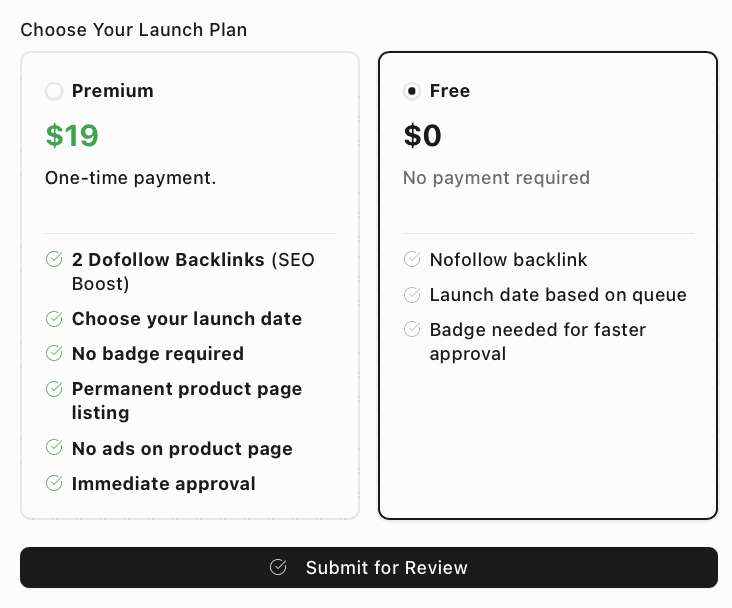
Premium costs $19 as a "One-time payment." Its card lists "2 Dofollow Backlinks (SEO Boost)", "Choose your launch date", "No badge required", "Permanent product page listing", "No ads on product page" and "Immediate approval". Select it and the button changes to Continue to Payment ($19), with a date picker for launches "scheduled for 12:01 AM Pacific Time (PT)."
On the 109 Premium listings the Visit links are followed, and each Premium card on a category page adds another followed link to the product. Our route is the free plan, with the badge placed and kept live.
Super Launch review: the short answer
Yes, launch here. Every product gets a week on the front page, a listing page of its own and then a place on its category page. The free plan costs nothing. Their badge is optional, speeds approval and keeps a plain link pointing at your listing for as long as it stays up: place it, then leave it there.
How to launch on Super Launch, step by step
- 1
Press Launch Now
The button in the header, or the one under the home page headline, asks you to sign in and then opens the Submit a Product form.
- 2
Fill in the three required fields
Product Name, a one-line Tagline and your Website, typed exactly as you want the Visit links to point.
- 3
Add a logo, a category and a real description
A logo under 3 MB, the one of 20 categories your buyers browse and a description covering the problem it solves, the people it serves and its price.
- 4
Open Optional Details
Founder name, X handle, a discount code with its percentage and a landing page screenshot all show on your listing. Fill in both discount fields or the offer box stays hidden.
- 5
Choose Free and press Submit for Review
Read the button before you press it. The plan cannot be changed afterwards.
- 6
Place the badge and press Verify Badge
Copy the snippet from the dialog and put it on the site you entered as Website. If verification fails, the dialog says to contact support with your website link and error message.
- 7
Click your badge, then leave it up
Once you are approved, check that it opens your own listing. Or hand the badge to Submitator: our component carries it and we keep it live with your other directories' badges.
$0 and a badge here. $29 installs it, on thirty directories.
One payment, every directory named in your dashboard with its Domain Rating on the card, a rejection replaced by another directory you pick and one component that places every badge a directory asks for and keeps it live.
$0 and a badge here. $29 places it for you, on thirty directories.
Super Launch gives every product seven days on its front page, ranked by votes, and then a place on one of 20 category pages. The free plan costs nothing; their badge is optional, speeds approval and doubles as a plain link to your listing, so place it and leave it up. Fill in the three required fields, open Optional Details and check the button reads Submit for Review. The whole catalog.
FAQ
How do I submit to Super Launch?
Press Launch Now on superlaun.ch to open the Submit a Product form. Fill in Product Name, Tagline and Website, which are required, then a logo under 3 MB, one of 20 categories, a description and, if you like, the Optional Details. Choose the Free plan and press Submit for Review; a dialog then offers their badge and ends with two buttons, Verify Badge and Skip for Now.
Is Super Launch free?
Yes. The Free plan costs $0, with “No payment required” under the price; its card reads “Nofollow backlink”, “Launch date based on queue” and “Badge needed for faster approval”. Premium, the paid plan, costs $19 as a “One-time payment” and lists “2 Dofollow Backlinks (SEO Boost)”, “Choose your launch date”, “No badge required”, “Permanent product page listing”, “No ads on product page” and “Immediate approval”.
Is the Super Launch link dofollow?
Not on the free plan. On 11 October 2026 the Visit links on 550 of the 552 free listing pages carried rel="noopener nofollow", which matches the Free card's “Nofollow backlink”, and free listings whose sites display the badge are no exception. On all 109 Premium listing pages the Visit links carry rel="noopener" and are followed. Either way the link points at the exact address you entered, with no redirect in between. None of the listing pages carries a noindex tag.
Does Super Launch require a badge?
Not to list. The Free card says “Badge needed for faster approval”, and the dialog that opens after you submit, headed “Badge Required for Immediate Approval”, offers Skip for Now beside Verify Badge. Premium reads “No badge required”. The badge links to your own Super Launch listing page.
How long does Super Launch take to approve a product?
Super Launch publishes no timescale for free submissions. Its dialog says a submission “needs to be approved for it to be visible and be assigned a launch date”, the Free card links the badge to “faster approval” and Premium promises “Immediate approval”. Each launch starts at 12:01 AM Pacific on its day.
What is Super Launch's Domain Rating?
Our checker pulled Ahrefs' Domain Rating for superlaun.ch on 11 October 2026: 62. Super Launch shows its own figure in a FrogDR badge on the home page, and it reads 62 too.
What does the Super Launch form ask for?
Three required fields: Product Name, Tagline and Website. The rest of the main form is a Logo (an image under 3 MB), a Category and a Description in a rich-text editor, kept under 100,000 characters. A collapsed section headed “Optional Details (highly recommended)” adds Founder Name, X (Twitter) Handle, Discount Code, Discount Amount (%) and Landing Page Screenshot. The form ends with the choice of plan.
What categories does Super Launch have?
Twenty: Productivity, Developer Tools, Marketing & Growth, Sales & CRM, Customer Support, Analytics & BI, Collaboration & Teamwork, Design & Creative, Finance & Accounting, HR & Recruiting, Learning & Education, Health & Wellness, Fitness & Sports, Lifestyle & Personal, Security & Privacy, AI & Machine Learning, No-Code & Automation, E-commerce & Retail, Travel & Local and Gaming & Entertainment. After its week on the front page, a listing is shown on its category's page.
Can I change my Super Launch plan or launch date?
Not the plan: “Plan cannot be changed after submission.” On Free the launch date “is automatically assigned and cannot be changed”; on Premium you pick it and can change it. Their terms allow edits or rescheduling “up until 11:59 PM PT the day before launch. After that, submissions are locked.”
Does Submitator submit to Super Launch?
It does. Customers go on the free plan, with Super Launch's badge placed on their site, which speeds approval. Our badge component carries it. You install that component on your site a single time; we keep the badge live after that, and no directory in your plan needs a commit from you.
More submit-to guides.
$0 and a badge here. Our $29 installs it, on thirty directories.
One payment, each directory named with its Domain Rating on the card before you choose it, a rejection swapped for another directory and one component that installs every badge and keeps it live.