
Three Cards, No Account and a Page of Its Own for Your SaaS.
Submitator sends customer products to SaaS Radius through the free form described here. Quotes, fields and counts are from www.saasradius.com as it stood on 10 October 2026.
SaaS Radius is a free directory for SaaS products and nothing else. It holds more than 30,000 listing pages and offers 31 categories and 224 sub-categories to file a product under. Its FAQ settles the price in three words: "It is FREE!"
Getting in takes one form and no account. The form runs to three cards: General Information, Full Details and Socials. A person reviews whatever arrives, and an approved listing gets its own page, named after your product, with your pitch under the heading, a Description box, a Visit Website button and your social icons.
Two of those fields decide how the page reads: the pitch and the description. When SaaS Radius is among the directories you pick in Submitator, both are written for it.
| Field | On your listing |
|---|---|
| Listing Title | Your heading and the page title |
| Website | The Visit Website button and the sidebar link |
| Category | One of 31; it files the listing |
| Sub-Category | One of 224; printed beside your name |
| Not printed on the page | |
| Location (optional) | Not printed on the page |
| Pitch | The line under your name and on category cards |
| Description | The Description box |
| Socials (optional) | Icons for Facebook, Instagram and LinkedIn |
Readers meet it under your name on the listing and as the only line below the name on your card in the category pages. Listing pages also leave the meta description empty, so a search engine writes the snippet under your page title from the words on the page, and the words that describe your product are your pitch and your description. Make the pitch a plain statement of the problem the product solves and the people who have it; that single line serves all three.
SaaS Radius at a glance
| What you get | SaaS Radius |
|---|---|
| Price to list | Free; nothing on the site is priced |
| Who it is for | SaaS products only |
| Account to create | None |
| Where to submit | One form at /add-listing, three cards |
| Review | By a person; “a few weeks”, in their words |
| Your listing | Its own page, your product's name as the title |
| Link to your site | Direct; nofollow on 164 of 165 regular pages |
| Filed under | 31 categories, 224 sub-categories |
| Wanted from your site | Nothing; no badge or link back |
| Domain Rating | 10 on our checker |
| Filed for you by Submitator | Pitch and description written, your email entered, from $29 |
Per www.saasradius.com, read on 10 October 2026 without submitting anything: its home page, /add-listing and the script that sends the form (/assets/js/main.js), /about, /faq, /categories, all 31 parent category pages from the first page to the last, robots.txt, both sitemaps and 168 listing pages, namely 80 spaced evenly through the 30,712 in listings-sitemap.xml, all 39 still live of the URLs added in three of the four intervals that archived copies of that sitemap mark out after 14 August 2024 (the one left out, 20 September 2024 to 10 April 2025, added 3,342), 45 with a pitch picked from category pages, two featured listings (the third is among the 39) and two more regular ones. Field labels come from the form's own markup and agree with our founder's screenshots of the empty form taken the same day; none of the 19 fields is marked required or given a length limit. Of the eleven social fields the script sends three (Facebook, Instagram and LinkedIn), and on the listing pages read here that were first archived from April 2025 on, every social link is one of those three. A regular listing links its site from Visit Website and from the Contact info box: 328 of 330 such links on 165 regular pages carry rel="nofollow", including all 156 on the 78 of those regular pages first archived after 14 August 2024; the other two belong to a single older listing, and the three featured listings link without it. No link is marked sponsored or ugc or routed through a saasradius.com address, 16 pages rendered in a browser and 6 re-fetched as Googlebot showed the same links, no page carries meta robots or a canonical, every meta description is empty and robots.txt disallows nothing. The site claims "33000+" listings and its sitemap holds 30,712; its category pages show 16,380 cards, the rest being mostly listings filed outside the current tree: on 45 of the 80 evenly spaced pages the category label is empty and links to the home page or to a category that /categories does not list. The FAQ's "We aim to approve all submissions within 24 hours" is older than the form's "a few weeks" notice, first archived in April 2025. No price appears anywhere on the site, and the footer's Privacy Policy and Terms & Condition links carry href="#". The Domain Rating of 10 is Ahrefs' reading, taken through submitator.com/domain-rating-checker. On 10 October 2026 Submitator's founder named SaaS Radius as a directory customers are filed to on its free route; how the form is filled rests on statements the founder made earlier: a description written for each directory, every form field filled and the customer's own address in the Email field. Plans: 30 directories at $29, 60 at $49 and 100 at $79, one payment each and every directory chosen by you; a rejection earns one replacement directory of your choice, and refunds are governed by the 30-day policy in our terms.
SaaS, and nothing else
The first box above the form is headed "Submission Guidelines", and its first rule draws the line: "This directory is exclusively for SaaS (Software as a Service) projects. Please do not submit websites, blogs, e-commerce stores, or other non-SaaS platforms." A third rule says what counts: "Submissions should offer a service or software that users can access online."
A person reads every submission, and the ones that miss the line "will be rejected without notification." So make it plain in the first words of the pitch and the description that the product is software people use online, not a site about it.
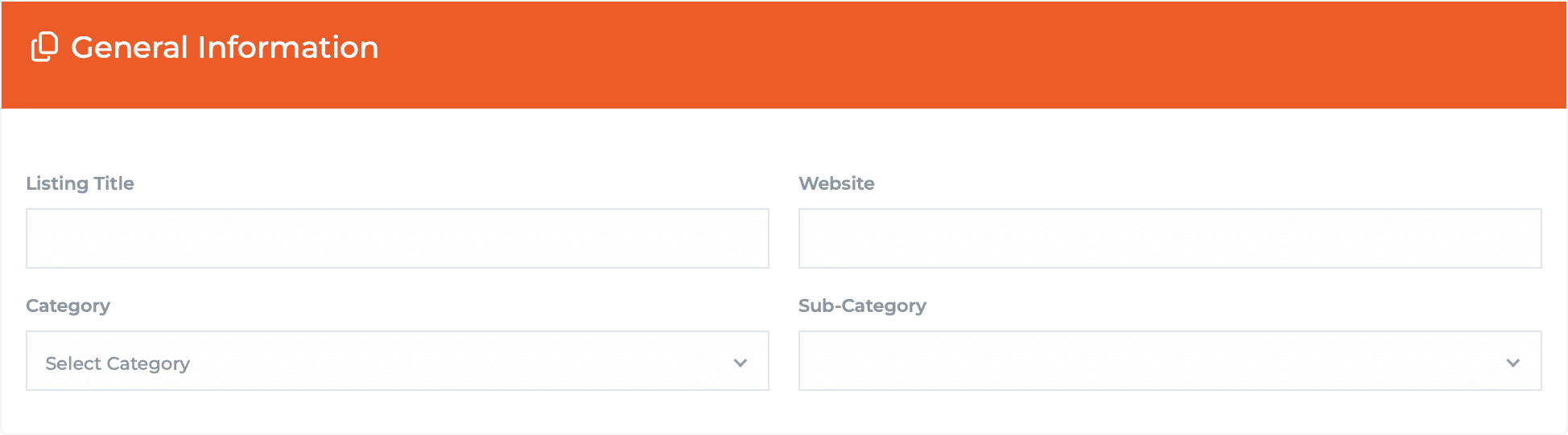
General Information: the name, the address and the shelf
Listing Title is your product's name, and it becomes both the heading of your listing and the title of its page, written as "Name | SaaS Radius". Search results usually show that title as their headline, so use the name people already search for, with no slogan attached.
Website is the address behind the Visit Website button and behind your name in the sidebar, so give the address you want visitors to arrive at, https:// included. Pick the Category next, one of 31; the Sub-Category list fills only after that. There are 224 sub-categories in all, from Invoicing and Help Desk to Gantt Charts and Password Management, and the one you choose is printed beside your name and links to its own page of similar products.
Full Details: the two boxes that make the page
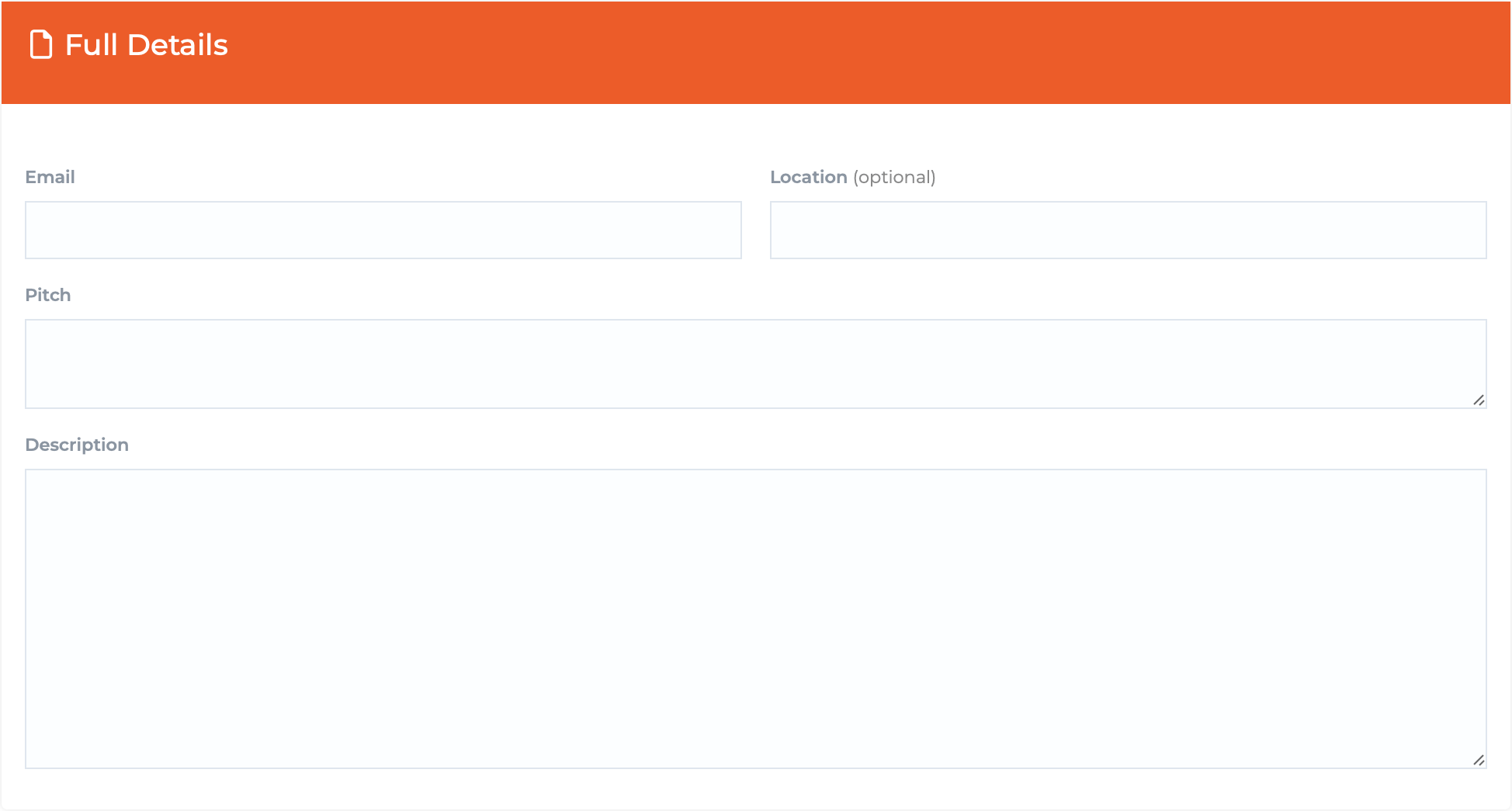
Email and Location come first. Neither is printed on your listing, and Location is marked optional. Below them sit the two boxes that carry the page: Pitch, a short one, and Description, a tall one.
The pitch is one line. Across 66 listings with a pitch, the median runs to about fifty characters, room for what the product does and for whom. The description fills the Description box on your page, and on those same listings its median is about 430 characters: a few short paragraphs on the pain it removes, how it works and who relies on it.
Socials: fill the three that show
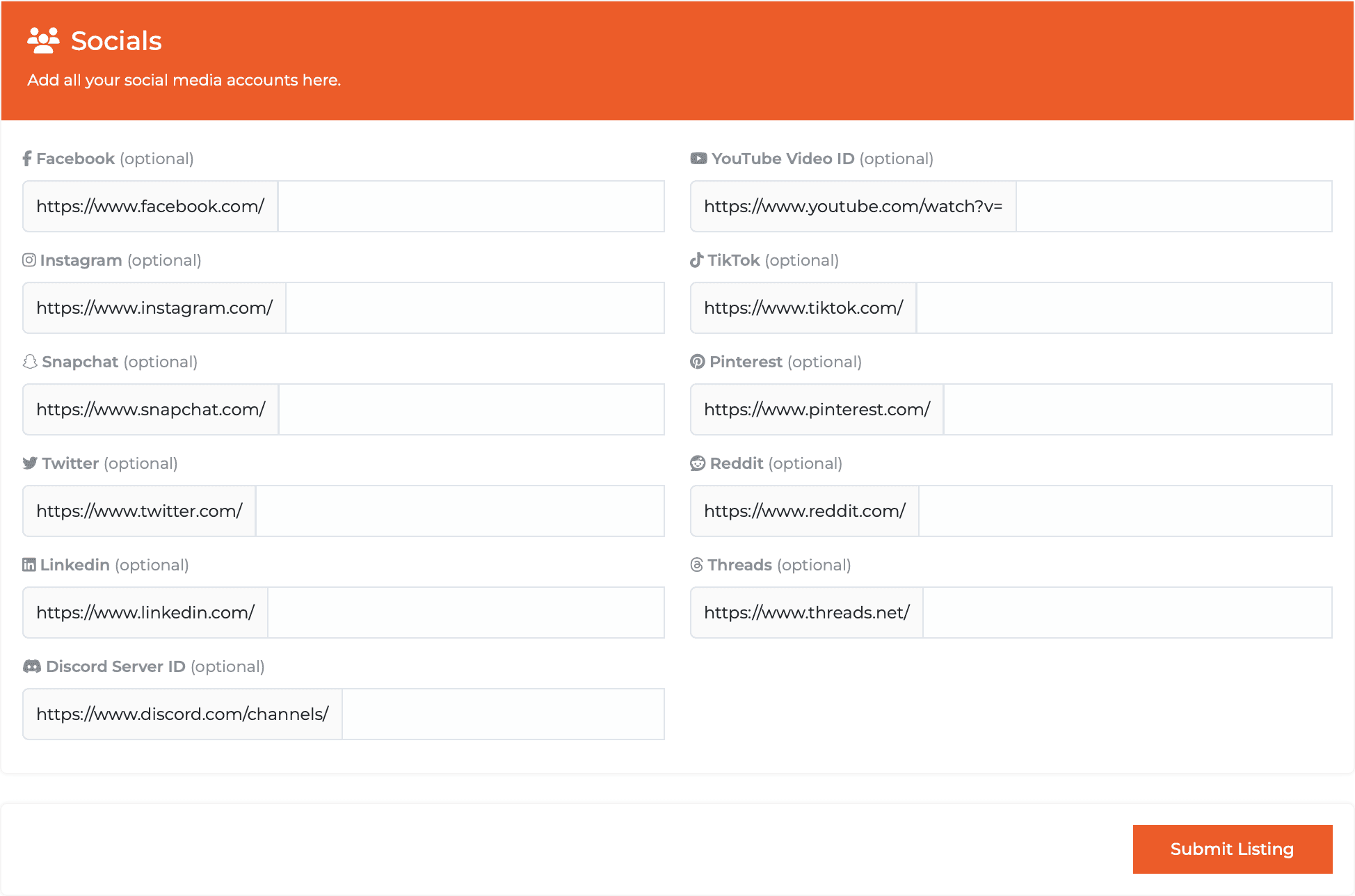
The last card asks for "all your social media accounts" and offers eleven networks, each a field with a grey prefix such as https://www.linkedin.com/ already in place. On listings sent through this form, the icons in the Socials box are Facebook, Instagram and LinkedIn, so those three are the ones to fill.
Type only what follows the prefix, since the link is printed exactly as you type it: for LinkedIn that is company/yourname, with no slash in front and no spaces. Each icon is a plain link to your profile.
Sending it, and what to plan on
One setting on your own side first. SaaS Radius makes each listing's thumbnail by visiting the site, and its FAQ says: "You need to whitelist our IPs to allow our system to access your website and generate a thumbnail." If a firewall or bot check guards your site, allow 137.184.196.172 and 88.198.41.235 before you submit.
Then press Submit Listing. The site answers "Listing request was added successfully" and returns you to its home page.
The review is theirs, and the notice above the form sets the pace: "Due to the high volume of requests, please note that it may take a few weeks for us to review and respond." So send it weeks ahead of a launch rather than in the days before one. Changes later go by email to support@saasradius.com, and their FAQ asks you to "contact us with the details you would like to change".
Your page, and the link on it
An approved listing is a page of its own. Your name heads it with the sub-category beside it and the pitch beneath, followed by the Visit Website button and the Description box; the sidebar holds a Contact info box with your name as a link and a Socials box with your icons. Listing pages are open to indexing, and robots.txt blocks nothing.
Both links to your site go straight there with no redirect, and on 164 of 165 regular listing pages both carry rel="nofollow", which asks search engines not to count them as votes for your site. The three featured listings link without it; the About page mentions "featured listings for increased visibility", but no price for one is published. That is why the SaaS Radius card in our catalog reads "no equity" before its Domain Rating: pick it for the page and the shelf, not for link equity.
Both boxes, written for SaaS Radius
Choose SaaS Radius when you pick your directories and the form is sent complete. The pitch is written to read as one line under your name, the description is written for SaaS Radius alone and the category and sub-category are set from their tree.
The email you give us goes in the Email field, and the form goes through the free route alongside the other directories you picked.
Should your SaaS be on SaaS Radius?
Yes, if it is SaaS. There is no fee, no sign-up and nothing to place on your site, and an approved listing becomes a page named after your product on a shelf that fits it. Put the work into the pitch, the one line that sits under your name on the page and on category cards, and send it early; their notice speaks of weeks.
How to submit to SaaS Radius, step by step
- 1
Open the form on the www address
Go to www.saasradius.com/add-listing. The address without www shows a certificate error, and no sign-in comes first.
- 2
Check that the product is SaaS
The directory takes software and services people use online, and a person reads each submission. Off-topic ones are turned down without a message.
- 3
Fill General Information
Listing Title becomes your heading and the page title. Paste the full https address into Website, pick a category, then a sub-category once its list loads.
- 4
Fill Full Details
Email is not shown on the page and Location is optional. Write the pitch as one line, around fifty characters on a typical listing that has one, and the description as a few short paragraphs.
- 5
Add Facebook, Instagram and LinkedIn
Type only what follows the grey prefix, such as company/yourname, with no leading slash or spaces. These three appear as icons on your listing.
- 6
Allow two IPs, then press Submit Listing
If a firewall guards your site, allow 137.184.196.172 and 88.198.41.235 so the thumbnail can be made. The site answers “Listing request was added successfully”.
- 7
Or leave the form to Submitator
Pick it among your directories. We fill in every field, put your own address in the Email field and write a description used only on SaaS Radius.
$0 here. $29 for the thirty you have not filled in yet.
One payment, every directory named in your dashboard with its Domain Rating on the card and a no-equity mark where the link passes none, so you can tell a link from a listing before you pick it.
One free form here. $29 files thirty.
SaaS Radius takes SaaS products free through one form of three cards, with no account and a person reviewing every submission. An approved listing gets its own page under your product's name, carrying your pitch, a Description box and a Visit Website button, on one of 224 sub-category shelves. The pitch and the description are ours to write when you pick it: $0 here, $29 for thirty. The whole catalog.
FAQ
How do I submit to SaaS Radius?
Open www.saasradius.com/add-listing, with the www, because the bare domain shows a certificate error. Fill the three cards (General Information, Full Details and Socials), then press Submit Listing. You never make an account or pay anything.
Is SaaS Radius free?
Yes. Their FAQ says “We do not charge any fees to list your SaaS on SaaSRadius.” The same answer asks only that you consider “providing a discount or special offer to our users”, and nothing on the site carries a price.
What can I submit to SaaS Radius?
SaaS only. The rules above the form say “This directory is exclusively for SaaS (Software as a Service) projects. Please do not submit websites, blogs, e-commerce stores, or other non-SaaS platforms.” A submission should be software or a service people use online; off-topic ones are turned down without a message.
What does the SaaS Radius form ask for?
Nineteen fields on three cards. General Information takes the Listing Title, Website, Category and Sub-Category; Full Details takes your Email, an optional Location, a Pitch and a Description; Socials offers eleven optional social fields. There is no upload, because the thumbnail is made from your site.
How long does SaaS Radius take to review a submission?
Plan on weeks. The notice above the form reads “Due to the high volume of requests, please note that it may take a few weeks for us to review and respond.” Every submission is reviewed by hand.
Is the SaaS Radius link dofollow?
No. A regular listing has two links to your site (the Visit Website button and your name in the Contact info box), and on 164 of 165 regular listing pages both carry rel="nofollow". They point straight at your site, no redirect in between, and none is marked sponsored or ugc. The three featured listings link without nofollow, and the social icons are plain links to your profiles.
Which social profiles show on a SaaS Radius listing?
Facebook, Instagram and LinkedIn. Those are the icons on listings sent through this form, each a plain link to the profile. Type only what follows the grey prefix in each field, such as company/yourname for LinkedIn.
Why is my SaaS Radius thumbnail not showing?
Their FAQ gives the reason: “You need to whitelist our IPs to allow our system to access your website and generate a thumbnail.” The two it lists as its main IPs are 137.184.196.172 and 88.198.41.235. Allow both in your firewall or bot protection, ideally before you submit.
What is SaaS Radius's Domain Rating?
10. That is the figure Ahrefs gives saasradius.com, read through our checker on 10 October 2026.
Does Submitator submit to SaaS Radius?
We do, on the free route. Pick SaaS Radius in your dashboard and we complete its whole form: the pitch, both category fields, your own address in the Email field and a description that appears on no other directory. Thirty directories, all chosen by you, come to $29.
More submit-to guides.
SaaS Radius is free. Thirty directories are $29, each one measured.
One payment. Each directory is named with its Domain Rating on the card before you choose it, a no-equity mark sits where the link passes none and a rejection is swapped for another directory.