
Free Weekly Launches at DR 60. Their Badge Books Your Week.
Submitator sends customers through Launch Vault's free route and places the badge it asks for, so read this as a guide from people who use that route. Quotes and counts come from launchvault.dev on 11 October 2026.
Launch Vault runs launches in weekly rounds. Each round opens on a Monday at 8:00 AM UTC with room for up to 25 free and 10 Premium launches, and every launch keeps what their Free card calls "a permanent, Google-indexed listing". Its Domain Rating is 60 on Ahrefs, read with our checker on 11 October 2026, and 2,290 listing pages have gone up since the first launch in July 2025.
There is one condition on the free route, and the Free card prints it under the queue: "Badge verification is required before a free launch is scheduled." Their badge goes on the page you submitted and you press Verify. Their check fetches that page for a followed link to launchvault.dev; once it passes, you choose your week.
That badge is our part. We file customers on the free route, where our badge component puts Launch Vault's badge on the customer's site and keeps it live. Once it is verified, earlier launch dates open up.
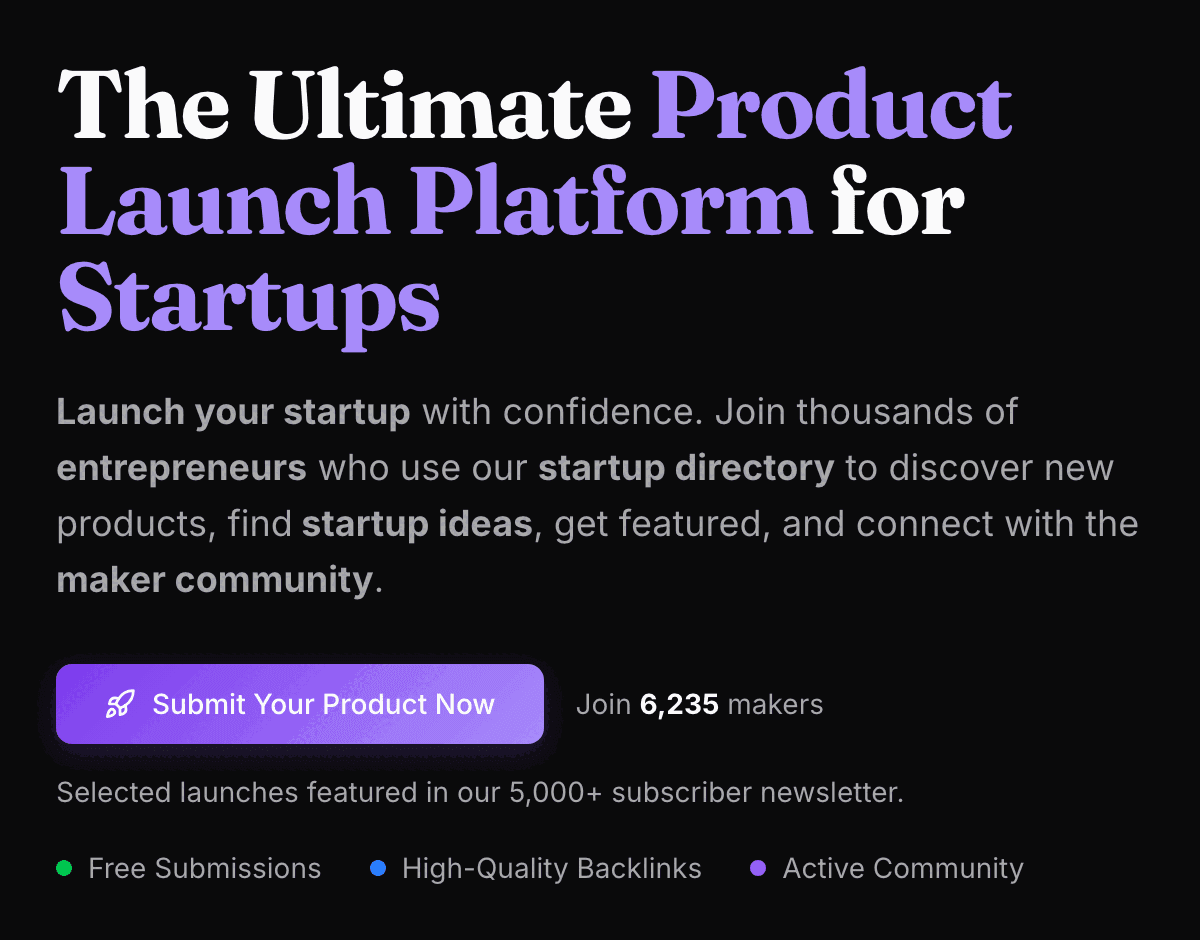
| Field | What it asks for |
|---|---|
| Product URL | Required, at the top of step 1; Auto-fill with AI drafts the other fields from it, and it becomes your Visit Website link |
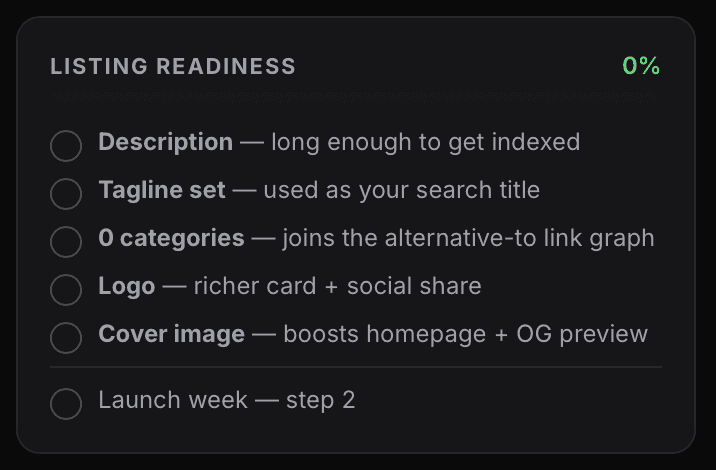
| Project Name, Tagline | Both required; the readiness card says the tagline is “used as your search title” |
| Short Description | Required; formatted text (headings, bold, italics, lists, quotes) with no link button, and the placeholder asks for at least ~80 words |
| Key features, Use cases, Best for | Optional, up to five of each, shown on your page as bullets, a checklist and tags |
| FAQ | Required, three pairs at least, shown on your page and built into FAQ markup |
| Categories | Required, up to three of 43 |
| Platforms, Pricing Model | Required: Web, Mobile, Desktop, Api or Other; Free, Freemium or Paid |
| Alternative to | Optional; the main product yours replaces, picked from their list |
| Special deal | Optional discount code and amount, shown only when both are filled in |
| GitHub URL, Twitter URL | Optional; icons at the top of your listing |
| Logo, Cover image | On the readiness checklist: “richer card + social share” and “boosts homepage + OG preview” |
| Launch week | Step 2: their badge on your site, Verify, then a date from the free weekly slots |
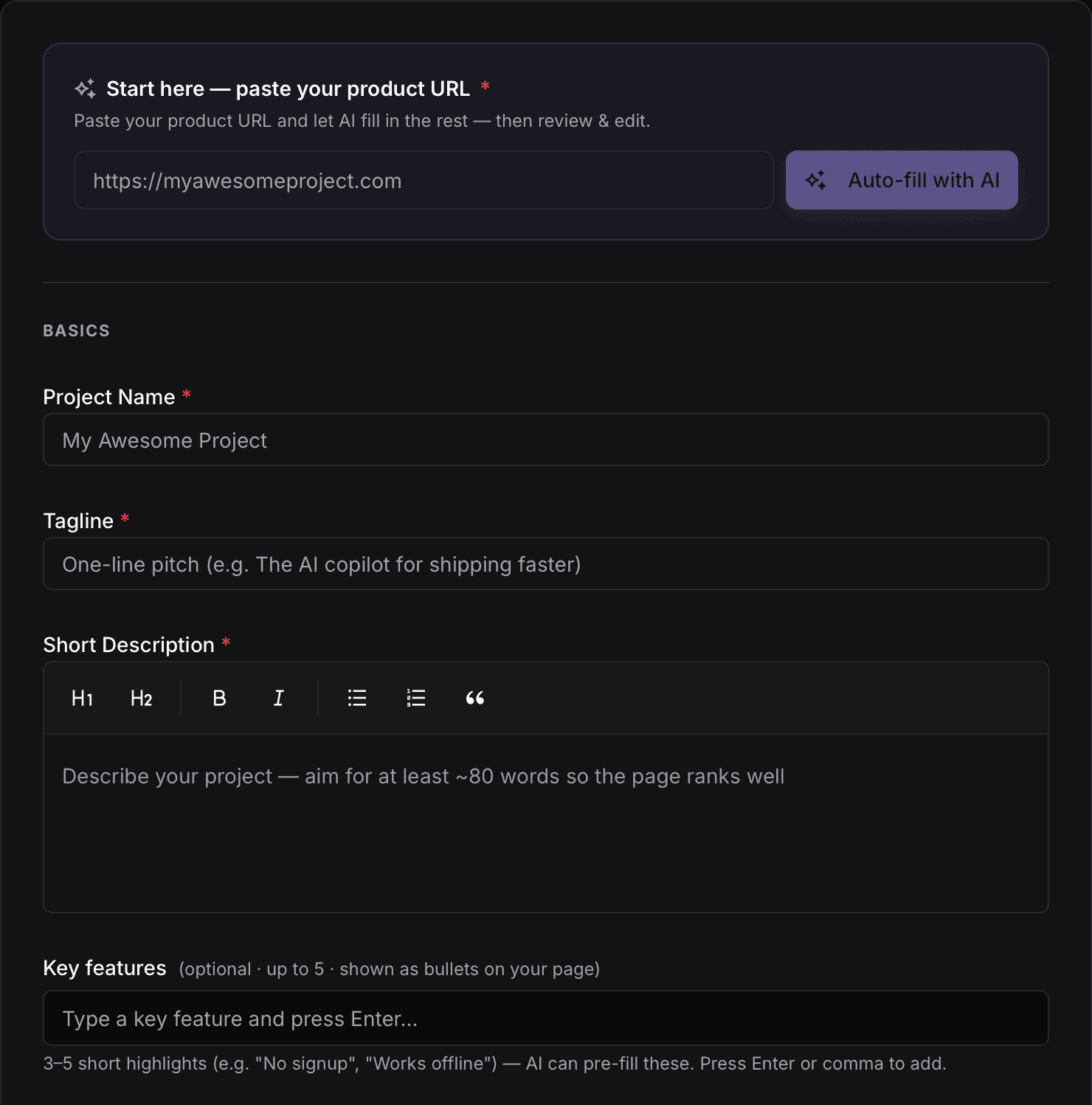
"Badge verification is required before a free launch is scheduled." Their blog says who the free route suits: "Use the free launch if you have a site you control and you're happy to keep our badge in your footer." A footer is where our component sits. Installed once, it carries Launch Vault's badge with no commit from you, and we keep it there.
Launch Vault at a glance
| What you get | Launch Vault |
|---|---|
| Price to list | $0 with their badge verified; Premium $9.99 once, no badge |
| Their badge | Verified on your site before a free launch is scheduled |
| Launch days | Mondays at 8:00 AM UTC; up to 25 free and 10 Premium a week |
| Listing page | Permanent and open to indexing, with FAQ markup and a self canonical |
| The link | Followed on Premium and on top-three finishes, 1,234 of 2,290 pages; nofollow on the other 1,056 |
| Domain Rating | 60 (Ahrefs) |
| Listings | 2,290 since July 2025, in 43 categories |
| Filed for you by Submitator | Free launch, badge placed and kept live, from $29 |
Read from launchvault.dev with GET requests alone on 11 October 2026, 14:15 to 18:10 UTC: the home page, /pricing, /legal/terms, /legal/privacy, /categories with all 43 category pages, /trending, /winners, robots.txt and the sitemap with every listing page it names, 2,290 in all. The blog posts quoted are those on free launches and on dofollow links, both dated 28 May 2026, plus one on upvotes dated 1 June 2026. The site deployed a new build that afternoon, and the quotes from its pricing page, home page, terms and all three posts were read again on it. Form labels and placeholders are transcribed from screenshots of the blank form supplied by Submitator's founder, and the field set agrees with the project fields in the site's public code; the home page and plan card images were saved from a browser that same day. All 2,290 listing pages hold a single Visit Website anchor, pointing at the submitted address plus ?ref=launchvault; 23 addresses already held a query string and so end up with two question marks, and one of those, an app store address, returned 404 where the address as submitted loaded. Beyond that anchor, the only maker links are the optional GitHub and Twitter icons, rel="noopener noreferrer" and so followed; on 11 pages one or both lead to the product's own host. Premium listings, 75 of them, all carry the Visit Website anchor as rel="noopener", as do the 1,159 free listings with a Weekly or Daily Winner achievement; the remaining 1,056 free listings carry rel="noopener nofollow", and sponsored and ugc appear in no product link. Not one page carries a robots directive, either as a header or as a meta tag, and all 2,290 canonicals point back at the page they sit on. The anchor was located three ways, by its button text, by the product's host and in the page data, with matching results, and the same rel came back when 12 pages were fetched as Googlebot and when 16 were rendered in a browser. Daily Winner labels come from the daily ranking the site ran before its launches went weekly, and all 43 July 2025 listings with that label still link out followed. Category sizes are the /categories counts, which agree with a walk of every category page. Ahrefs puts launchvault.dev at Domain Rating 60, the figure submitator.com/domain-rating-checker reported at 18:34 UTC on 11 October 2026, up from 59 at 16:54 UTC; the site's pricing page and blog print DR 58. Nothing on the site was filed, upvoted or purchased while researching this guide. Submitator's part is as our founder set it out on 11 October 2026: we submit customers through Launch Vault's free route with their badge on the customer's own site, which unlocks earlier launch dates; we place it with our badge component and keep it live. The component itself is a single install on the customer's site and carries every badge or link the plan's directories require, Launch Vault's included, so a new directory costs the customer no commit. Step 1 of the form is written by us for this directory. Our plans are one-off: $29 buys thirty directories, $49 buys sixty and $79 buys a hundred. Customers pick their directories from a dashboard that shows the Domain Rating of each, and each rejection earns one extra directory to pick, as our terms set out.
The badge goes up before your week is booked
Their snippet is a linked image, titled Featured on LaunchVault and set 195 pixels wide, that points at launchvault.dev. Their blog says where it belongs: "Put the badge on a page that's publicly reachable — your homepage or your site-wide footer is ideal, because a footer shows up on every page including the homepage."
Then you press Verify, and their check fetches the exact address you submitted, so if that is not your homepage, the badge goes on that page or in the footer. The link has to count: "it has to be a normal do-follow link." If a theme or plugin adds nofollow, ugc or sponsored to it, the check fails. Once it passes, you take a date from the free weekly slots. You can also save the project privately first and finish the badge step later from your dashboard.
That whole step is ours. One Submitator component goes onto your site once and carries whatever badge or link each directory in your plan asks for. For Launch Vault it shows their badge and we run their Verify, which opens up the earlier launch dates. From then on the badge stays live, and neither this directory nor the next one needs a commit from you.
Badges our one component already carries
Why the badge stays up after you verify
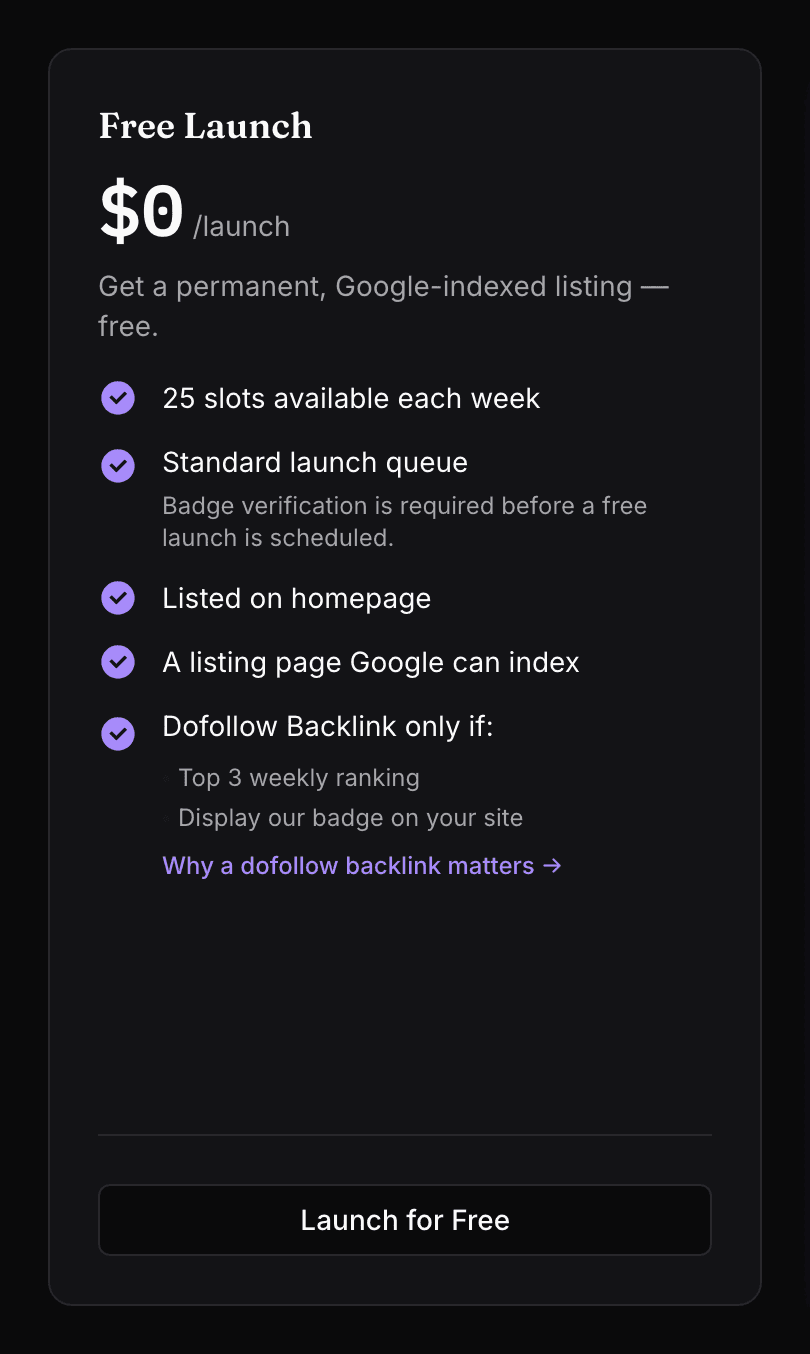
The Free card prints two lines under "Dofollow Backlink only if:", and the second reads "Display our badge on your site". That is the present tense: a badge on display, not a badge that was there on the day of the check. Their blog pitches the free route the same way, to makers who keep the badge in their footer.
The same post warns that the terms can move: "We may tighten the limits or raise the bar as the platform matures." So the badge belongs on your site for good. Ours stays there because keeping every directory's badge live is part of the plan you buy, not a note on your to-do list.
What your listing page carries
A Launch Vault listing is a full page. Under your logo, name and tagline it opens on What is your product, then How to use it in numbered steps, then your key features, use cases and best-for tags. Other tabs hold six alternatives and similar tools, your FAQ and the comments. Beside them, a Launch facts panel lists the publisher, launch date, pricing, platforms and tech stack above the Visit Website button.
All 2,290 listing pages name themselves as canonical, carry no noindex, appear in the sitemap and turn their FAQ into FAQPage markup. During its week a listing sits in This Week's Launches on the home page; after that, in Last Week's Launches, its categories and, for a weekly top three, the winners page. Their pricing page adds "Newsletter consideration included with every launch."
Where the followed link comes from
Visit Website is the product button on every listing, and it goes directly to your submitted address with ?ref=launchvault added on the end. Premium listings carry that link followed, all 75 of them. A free listing carries it followed once it finishes in the top three of its launch week, which shows on the page as a Winner achievement: all 1,159 free listings with one link out followed, while the 1,056 without one carry rel="noopener nofollow".
That matches the first line under "Dofollow Backlink only if:" on their Free card, "Top 3 weekly ranking". The label does not lapse either: listings that won a day in July 2025, when the ranking was still daily, carry it today and still link out followed.
The ranking counts votes from launch week; in the words of their terms, "Projects are ranked weekly based on community votes received during their launch week." Votes keep working once the week is over, too: part of the Similar tools block on other listings "is reserved for high-upvote products", according to their blog. So tell your users the week your launch opens.
The form, field by field
Product URL comes first. Give the precise page you want the Visit Website button to open, without a query string: Launch Vault adds ?ref=launchvault to whatever you paste, even an address that already holds a question mark, and an address built that way can land on an error page. Auto-fill with AI then drafts the fields below from that page; read each one before you keep it.
Tagline is, according to their readiness card, "used as your search title", so write it as one: the product and its audience, in a single line. Short Description asks for "at least ~80 words so the page ranks well". The editor offers headings, bold, italics, lists and quotes but no link button, so spell out the problem, the audience, how it works and the price in words.
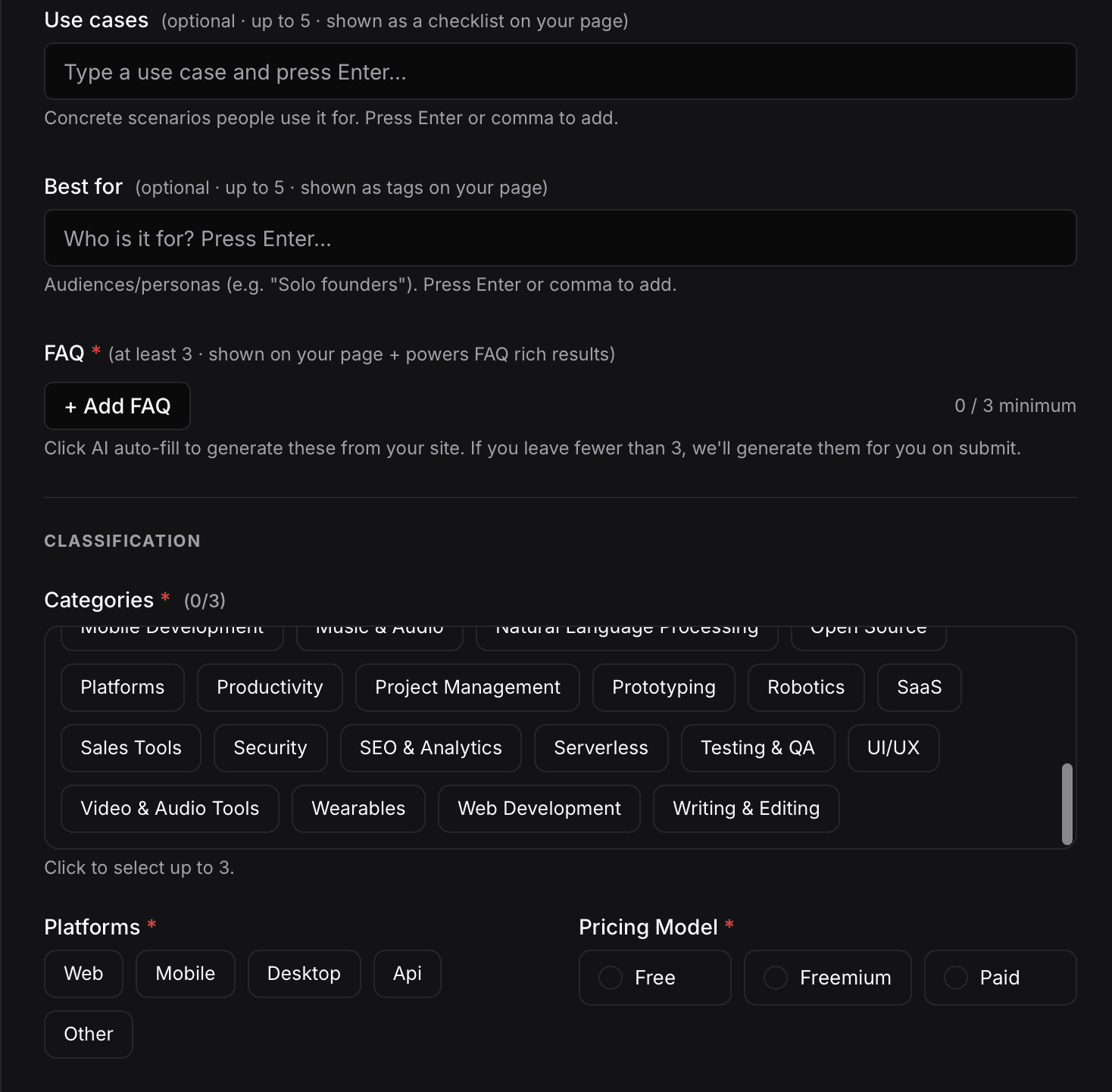
Key features, Use cases and Best for take up to five entries each and print as bullets, a checklist and tags. Their own examples set the register: short features such as "No signup", concrete scenarios and audiences such as "Solo founders". The FAQ needs three pairs or more; leave fewer and the form says it will generate them for you on submit, so write your own from the questions buyers actually ask.
Categories allow three of 43. The broad ones are crowded: on 11 October Artificial Intelligence held 1,007 listings, SaaS 727 and Productivity 472. Pairing a broad category with a precise one puts you on a short page as well as a long one. Platforms and Pricing Model show in your Launch facts panel.

Alternative to is optional and worth filling in when the match is genuine. Their help text says it "helps users find you when searching for alternatives" and warns that "unrelated tags are removed during review". Special deal shows on your page only with both the code and the amount filled in. GitHub URL and Twitter URL become icons at the top of your listing, and both link out followed, so give the real repository and profile.
What we write and place for you
Pick Launch Vault in your plan and step 1 is ours to fill: a description written for this directory to their 80-word hint, the features, use cases and best-for tags, the FAQ pairs, the categories and the rest of the form. Your Launch Vault account runs on an email we create on your behalf.
Step 2 is the badge, placed through our component, passed through their check and kept live afterwards. Thirty directories cost $29, and you choose each of them in the dashboard, where its Domain Rating is shown.
What Premium's $9.99 adds
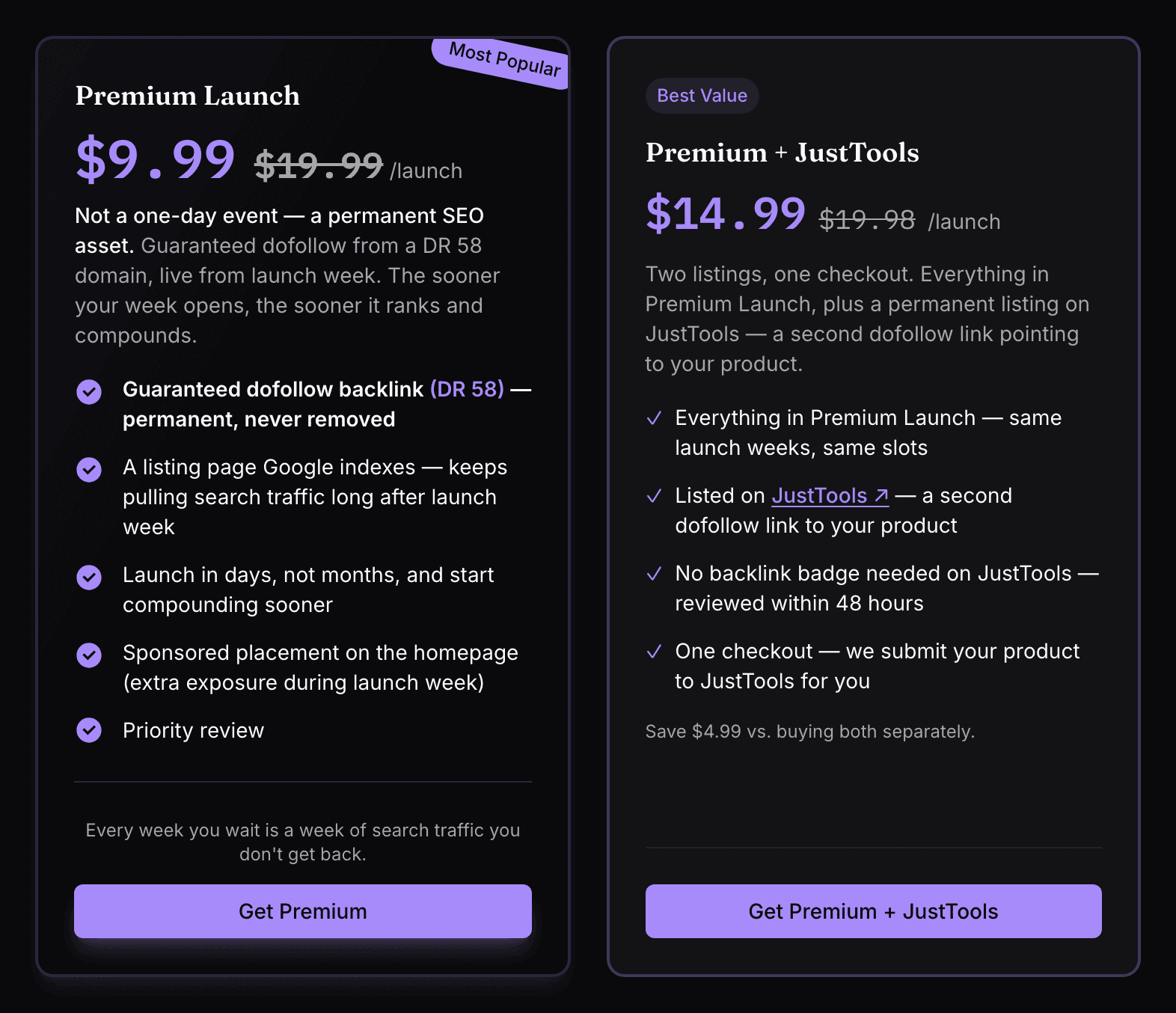
Premium costs $9.99 once (shown against $19.99), and their blog sums it up: "A Premium launch includes a guaranteed dofollow backlink from LaunchVault to your product, and no backlink to us required." The card adds a sponsored spot on the homepage during launch week and priority review, and Premium dates can be picked within the next 30 days. Premium + JustTools, at $14.99, adds a second listing on JustTools.
The guaranteed followed link, the date you pick within 30 days, the homepage spot and the priority review belong to Premium. Our route is the free launch, with the badge placed by our component and kept live.
Launch Vault review: the short answer
Book the free launch. It gets your product a week in This Week's Launches and a permanent listing page on a DR 60 domain, with your description, features, use cases and FAQ on it and up to three of 43 categories around it. The one condition is their badge, verified on your site before your week is booked. Put it up, leave it up and fill the form in full.
How to launch on Launch Vault, step by step
- 1
Create an account
Sign up with Google, GitHub or a name, email and password, then open Submit Project. The form opens only for a signed-in account.
- 2
Paste a clean product URL
Use the address the Visit Website button should open, with no query string of its own, since ?ref=launchvault is added after it. Auto-fill with AI can draft the fields from that page.
- 3
Write the tagline, the description and the lists
A tagline that works as a search title, a description of 80 words or more, then up to five key features, use cases and best-for tags.
- 4
Add at least three FAQ pairs
Answer the questions buyers put to you. The pairs appear on your listing and in its FAQ markup.
- 5
Classify it and add the extras
Up to three of 43 categories, your platforms and pricing model, an Alternative to pick only if the match is real, a deal only with both fields filled in, then your GitHub and Twitter addresses.
- 6
Place the badge and press Verify
Put their snippet on the address you submitted, or in a footer that renders there, as a plain link with no nofollow, ugc or sponsored. Then pick your week from the free slots.
- 7
Tell your users when your week opens
Launches open on Monday at 8:00 AM UTC, and the top three by launch-week votes earn a Winner achievement and a followed link.
- 8
Or let Submitator file it
We write step 1 for Launch Vault, place the badge through our component, run their Verify and keep the badge live with your other directories' badges.
Their $9.99 skips the badge. Our $29 installs it, on thirty directories.
One payment, every directory named in your dashboard with its Domain Rating on the card, a rejection replaced by another directory you pick and one component that places every badge a directory asks for and keeps it live.
$9.99 skips their badge. $29 places it for you, on thirty directories.
Launch Vault launches products every Monday at 8:00 AM UTC and gives each one a permanent listing page on a DR 60 domain, with FAQ markup, a self canonical and room in up to three of 43 categories. A free launch is booked once their badge is verified on the site you submitted; Premium, at $9.99 once, skips the badge and adds a guaranteed followed link. Fill the form in full, keep the badge up and tell your users the week you launch. The whole catalog.
FAQ
How do I submit to Launch Vault?
Sign up, open Submit Project and paste your product URL; Auto-fill with AI can draft the rest. Step 1 asks for a project name, a tagline, a description, at least three FAQ pairs, up to three categories, your platforms and a pricing model, with optional features, use cases, best-for tags, an Alternative to pick and a deal, plus your GitHub and Twitter links. Step 2 sets the launch week: Verify must find their badge live at the URL you submitted, after which a free launch takes its date from the free weekly slots.
Is Launch Vault free?
Yes. The Free Launch costs $0 with 25 slots a week, on a condition printed on its card: “Badge verification is required before a free launch is scheduled.” Premium is $9.99 once, with no badge to place; Premium + JustTools costs $14.99 and adds a second listing on JustTools.
Is the Launch Vault link dofollow?
On Premium, and on free listings that finish in the top three of their week. The link in question is the Visit Website button, one per listing page, which leads directly to the submitted address. Every Premium listing had it followed on 11 October 2026 (75 of 75), as did every free listing with a Weekly or Daily Winner achievement (1,159 of 1,159); the other 1,056 free listings, which have none, gave it rel="noopener nofollow". Their Free card lists “Top 3 weekly ranking” and “Display our badge on your site” under “Dofollow Backlink only if:”. No listing page is noindexed.
Does Launch Vault require a badge?
Yes, for any free launch: no free date can be booked until their Verify check passes. Their snippet is a linked Featured on LaunchVault image pointing at launchvault.dev. Verify fetches the exact address you submitted and looks for that link there, so the badge belongs on that page itself or in a site-wide footer that shows on it, as an ordinary followed link. Premium skips it, with “no backlink to us required”, in their words.
What is Launch Vault's Domain Rating?
60, the Ahrefs figure our Domain Rating checker returned for launchvault.dev on 11 October 2026. Launch Vault prints its own number, DR 58, on its pricing page and in its blog.
What does the Launch Vault form ask for?
Step 1 requires your product URL, a Project Name, a Tagline, a Short Description, at least three FAQ pairs, up to three of 43 categories, Platforms (Web, Mobile, Desktop, Api or Other) and a Pricing Model (Free, Freemium or Paid). Optional fields take up to five key features, use cases and best-for tags each, an Alternative to pick, a discount code with its amount, a GitHub URL and a Twitter URL. A readiness card also tracks your logo and cover image, and step 2 sets the launch week.
How does Launch Vault review submissions?
Launch Vault publishes no review time for free launches. Its own wording: the form warns that unrelated Alternative to picks “are removed during review”, Premium lists “Priority review” and the terms say “Projects that are incomplete, misleading, or violate our community guidelines will be removed.” Badge verification itself, their blog says, “is instant”.
When do Launch Vault launches go live?
Every launch window opens on a Monday at 8:00 AM UTC, and their FAQ says “We launch up to 25 free projects and 10 premium projects each week.” On the free route you pick your date from the free weekly slots once the badge is verified; Premium users pick within the next 30 days. Each launch then spends its week in This Week's Launches, ranked by votes.
What categories does Launch Vault have?
43, running alphabetically from 3D & Motion Design to Writing & Editing, and each listing may join as many as three. The biggest on 11 October 2026: Artificial Intelligence with 1,007 listings, SaaS with 727 and Productivity with 472.
Does Submitator submit to Launch Vault?
We do, through the free route. Our badge component puts Launch Vault's badge on your site, which unlocks earlier launch dates, and we keep that badge live afterwards; the component goes onto your site once. We also write step 1 for this directory, the description and FAQ pairs included. Thirty directories cost $29.
More submit-to guides.
Their $9.99 skips the badge. Our $29 installs it, on thirty directories.
One payment, each directory named with its Domain Rating on the card before you choose it, a rejection swapped for another directory and one component that installs every badge and keeps it live.