
Free or Boosted, a ToolsNoCode Listing Carries the Same Followed Link.
ToolsNoCode is on our list: we file customers there through its free route. The form, the listings and the numbers here were all read on 10 October 2026.
ToolsNoCode lists AI and no-code tools, 2,927 of them across 33 categories on 10 October 2026, and listing yours costs nothing. Sign up, fill in the one form headed New Tool and press Publish Tool; the next screen reads "Your tool has been published".
Each listing gets a dedicated page that links to your site once, through a Visit Website button that goes straight to the exact address you typed. That link is followed. On all 120 listings we read on 10 October, nothing marked it nofollow, sponsored or ugc, and every page invited indexing and named itself as canonical.
ToolsNoCode sells one thing, Boost, at $49.90 a year: the top of the directory, a homepage section, a demo video and a badge. The link stays as it is, so free and boosted listings carry the same one. Our customers' tools go in as free listings, with the tagline and description written for ToolsNoCode.
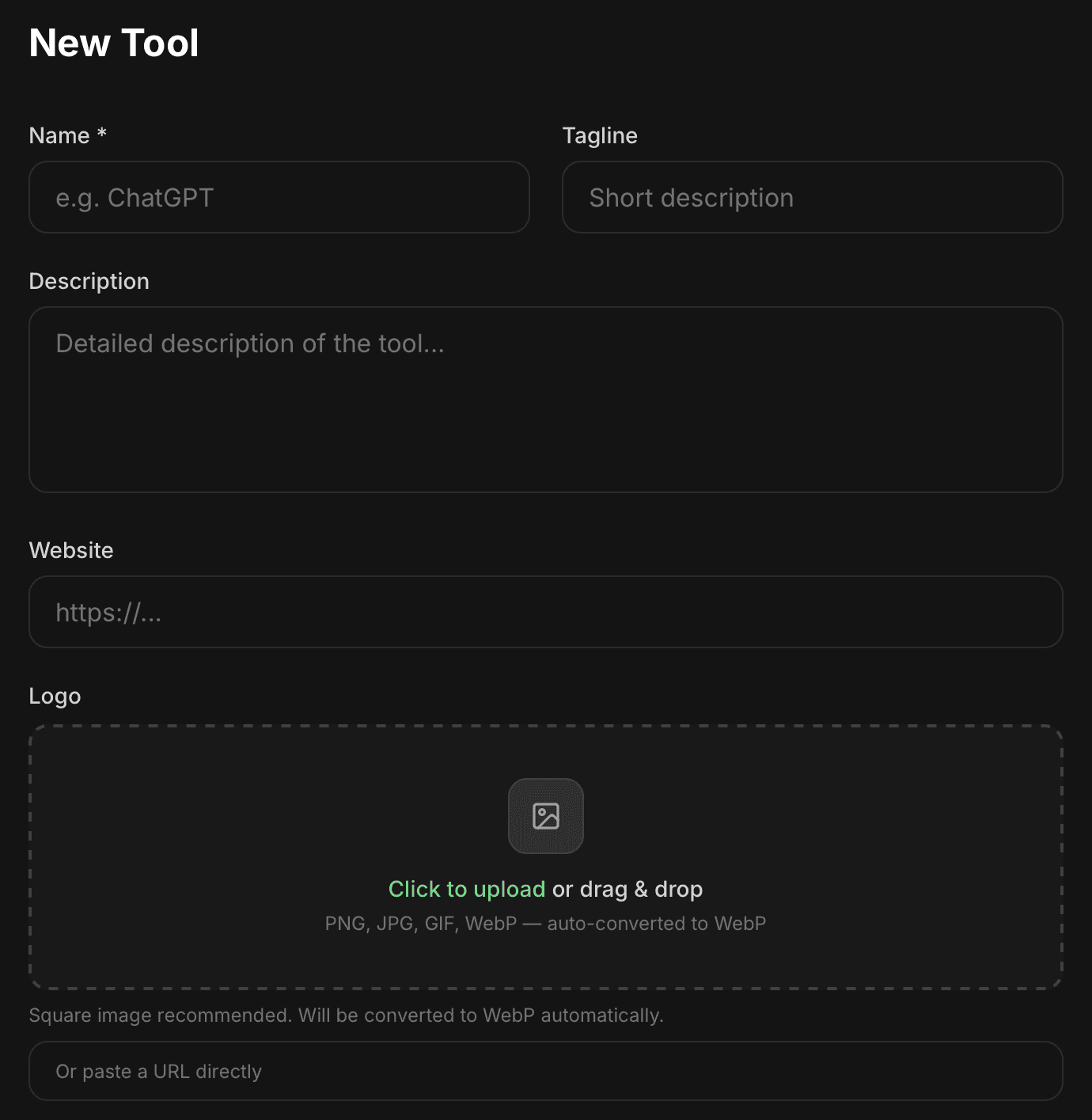
| Field | What it takes |
|---|---|
| Name | Required; becomes the page address, lowercased with hyphens |
| Tagline | Optional, no limit; under the name, in the page title and on the share card |
| Description | Optional, no limit; fills the About section |
| Website | Optional, stored exactly as typed; the listing's only link |
| Logo | An upload under 10 MB (saved as WebP, 512 px at most) or a pasted URL |
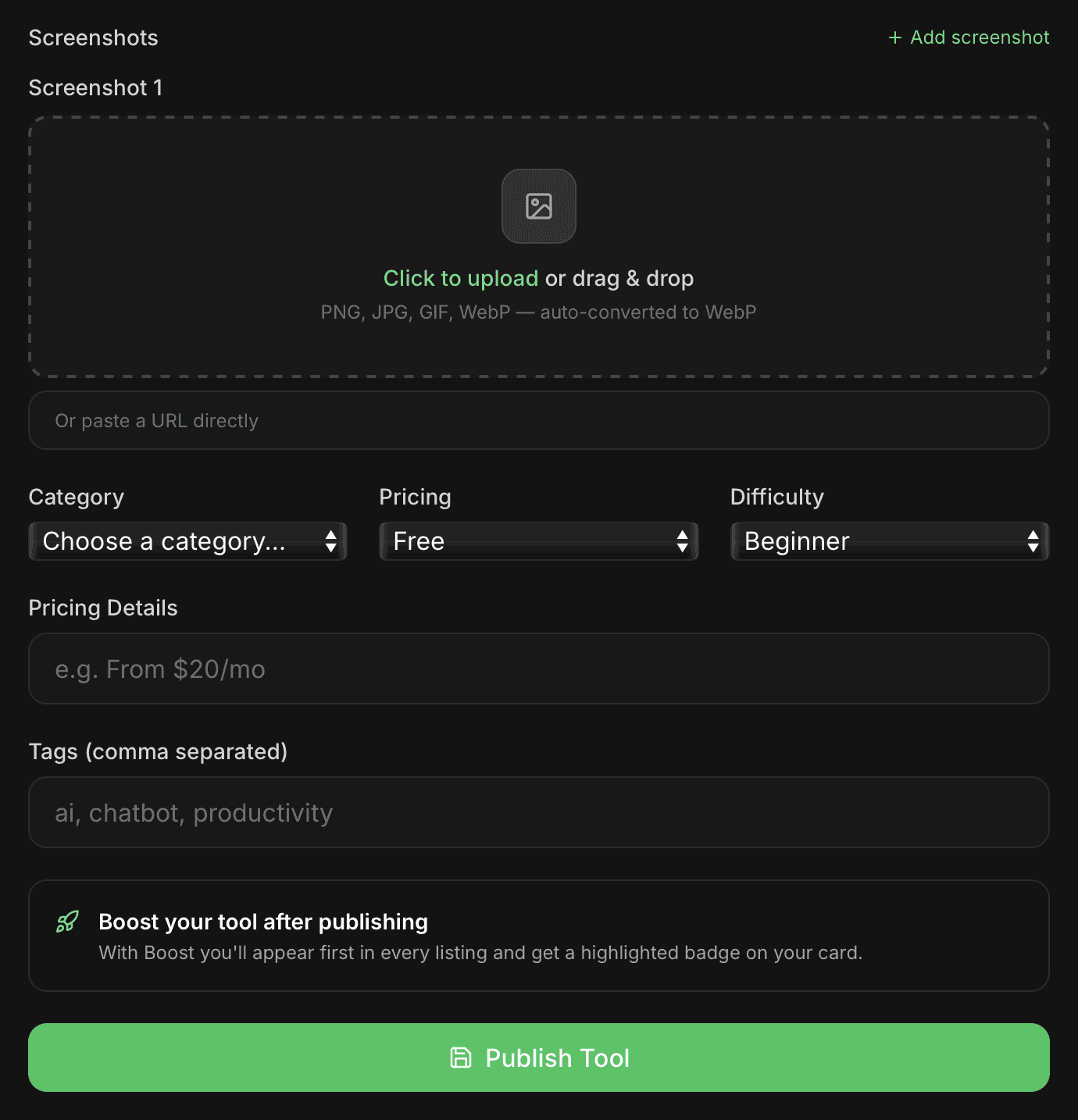
| Screenshots | As many as you add; saved at up to 1,280 px on the long side |
| Category | Required, one of 33 |
| Pricing | Free (preset), Freemium, Paid or Enterprise |
| Difficulty | Beginner (preset), Intermediate or Advanced |
| Pricing Details | Optional free text, such as From $20/mo |
| Tags | Optional, separated by commas |
A boosted listing and an Editor's Pick link out exactly as a free listing does: one Visit Website button, straight to the product, followed. Boost changes where a card sits and what surrounds it. The one element on the page that points at your site comes with the free listing.
ToolsNoCode at a glance
| What you get | ToolsNoCode |
|---|---|
| Price to list | Free; Boost ($49.90 a year) is optional |
| Account | Email and a password of 6+ characters, or Google |
| Required fields | Two: name and category |
| After Publish Tool | “It's now live in the directory.” |
| Link to your site | Followed and direct, 120 of 120 pages |
| What Boost adds | Position and extras; the link is unchanged |
| Badge or link back | Neither is asked for |
| Catalog | 2,927 listings in 33 categories |
| Domain Rating | 11 on Ahrefs, via our checker |
| Filed for you by Submitator | Every field, free route, from $29 |
Read on toolsnocode.com on 10 October 2026: the home page, robots.txt, sitemap.xml, /tools, /categories with its category and pricing-label pages, /pricing, the terms, privacy and cookie policies, /news with its three data stories of 13 and 18 September 2026 and the sign-in and sign-up pages; /about, /contact, /faq, /blog and /llms.txt answer 404. The New Tool form is described from its own code, which matches two screenshots of the empty form our founder took that evening; the same code supplies the field limits, the image sizes and the confirmation screen, writes a new listing straight to the directory and keeps manual review for ownership claims. The census covers 120 listing pages, 80 at even steps through the sitemap and the 40 dated most recently. On every one the product has a single link, Visit website, pointing directly at the address submitted, with rel="noopener" in the served HTML and "noopener noreferrer" after rendering; no link carries nofollow, sponsored or ugc (0 of 120 served, 0 of 360 external links rendered), and every page is index, follow with a canonical to itself. All 120 were also rendered in a browser and three fetched with a Googlebot user agent, with identical links, and a boosted listing and an Editor's Pick carry the same link. The 60-character figure is where the served page title starts trimming a tagline. The sitemap and the site's own titles agree on 2,927 listings; the sitemap, /categories, the home page and the form's dropdown agree on 33 categories. Dates are sitemap lastmod values, which also move when a listing is edited; the audit, label and intake figures are ToolsNoCode's own. submitator.com/domain-rating-checker returned Ahrefs' Domain Rating of 11 for toolsnocode.com on 10 October 2026. Our founder is the source for Submitator's side: we file customers to ToolsNoCode on the free route (10 October 2026), write each directory its own description and cut images to each site's format. Starter costs $29 for 30 directories, Growth $49 for 60 and Scale $79 for 100, each a single payment, and you pick every directory in the dashboard; a rejected submission is replaced by one more directory of your choosing, and refunds follow the conditions set out in our terms.
Sign up, then look in the footer
The form sits behind a free account. Signing up takes an email and a password of at least six characters, or just a Google account through Continue with Google. Nothing else is asked: no company name, no card. Get Started, at the top of every page, opens the sign-up.
Signed in, head for the footer, because the menu has no submit link. Submit a Tool sits in the Community column, and the home page carries an Add your tool button near its foot. Before filling anything in, search for your product. If it is listed already and nobody owns it, its page shows Claim this listing, and claiming that page beats publishing a second one.
The name sets your address
Name is the one field with an asterisk, and it becomes the listing's address: lowercased, with every run of spaces or punctuation turned into a single hyphen. A product called My Tool.ai would get the address /tools/my-tool-ai. Use the name you intend to keep.
The tagline has no limit and three jobs. It appears beneath the name on the listing, follows the name in the page title and shows on the 1200 x 630 share card ToolsNoCode draws for every listing, next to your logo, category and pricing label. Keep it to 60 characters or fewer: the title in the page's HTML carries that much whole and trims anything longer with an ellipsis.
Description first, then the one link
The description has no limit either. It fills the About section with your line breaks kept, and its opening words also feed the listing's meta description, which ends at 160 characters. Open with the product's job and the people it serves.
Then keep going. In September ToolsNoCode opened the homepage of every listed tool "whose page was thin enough to need rewriting", about 2,000 of them, according to its audit write-up. A full description from you gives your listing its substance, in your own words, from the first day.
The Website field is the one to get right, and the form will let you skip it. It is the listing's only link: what you type is stored exactly as typed and becomes the Visit Website button, and a blank field leaves the page with no link at all. Paste the full address, https:// included. ToolsNoCode adds no tracking parameters, so add your own utm tag if you want those visits labelled in your analytics.
A square logo, wide screenshots
The logo box says it plainly: "Square image recommended. Will be converted to WebP automatically." Uploads must be under 10 MB and are stored as WebP at up to 512 px on the long side; a pasted URL is used as given.
Add screenshots one by one with + Add screenshot; the form sets no maximum. On the listing they run in a sideways-scrolling row at one fixed height, each keeping its own proportions, so landscape shots fill the most room. They are stored at up to 1,280 px on the long side, so send them at that width or more.
One of 33 categories, one honest label
Category is required. Leave it on Choose a category… and the form will not send; its error message explains that the category "decides which page your tool appears on." The 33 run from 3D & AR/VR to Writing & Copy. On 10 October Marketing was the largest with 382 listings, Other AI had 332 and Education 255, while Translation had five. Pick the one a buyer would open to find a product like yours.
Pricing starts on Free, and ToolsNoCode defines each label on its category pricing pages. Free means "free to use according to the tool's own site, with no paid plan mentioned anywhere on it". Freemium means "offering a permanent free plan next to paid ones; a free trial alone does not count". A trial that turns into a bill is Paid, and Enterprise covers products "sold without a public price".
The labels get checked against the source. A September pass compared the label on 2,000 listings with each tool's own homepage and found 439 wrong, and the write-up's advice to makers is "the label comes from what your homepage says." Each listing also turns up on the pricing page that matches its label (Finance has one for its free tools, for example).
Everything else is optional. Difficulty appears on the listing as Level. Tags, split at the commas, show as chips under their own heading, and Pricing Details takes a line like their example, "From $20/mo". Above the button, a box headed "Boost your tool after publishing" introduces the paid plan. Then press Publish Tool; the confirmation screen repeats the Boost offer next to a link reading No thanks, view my tool.
Where a new listing shows up
The site gives its newest entries several ways in. The home page's Recently Added row, "The latest tools in the directory", holds the eight newest listings, and the main directory list opens sorted by Newest. Standard listings are placed "By date added", as the comparison table on the pricing page puts it, with boosted ones above them.
Your tool can also appear in the alternatives block on other listings in its category, which shows up to eight, the most visited first and then the newest. Category pages sort by Trending, a ranking built on real visits and clicks. The directory is busy, too: its sitemap dates 50 listings to the first ten days of October 2026, and the 13 September newsletter says intake "has run between 62 and 74 a month since June."
Boost: $49.90 a year for position
Boost is the one paid plan, at $49.90 a year. The pricing page lists a "Full-width card at the top of the directory", first place on the category page, the Boosted section on the home page, a demo video on the listing, a Boosted badge and first place in on-site search. The home page labels that section "Paid placement by the people who made them", so a visitor always knows which cards were bought.
What money cannot move is just as clear. Trending is "Earned by real traffic" on both plans, and a boosted listing's Visit Website button is the same followed link a free listing carries. Boost can be cancelled at any time, and, in the pricing page's words, "the boost runs to the end of the period you paid for."
A directory that checks its own listings
In September 2026 ToolsNoCode opened about 2,000 of its listed tools' homepages and delisted 207 of them. In 164 cases the product had been renamed, acquired or replaced; in 35 the domain now served something else entirely. The label check described above ran alongside it, and the audit write-up says plainly: "We will repeat the check." Upkeep like that is what makes a listing here worth having.
For a maker the lesson is simple: keep your homepage and your listing telling the same story. Renamed and repurposed products made up most of the 207.
Every field, filled by us
Customers who tick ToolsNoCode in their dashboard get the whole form handled. We write both the tagline and the description for ToolsNoCode's own fields.
Your logo is cropped square and your screenshots sized for the row they sit in, and the category and the pricing label are set for you. Then it goes in through the free route with your other picks. For a whole package our terms set 2 to 3 days as the target and 21 days as the most we commit to.
ToolsNoCode review: worth listing?
Yes, list it. It is free, wants nothing placed on your site and needs two fields, though it is the website field that carries the link. The listing links to you once, directly and followed, exactly as a paid one does, inside a directory that audits itself. Boost is there for a verified owner who wants the top row; the link does not need it.
How to submit to ToolsNoCode, step by step
- 1
Create a free account
Your email and a password of six characters or more, or Continue with Google. Get Started at the top of the page opens the sign-up.
- 2
Check whether you are listed already
Search the directory first. An existing listing that nobody owns shows Claim this listing; claim it instead of publishing a duplicate.
- 3
Open Submit a Tool in the footer
It is in the Community column, since the top menu has no submit link. The form is headed New Tool.
- 4
Name it and write the tagline
The name becomes the page address. A tagline of up to 60 characters shows whole in the page title.
- 5
Write the description, enter the website
Say who the product serves and what it does, then write the rest in full. Enter the whole address, https:// and all, since it is the listing's only link.
- 6
Upload a square logo and wide screenshots
Files under 10 MB. Logos are stored at up to 512 px and screenshots at up to 1,280 px, and you can add as many screenshots as you like.
- 7
Choose the category and the label, then publish
One of 33 categories and the pricing label your homepage supports, then Publish Tool. The next screen reads “Your tool has been published”.
- 8
Or leave ToolsNoCode to Submitator
Tick it in your dashboard: the tagline and description are written for it, the images cut, every field set and the listing filed through the free route as part of your plan.
$0 here. $29 for the thirty you have not filled in yet.
One payment, every directory named in your dashboard with its Domain Rating on the card, text written for each one and the ones you tick filed for you.
Free listing, followed link. $0 here, $29 for thirty.
Free to list on ToolsNoCode: one form behind a sign-in, two required fields and a confirmation that reads "Your tool has been published". Free or boosted, every listing links straight to its product with the same followed link. We write the tagline and the description, fill in the rest and file it for you. The whole catalog.
FAQ
How do I submit to ToolsNoCode?
Sign up free with your email and a password of six characters or more, or use Continue with Google. Once signed in, follow Submit a Tool in the footer to the New Tool form, fill it in (the name and the category are the two required fields) and press Publish Tool. The screen that follows reads “Your tool has been published” and “It's now live in the directory.”
Is ToolsNoCode free?
Yes. A listing costs nothing, and ToolsNoCode wants no badge or link back on your site in return. Section 2 of the terms says so in one line: “The service is provided free of charge, with additional features available for registered users.” The only thing ToolsNoCode sells is Boost, $49.90 a year, which buys placement for a listing that already exists.
Is the ToolsNoCode link dofollow?
Yes. A listing links to its product once, through the Visit Website button, straight to the address the maker typed. On 10 October 2026 we read that button on 120 listings: its rel never went beyond noopener and noreferrer, and not one of the 120 carried nofollow, sponsored or ugc. Each page also asked to be indexed under its own canonical. ToolsNoCode's own copy never calls the link dofollow; it is simply how every listing is built.
Does ToolsNoCode review tools before they go live?
Its own wording describes publishing, not a review: the button is labelled Publish Tool, and the screen after it says “Your tool has been published” and “It's now live in the directory.” The one manual review the site mentions is for claims on existing listings: “Your request will be manually reviewed before ownership is granted.”
What does the ToolsNoCode form ask for?
Two required fields, a name and a category, and nine optional ones: tagline, description, website, logo, screenshots, pricing (set to Free until you change it, with Freemium, Paid and Enterprise as the alternatives), difficulty, pricing details and tags separated by commas. No text field has a length limit, and images go in as uploads under 10 MB or as pasted URLs. Treat the website as required too: without it the listing has no link.
What does ToolsNoCode Boost include?
Boost costs $49.90 a year and buys position: a full-width card at the top of the directory, first place on the category page, the Boosted section on the home page, a demo video on the listing, a Boosted badge and first place in on-site search. It leaves the Visit Website link exactly as a free listing has it, and the pricing page's own table gives Trending as “Earned by real traffic” on both plans.
Which pricing label should I pick on ToolsNoCode?
The one your homepage backs up. ToolsNoCode's category pricing pages define Free as “free to use according to the tool's own site, with no paid plan mentioned anywhere on it” and Freemium as “offering a permanent free plan next to paid ones; a free trial alone does not count”; a trial that ends in a bill is Paid. Its September write-up on pricing labels tells makers: “If your tool is listed here, the label comes from what your homepage says.”
How many categories does ToolsNoCode have?
Thirty-three, listed alphabetically in the form from 3D & AR/VR to Writing & Copy. On 10 October 2026 Marketing was the largest with 382 listings, ahead of Other AI (332) and Education (255). Choosing one is required, and the form's error message gives the reason: the category “decides which page your tool appears on.”
What is ToolsNoCode's Domain Rating?
DR 11. That is Ahrefs' figure for toolsnocode.com, which our checker looked up on 10 October 2026. Nothing in robots.txt closes the listing pages to crawlers, AhrefsBot included, so Ahrefs can see the links on them.
Does Submitator submit to ToolsNoCode?
Yes. Pick ToolsNoCode in your dashboard and it goes in on the free route: we write its tagline and description for this directory, crop your logo square, size your screenshots for it and set the category and pricing label before pressing Publish Tool. The $29 Starter plan covers thirty directories.
More submit-to guides.
ToolsNoCode is free. Thirty directories are $29, each one measured.
One payment. Each directory is named with its Domain Rating on the card before you choose it, badges are installed and kept live where one is wanted and a rejection is swapped for another directory.