
One Field, Your Product URL. Toplistly Drafts the Rest.
Submitator files customers on Toplistly, using its free plan. This guide draws on toplistly.com as of 11 October 2026: the submit page, the plans and every one of the 178 listings.
Toplistly is a launch board for products and tools, built and run by its founder, Jan Lavička. Listing a product there is free, and the submit page sums up what you get: "Free to list. Your product gets its own page, a spot in its categories, and a launch day on the homepage."
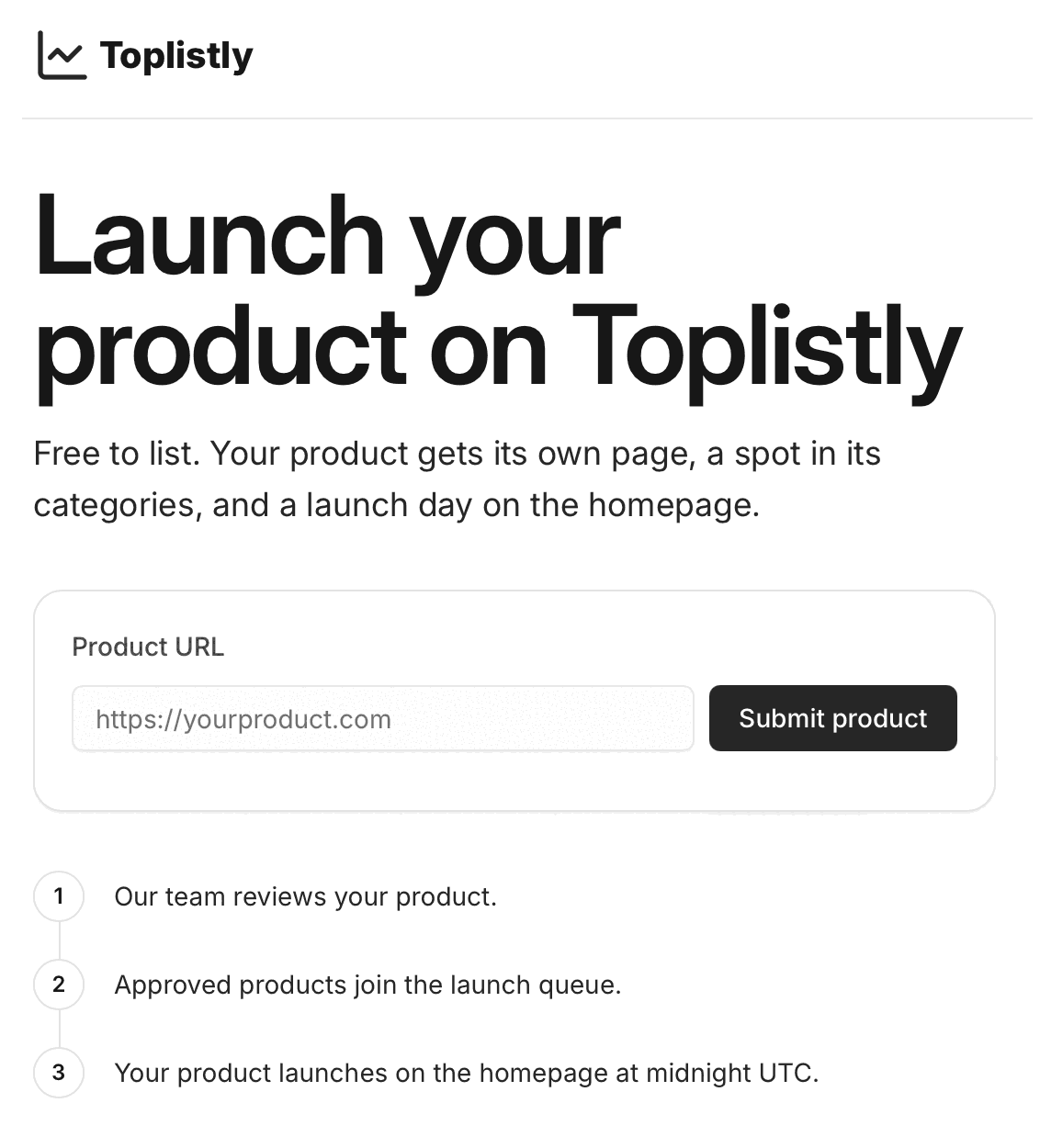
The form asks for one thing, the product URL. Toplistly drafts everything else from your site: the name, the tagline, a full description, the pricing and platform labels, one to three categories, the logo and a screenshot of your homepage. Three steps follow under the form. Their team reviews the product, approved products join the launch queue and each one launches on the homepage at midnight UTC.
We file customers' products here on that free route, as part of their plan: we submit the URL, and Toplistly builds the listing.
| On the listing | Who fills it |
|---|---|
| Product URL | You: the form's only field, a full address |
| Name and tagline | Toplistly, from your site; taglines run 16 to 72 characters |
| Description | Toplistly, from your site; 110 to 382 words, most with a feature list |
| Pricing and platforms | Toplistly: one pricing label, plus platform tags |
| Categories | Toplistly: one to three of its 75 |
| Logo | Toplistly, from your site |
| Main image | Toplistly: your homepage's first screen, framed in a brand colour |
Toplistly's 178 launches fall on 178 different dates, every one at midnight UTC, so each launch day has gone to a single product. The site's line on that day: "New launches go live at midnight UTC and lead the homepage feed." That feed holds the 50 most recent launches, newest first, so a product stays in it until fifty newer launches have gone out.
Toplistly at a glance
| What you get | Toplistly |
|---|---|
| Price to list | Free; paid options from $19, by email |
| The form | One field: your product URL |
| Listing content | Drafted by Toplistly from your site |
| Before launch | A review by their team, then the launch queue |
| Launch | On the homepage at midnight UTC |
| Your page | Indexable, in their sitemap, with a share card |
| Categories | One to three of 75 |
| Asked of your site | Nothing; the badge is optional |
| Visit website link | nofollow via their redirect, 356 of 356 |
| Domain Rating | 7 on Ahrefs, via our checker |
| Filed for you by Submitator | Your URL on the free route, from $29 |
Sources, all read on toplistly.com on 11 October 2026: the home, submit and Advertise pages, /categories and its 75 category pages, the terms, privacy and By a human pages, robots.txt, the sitemap and all 178 product pages the sitemap names. The form, its three steps, the plan cards and both FAQs are quoted from the submit and Advertise pages; the form, the steps and the plan cards also match the two screenshots our founder sent, and the wording for an incomplete address is quoted from the form's code. On each of the 178 product pages, both Visit website buttons point at Toplistly's redirect with rel="nofollow noopener noreferrer", 356 of 356. No button links a product directly, neither sponsored nor ugc occurs on those pages and every page carries meta robots "index, follow" with a canonical pointing to itself. A second extraction method agreed on all 178, and 21 pages rendered in a browser and three fetched as Googlebot carried identical links. One request to the redirect returned a 302 with an X-Robots-Tag of noindex, follow, pointing at the product's address with ref=toplistly appended. Nine descriptions, all for well-known products, also carry a plain link to the product's site inside the text Toplistly wrote for them; nothing on the form or the plans offers a link in the description. No listing wore a Sponsored label that day, so everything Sponsored includes, the direct link too, is taken from Toplistly's own pages. The sitemap and the category pages agree on 178 listings, and three counts agree on 75 categories; launch dates are the site's own page data, every one at 00:00 UTC and no two on the same day, and the home page's feed carries the 50 most recent. Tagline and description lengths, labels and category counts cover all 178 listings, 174 of which show a homepage screenshot and 176 a Similar products block; where the tagline appears is read from each page's title and meta description, from the category cards and from a listing's share image. Ahrefs' Domain Rating of 7 for toplistly.com came from submitator.com/domain-rating-checker on 11 October 2026. Our founder is the source for two points: that we file customers to Toplistly on the free route, and that Toplistly drafts each listing from the submitted URL (11 October 2026). Plans are paid once: 30 directories for $29 on Starter, 60 for $49 on Growth and 100 for $79 on Scale, each picked in the dashboard. Under our terms we aim to submit within 2 to 3 days and commit to 21 days at most; a rejected submission adds a directory back to your selection, and refunds are conditional.
Paste the address, press Submit product
Every page on Toplistly has a Submit button at the right of its header, and the home page adds a Submit your product button of its own. Both open the page headed "Launch your product on Toplistly", with the form just below the heading.
Paste the full address into Product URL, https:// included, because the form answers anything less with "Enter the full address, starting with https://." Then press Submit product. Use the page you want visitors to arrive on, which for most products is the homepage. The listing is drafted from the address you give, so make sure that page explains the product well.
Your homepage is the brief
With nothing to fill in but the address, your homepage does the talking. Toplistly drafts the listing from what it finds there, and the line that matters most is the tagline, which the preview beside the form calls "Your tagline, first thing people see." You will find it under the product name on the page and on the cards that link to it, in the browser tab after the name, at the start of the meta description and on the preview image shown when the page is shared.
So say it on your own site first. Give your title tag and your opening headline the line you would want as a tagline, and use your first paragraph to say what the product is for and who needs it. The same groundwork pays off on every directory that builds a listing from your site instead of asking you to type one.
The main image comes from the same place. On 174 of the 178 listings it is a screenshot of the product's own homepage, framed on a panel in the brand's colour. Check how your first screen looks with nothing on top of it: no cookie notice, chat bubble or pop-up across the headline.
What the free listing comes with
First, a page of its own. Every listing page is open to indexing, names itself as canonical and appears in Toplistly's sitemap, with the tagline in its title. It shows the name, the tagline, the categories as chips and the framed homepage screenshot. A side card lists pricing, platforms, website and launch date. The description sits below, under an Overview tab.
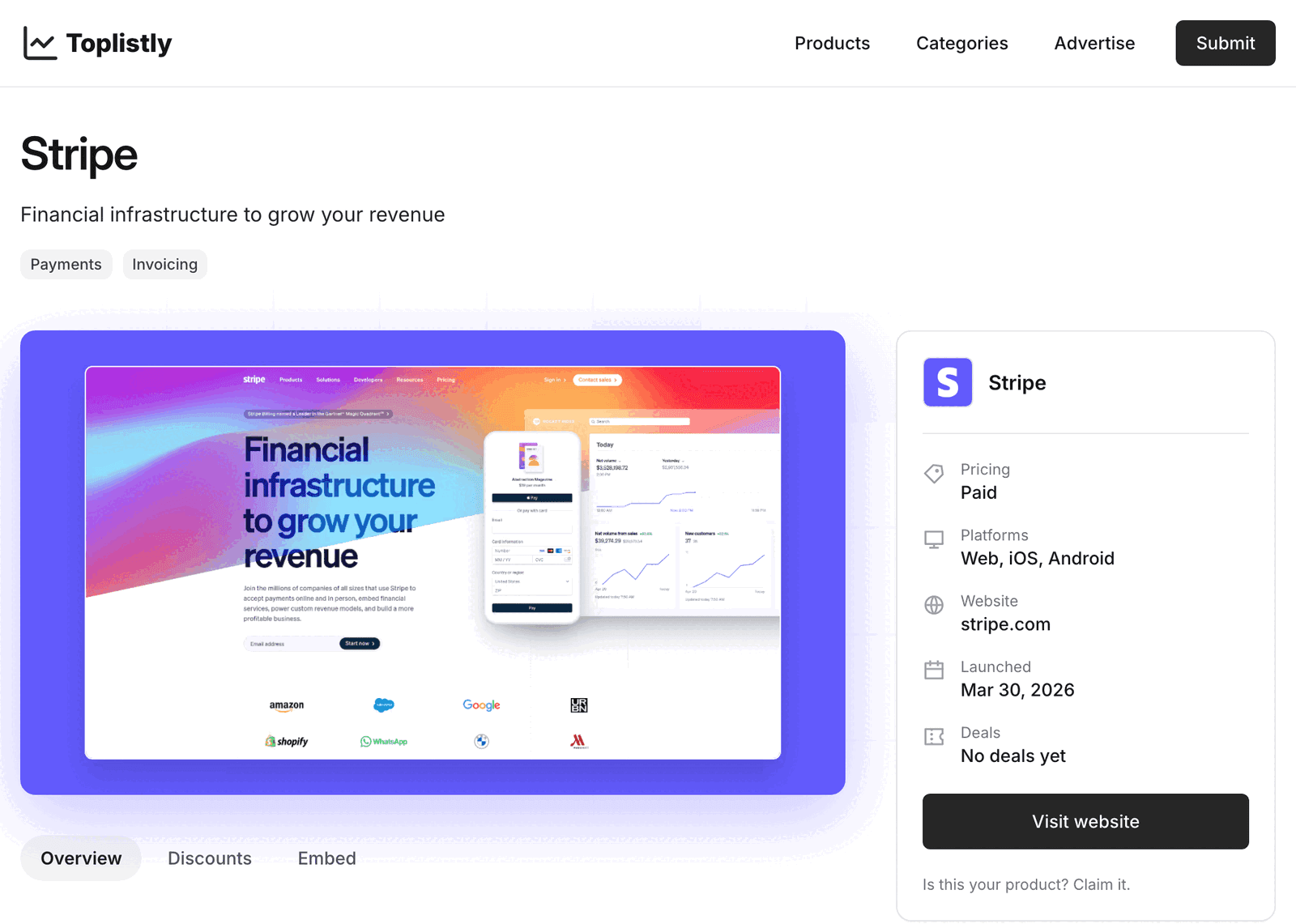
Then the placements. The product is filed in one to three of Toplistly's 75 categories, whose pages put the newest launches first. Most listing pages also carry a Similar products block that can show it beside related tools.
One thing to plan around. The Visit website button on a free listing runs through Toplistly's own redirect and carries rel="nofollow", so the listing passes no link equity. Toplistly's FAQ is open about the route: "Free listings link through our redirect." Plan on Toplistly for the launch day, the page and the category placement. Visitors who click still land on your site, and their visits arrive tagged ref=toplistly.
After launch day
Launch day is not the last time the product is shown. A Product of the day card sits in the homepage sidebar, and Toplistly's line on it is "Every launched product is in the daily rotation on the homepage sidebar." The listing also stays in its categories, next to the tools people compare it with.
Three extras are yours to add later, and none is required. A discount code goes on the Discounts tab: "Send us a code and it shows on your product page and in the listings." The featured badge, a small image that links to your Toplistly page, is copied from your listing's Embed tab. Changes to the wording or the categories go by email to info@toplistly.com, and their FAQ says "we will update your product page."
Skip the line and Sponsored, arranged by email
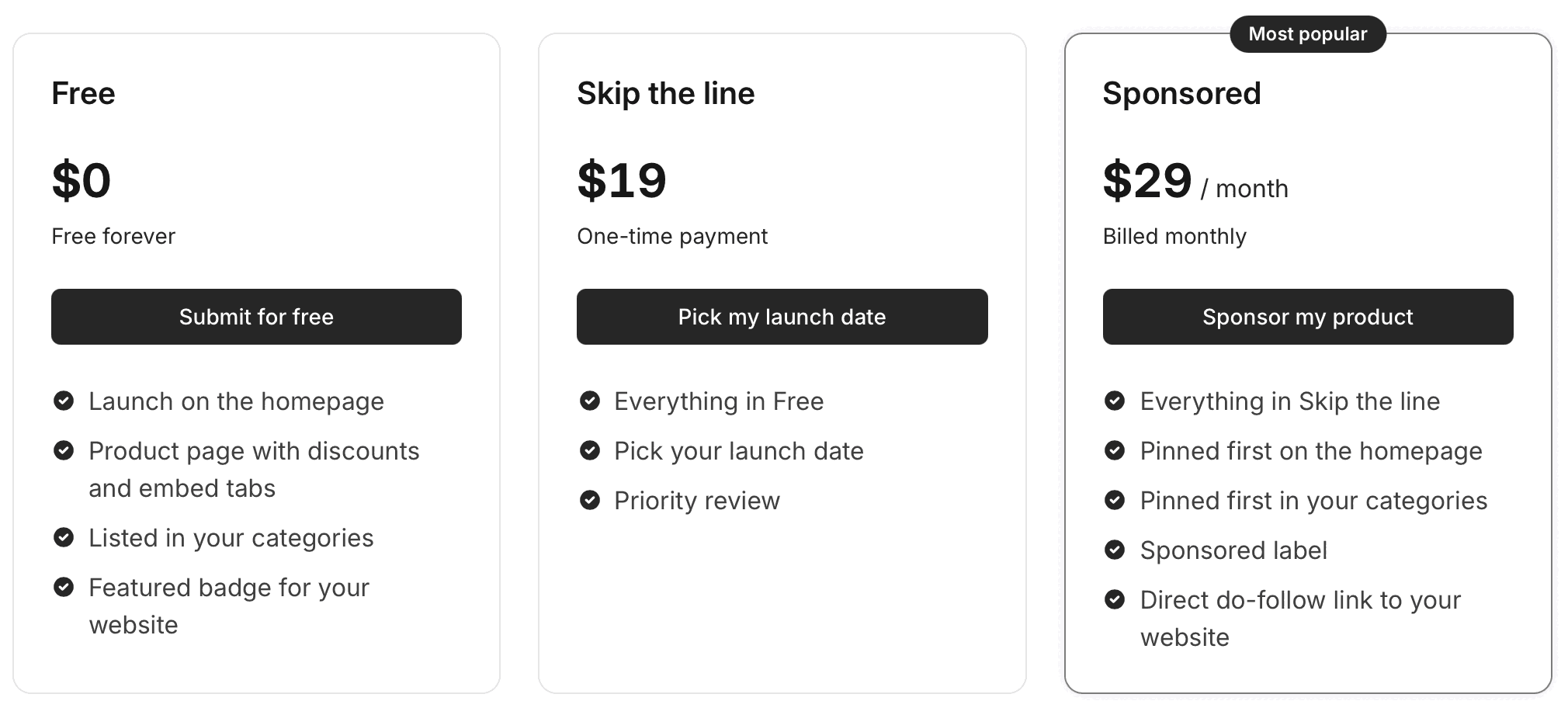
Two paid options sit beside the free one. Skip the line, $19 paid once, lets you pick the launch date and adds "Priority review". Sponsored, $29 a month, pins the product first on the homepage and first in its categories, marks it with a "Sponsored label" and adds a "Direct do-follow link to your website".
There is no checkout for either. Each button opens an email to info@toplistly.com, and the Advertise page sets out what follows: "We reply with a payment link and set up your placement once it is paid." Sponsorship is limited by category: "Sponsored slots are one per category, first come, first served." Under the cards sits "Month to month, no contract · Cancel anytime."
Run by a human, and it reads that way
One of Toplistly's pages is called By a human, and it opens with "Toplistly is run by a human." That human is Jan Lavička, its founder and sole developer, who describes the site as "a fully bootstrapped and customer-funded platform, free from venture capital influence."
It shows in the details. The submit page answers "Do I get a backlink?" in two plain sentences and puts a price on the direct link in the open. Sponsored cards are labelled, so visitors can tell a bought placement from a launch. Changing a listing takes one email, and no badge or link back is asked of a free product.
Your URL, filed by us
Toplistly sits in our catalog as a free-route directory. Choose it and we send your product URL; the listing is then drafted by Toplistly from your site, exactly as for every free submission.
Toplistly can fill one of the thirty places in a $29 Starter plan, picked from a dashboard where every directory card carries its Domain Rating. It goes out with the rest of your picks. Submitting a whole package is aimed at 2 to 3 days, and our terms cap the commitment at 21 days. Toplistly runs its own review and launch queue after that, and a rejected submission adds another directory to your selection.
Is a Toplistly launch worth it?
Yes. It costs one field and nothing on your site, and Toplistly drafts the listing for you. On its launch day the product leads the homepage feed; after that it joins the daily rotation and stays in its categories. If your homepage says plainly what the product does, the brief is already written.
How to submit to Toplistly, step by step
- 1
Get your homepage ready
Toplistly drafts the listing from your site. Make the title tag and the opening lines say what the product does and who it is for. Clear pop-ups off the first screen.
- 2
Open the submit page
Submit in the header, or Submit your product on the home page. The page is headed “Launch your product on Toplistly”.
- 3
Paste the full product URL
Start it with https://. An address the form cannot read in full gets “Enter the full address, starting with https://.”
- 4
Press Submit product
That is the whole form. Their team reviews the product next, and approved products join the launch queue.
- 5
Launch at midnight UTC
Free products launch in queue order, or on a date you choose with Skip the line. Each launch goes live on the homepage at midnight UTC.
- 6
Add a code, the badge or edits later
Email a discount code for the Discounts tab, copy the optional badge from the Embed tab and send any change to info@toplistly.com.
- 7
Or let Submitator file it
Add Toplistly to the directories you pick and we submit your URL on the free route with the rest of your plan.
$0 here. $29 for the thirty you have not filled in yet.
One payment, every directory named in your dashboard with its Domain Rating on the card and the ones you tick filed for you.
One URL, a launch day and a page. $0 here, $29 for thirty.
Toplistly needs one field, your product URL. It drafts the rest of the listing from your site. After a review by its team, approved products launch on the homepage at midnight UTC with a page of their own and a place in up to three of its 75 categories. We submit your URL on the free route, from $29 for thirty. The whole catalog.
FAQ
How do I submit to Toplistly?
Click Submit in Toplistly's header, or Submit your product on its home page. Paste your product's full address into Product URL, which is the whole form, then press Submit product. Include the https://, because the form answers an incomplete address with “Enter the full address, starting with https://.” Three steps follow, as the page lists them: their team reviews the product, approved products join the launch queue and the product launches on the homepage at midnight UTC.
Is Toplistly free?
Yes. Toplistly's Free card reads “$0” and “Free forever”, and the submit page's FAQ settles it: “Yes. Submit your product, and once it is approved it joins the launch queue at no cost.” Your site owes nothing in return. There are two paid options as well, both arranged by email: Skip the line at $19 once and Sponsored at $29 a month.
What does the Toplistly form ask for?
Only the product URL. The name, description, categories, logo and screenshot are left to Toplistly, which fills them in from your site together with the tagline and the pricing and platform labels. Across its 178 listings the descriptions run from 110 to 382 words, and each product sits in one to three of its 75 categories.
Is the Toplistly link dofollow?
No, not on the free plan. Toplistly's own FAQ answers it: “Free listings link through our redirect.” On all 178 listing pages read on 11 October 2026, both Visit website buttons point at that redirect with rel="nofollow noopener noreferrer". A direct do-follow link is one of the things Sponsored adds, at $29 a month. The free listing is there for the launch day, the page itself and the category placement.
Does Toplistly review products before they launch?
Yes. The first step under the form reads “Our team reviews your product.” and the second “Approved products join the launch queue.” Skip the line, the $19 option, includes what its card calls “Priority review”.
When will my product launch on Toplistly?
Toplistly gives no timescale and publishes no queue. Its FAQ answers the question this way: “Free products launch in queue order after review. Choose Skip the line to pick the date yourself.” Whatever the date, launches go live at midnight UTC and, in the site's words, “lead the homepage feed.”
What do Skip the line and Sponsored include?
Skip the line is $19, paid once: “Everything in Free”, “Pick your launch date” and “Priority review”. Sponsored is $29 a month: everything in Skip the line, plus “Pinned first on the homepage”, “Pinned first in your categories”, a “Sponsored label” and a “Direct do-follow link to your website”. Both start with an email to info@toplistly.com rather than a checkout, and the Advertise page explains the next step: “We reply with a payment link and set up your placement once it is paid.”
Do I have to add the Toplistly badge?
No. The featured badge is a perk, not a condition: no step of the form, no plan and no FAQ ties review, launch or placement to it. If you want it, the snippet is on your listing's Embed tab: a small image that links to your Toplistly page. The site's pitch for it is “Add the badge to your website to show your product was featured.”
What is Toplistly's Domain Rating?
A DR of 7 on Ahrefs' scale, fetched for toplistly.com through our checker on 11 October 2026. Toplistly prints no rating of its own, and its robots.txt turns away no crawler, Ahrefs' own included.
Does Submitator submit to Toplistly?
Yes, and on the free route. Add Toplistly to your picks and we submit your product URL, which is all its form takes; Toplistly drafts the rest from your site. Its catalog card shows a Domain Rating of 7 with a no-equity mark, and it can count toward the thirty on the $29 Starter plan.
More submit-to guides.
Toplistly is free. Thirty directories are $29, each one measured.
One payment. Each directory is named with its Domain Rating on the card before you choose it, the ones you tick are filed for you and a rejection is swapped for another directory.